

How Starlink Works: A Clear Explanation of Satellite Internet
February 21, 2026
The Internet has long become something familiar - as long as it's there. But once you go out of town or find yourself where no cable has been laid, everything changes. It is precisely in such conditions that people remember satellite Internet.
Starlink is often called "Internet from space", although in practice everything is arranged quite logically. No magic - just a network of satellites, an antenna at the user's location, and a stable signal where there was none before.
How Starlink is built and what its essence is
If we speak very simply, Starlink is a way to connect to the Internet without a cable underground and without being tied to mobile towers. The connection goes directly through satellites in low Earth orbit, so Internet can be obtained where there were almost no options before. If we break it down step by step, the scheme becomes quite understandable.
Internet is transmitted through a network of satellites in low orbit, not through ground communication lines
The user installs a special antenna that automatically connects to the nearest satellites
The signal enters the house through a router - then everything works like regular Wi-Fi
Due to the low orbit, latency is reduced, so the Internet feels faster than with classic satellite systems
Connection does not require laying a cable - only open sky and stable power supply are important
The idea is simple - to provide stable Internet where running fiber optic is difficult or economically unprofitable. Without complex infrastructure, but with a clear set of equipment and predictable connection.
How Starlink actually works in practice
When people say "Internet via satellites", it sounds complicated. In reality, the scheme is quite clear. There is no underground cable, no tie to the nearest tower. There is an antenna, satellites in orbit, and a regular router indoors. Then everything works roughly like this.
1. Satellites in low Earth orbit
Unlike old satellite systems, Starlink satellites are in low orbit. This means the signal travels a shorter distance to Earth and back. Because of this, latency is reduced, and the Internet feels closer to familiar wired connection.
Satellites are constantly moving, so the system automatically switches between them. The user does not notice this - the connection is maintained in the background.
2. Antenna at the user
An antenna is installed on the roof or in another open place. It needs a clear view of the sky - without dense trees and tall obstacles. After turning on, the antenna finds satellites by itself and aligns, without complicated manual adjustment.
In fact, it is the connection point between the house and the orbital network. Everything that happens next already resembles regular Internet.
3. Signal transmission into the house
The signal from the satellite arrives at the antenna, then is transmitted to the Wi-Fi router. The router distributes the Internet over the wireless network or via Ethernet cable if a wired connection option is needed.
For the user, it looks familiar: connecting to Wi-Fi, stable website loading, video calls, streaming. The only difference is that the signal source is not urban infrastructure, but a satellite network above the Earth.
Starlink kits: available models
Starlink is not just an Internet subscription, but a set of equipment that is installed at the user's location. The chosen version determines the connection format, antenna size, and usage scenario - stationary or more mobile. Before purchasing, it makes sense to understand how the available options differ and what tasks they are designed for.
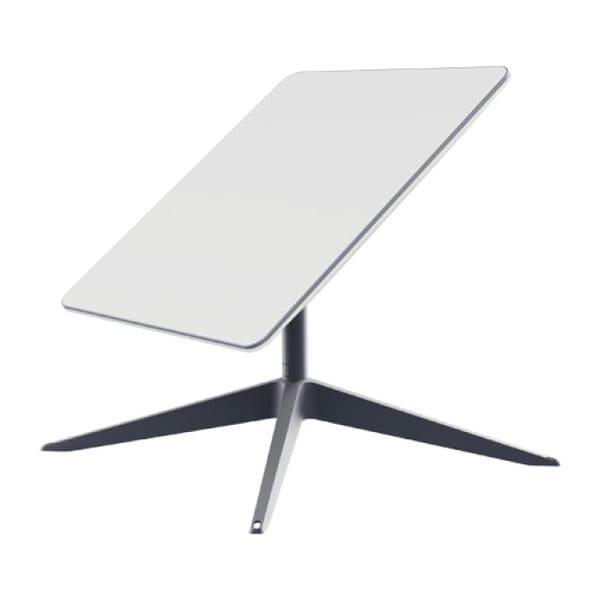
1. Starlink Internet Satellite Dish Kit V2
Starlink V2 is used to connect to satellite Internet where there is no fiber optic or stable mobile network. The system works through an external antenna that connects to satellites in low orbit and transmits the signal into the house via a Wi-Fi router. Then the Internet is distributed to regular devices - laptops, phones, TVs - just like with standard connection.
The antenna is installed on the roof or in an open area with direct sky view. After powering on, it automatically aligns and connects to the satellite network without complicated manual setup. This format is suitable for permanent use in a private house or at a site where stable Internet access is needed without laying cables.
Key features:
External antenna included
Automatic alignment and connection to satellites
Operation without ground infrastructure
Built-in Wi-Fi router
Suitable for stationary installation
Specifications:
Maximum download speed: 250 Mbps
Antenna: External
Wi-Fi router: 802.11a/b/g/n/ac (Dual Band - 3 x 3 MIMO
Connection interface: Wi-Fi

2. Starlink Internet Satellite 3gen
Starlink 3gen is an updated version of the satellite kit designed for stable operation in remote areas. The principle remains the same: an external antenna receives the signal from satellites and transmits it to the built-in router. Internet comes directly from the satellite network, without involvement of mobile towers or cable lines.
The model supports speeds from 40 to 220 Mbps and is equipped with a more modern wireless system supporting Tri Band and 4 x 4 MIMO. This allows connecting multiple devices simultaneously without noticeable speed drops. The presence of an Ethernet port makes the connection more flexible - wired network can be used inside the house or office.
Key features:
External antenna for receiving satellite signal
Tri Band Wi-Fi support
Wired connection option via Ethernet
IP67 enclosure protection rating
Suitable for home and small office
Specifications:
Maximum download speed: 40-220 Mbps
Antenna: External
Wi-Fi router: 802.11a/b/g/n/ac/ax (Tri Band - 4 x 4 MIMO)
Connection interface: Wi-Fi, Ethernet
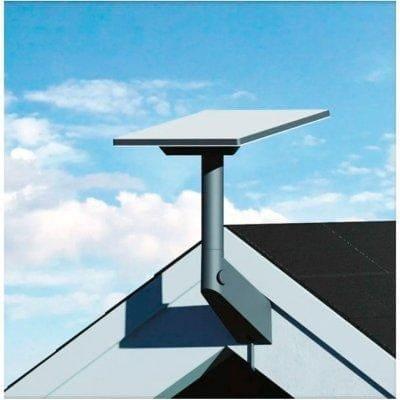
3. Starlink Internet Satellite Mini
Starlink Mini is designed for more mobile use. In this version, the antenna is built into the body, so installation is simplified - no need to mount a separate dish. The device connects to the same satellite network and works on the same principle: signal from satellites is transmitted to the built-in router and distributed via Wi-Fi.
The compact format makes the model convenient for temporary connection points, travel, or sites where equipment needs to be moved. At the same time, speeds up to 220 Mbps are supported depending on coverage and conditions. The presence of an Ethernet port allows direct cable connection of devices when needed.
Key features:
Built-in antenna
Compact format
Support for multiple devices simultaneously
Ethernet port for wired connection
IP67 enclosure protection
Specifications:
Maximum download speed: 40-220 Mbps
Antenna: Built-in
Wi-Fi router: 802.11a/b/g/n/ac (Tri Band - 3 x 3 MU-MIMO)
Connection interface: Wi-Fi, Ethernet
Which Starlink kit is suitable for different tasks
The operating principle is the same for all versions - the antenna connects to satellites in low orbit, and Internet is transmitted through the built-in router to devices in the house. The differences relate to the installation format and in which conditions the kit is more convenient to use. To avoid returning to each description separately, it is easier to look at the differences in one place.
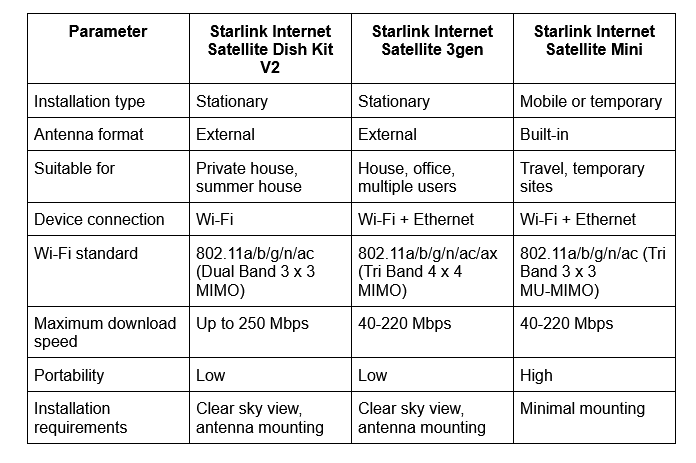
If you need primary Internet for the home and the installation is planned once for a long time, usually V2 or 3gen are considered. If connection at different locations or moving the equipment is important, it is more logical to look toward Mini.
The technology remains the same. Only the usage format and installation convenience for specific conditions differ.
What is the difference between Starlink and regular satellite Internet
Satellite Internet has existed for a long time, but earlier it was mainly chosen as a last resort. High latency, unstable signal, speed limitations - all this was considered normal. Starlink works on a different scheme, so the user experience is different. If we compare by main points, the difference looks like this:
Satellites are in low orbit, so signal latency is lower
Connection switches between satellites automatically, without manual adjustment
Download speed is higher compared to old geostationary systems
Equipment is simpler to install - the antenna aligns itself
Internet feels closer to wired connection in terms of stability
Classic satellite Internet uses satellites in high orbit. The signal travels a long distance, which makes latency more noticeable. In the case of Starlink, the distance is shorter and there are more satellites, so the connection appears more predictable in everyday use.
In which cases it makes sense to connect Starlink
Starlink is usually considered where regular Internet is either unstable or simply unavailable. These are private houses outside the city, summer cottages, small settlements where fiber optic has not been laid or works with interruptions. In such conditions, satellite connection becomes not an alternative, but the only real option.
It is also used at temporary sites - construction sites, mobile offices, field projects. The equipment does not require complex infrastructure, so it can be installed where it is important to quickly launch communication without laying cables.
For a city apartment with a good provider, Starlink is usually not needed. But if the task is to get stable Internet outside the usual network, without being tied to local infrastructure, this connection format is considered first.
Conclusion
Starlink does not work according to the usual cable scheme, but through a network of satellites in low orbit. The whole logic is quite simple: the antenna connects to satellites, the signal is transmitted to the router, then Internet is distributed via Wi-Fi or cable. For the user, it looks like regular connection, only without being tied to local infrastructure.
This format does not replace fiber optic in the city where there is already a stable provider. However, it covers another scenario - when connection is needed where running a cable is difficult or economically impractical. This is where its practical meaning lies: not technology for the sake of technology, but the ability to connect to the network where it was previously a problem.