

Acer Nitro V 16 AI AMD 2026: review for Ukrainian gamers
June 3, 2026
Quick Overview: The Acer Nitro V 16 AI AMD is an affordable gaming laptop powered by AMD Ryzen 5 240/Ryzen 7 260 processors, NVIDIA RTX 5050/5060/5070 graphics cards (up to 8 GB GDDR7), a 16-inch 180 Hz display, and AI-powered performance optimization features. Priced at around €1,100, it offers gamers 16 GB DDR5 RAM, a 1 TB SSD, long battery life, and reliable cooling even under heavy workloads.
Ukraine’s gaming industry continues to grow rapidly. According to AIN.ua, the combined audience of games developed by Ukrainian studios exceeds 770 million users. At the same time, the Ukrainian startup Lobby9 has attracted more than 60,000 users to the waitlist for its AI-powered platform for gamers.
But what about the hardware? Competitive gaming and content creation require a powerful laptop. That’s exactly what the Acer Nitro V 16 AI (ANV16-42) delivers: modern hardware, AI-driven optimization, and a reasonable price point tailored to the needs of Ukrainian gamers.
What Is the Acer Nitro V 16 AI AMD?
This is a 2025–2026 gaming laptop featuring a 16-inch display, AMD Hawk Point processors (Ryzen 5 240 or Ryzen 7 260), and NVIDIA GeForce RTX 5000-series graphics cards. The lineup includes configurations with RTX 5050, 5060, and 5070 Laptop GPUs, each equipped with 8 GB of GDDR7 video memory.
According to Notebookcheck, the base ANV16-42-R860 configuration with a Ryzen 5 240 and RTX 5050 is priced at approximately €1,100 (≈$1,089 USD). It belongs to the budget gaming segment while still delivering serious performance.
The key highlight is the integration of AMD Ryzen AI technologies. Hawk Point processors feature a built-in Neural Processing Unit (NPU) based on AMD’s XDNA architecture, enabling local AI processing for tasks ranging from game optimization to running LM Studio and other AI assistants offline.

Choose a Gaming Laptop at JustBuy
JustBuy sells laptops, computer hardware, gaming consoles, and gadgets for work, study, and entertainment. If you're looking for a gaming model with AI capabilities, JustBuy lets you browse available laptops, compare configurations, and choose the best option for specific games or everyday tasks.
The store offers delivery, in-store pickup, payment by cash, card, or bank transfer, a standard warranty, and a 14-day return policy.
Need a Laptop for Gaming and Work?
JustBuy can help with:
choosing a gaming laptop that matches your needs
comparing processors, graphics cards, and configurations
selecting laptop accessories
pre-purchase consultations
👉 Contact JustBuy to find the right gaming laptop for your needs.
Design and Chassis: Understated by Design
On the outside, the Nitro V 16 AI looks as neutral as possible. The black plastic chassis features no aggressive gaming accents, with only the Acer logo on the lid. The laptop weighs between 2.43 and 2.44 kg, which is standard for a 16-inch gaming machine.
As noted in a YouTube review, this understated appearance is exactly what many modern gaming laptops are missing. You can take it to work, university, or a café without anyone realizing it’s a gaming laptop.
The chassis is made of high-quality plastic with a pleasant texture. Build quality is appropriate for the price—not premium, but far from flimsy. For transportation, it’s best to use a backpack with soft padding.
Ports and Upgradeability
The Nitro V 16 AI offers a wide range of connectivity options:
USB4 (40 Gbps) — for high-speed external storage and displays
Multiple USB-A ports (typically 3–4)
HDMI 2.1 — for connecting external 4K 120 Hz monitors
Ethernet RJ45 — essential for online gaming (more stable than Wi-Fi)
3.5 mm audio jack
Charging port
Inside, there are two RAM slots (supporting up to 32 GB DDR5) and two M.2 SSD slots. According to Acer’s official recommendations, 32 GB is ideal for content creation, programming, and demanding workloads, while 8–16 GB is sufficient for students and office users.
Display: 180 Hz for Competitive Gaming
The display is one of the laptop’s strongest features. It comes with a 16-inch IPS panel available in either 1920×1200 (WUXGA) or 2560×1600 (2K WQXGA+) resolution, both with a 16:10 aspect ratio. The refresh rate reaches 180 Hz.
According to PlayUA.net, color coverage reaches 100% sRGB, making it suitable for gaming and basic photo/video editing. While it doesn’t offer Adobe RGB or DCI-P3 coverage, it is more than sufficient for most users.
The 180 Hz refresh rate delivers exceptionally smooth gameplay in shooters such as CS2, Valorant, and Overwatch 2, as well as MOBAs like Dota 2 and League of Legends. In less competitive games, the refresh rate can be reduced to 60–120 Hz to extend battery life.
Display brightness is adequate for indoor use, though glare may occur in direct sunlight. If you plan to use the laptop outdoors, it’s best to stay in shaded areas.
AMD Ryzen 5 240 / Ryzen 7 260 Processor: AI On Board
At the heart of the system are AMD Hawk Point processors based on the Zen 4 architecture. The AMD Ryzen 5 240 features 6 cores and 12 threads with boost frequencies of up to 5.0 GHz. According to Notebookcheck, its TDP is rated at 54 W (PL1/Sustained) and 65 W (PL2/Short Burst). The Ryzen 7 260 offers more cores and a larger cache.
The standout feature is the integrated AMD XDNA Neural Processing Unit (NPU). It handles AI computations locally without putting additional strain on the CPU or GPU. According to AMD, processors equipped with an NPU deliver up to 55 Peak TOPS of AI performance and up to three times higher AI performance compared to the previous generation.
What does this mean for gamers?
Local AI assistants (LM Studio, Copilot+) without an internet connection
Automatic FPS improvements through AI-driven optimization
Faster content processing for streaming, editing, and rendering
Longer battery life thanks to more efficient workload distribution
AMD Ryzen AI Software includes tools for running PyTorch and TensorFlow models on the NPU. Supported large language models include DeepSeek-R1 Distill, Qwen2, Gemma2, Codellama, Mistral, and others.
Everyday Performance
According to AMD, AI assistants can speed up document creation by up to 2.3 times. This means faster work with text documents, emails, and presentations, making the laptop useful for students and office workers.
However, Notebookcheck notes that Ryzen 5 240 CPU benchmark results appear somewhat modest compared to competitors in the same price segment. This is the trade-off: AMD prioritizes energy efficiency and AI capabilities over raw multi-threaded performance.
NVIDIA RTX 5050/5060/5070 Graphics: GDDR7 and DLSS 4
The Nitro V 16 AI lineup offers three GPU options:
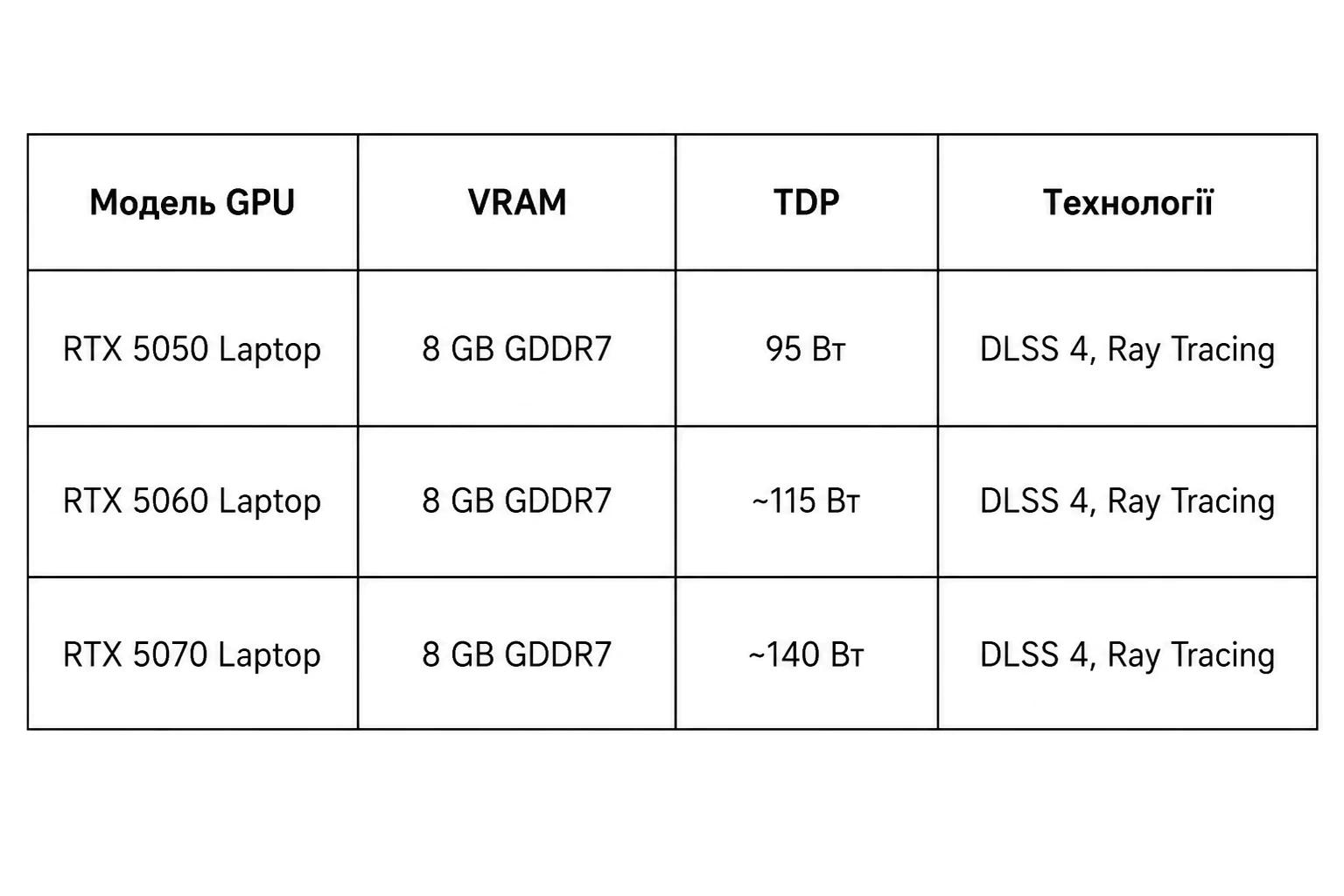
All graphics cards use the new GDDR7 memory, which is faster than GDDR6. The RTX 5050 Laptop GPU, with a TDP of 95 W (including 15 W Dynamic Boost), delivers Full HD (1920×1080) gaming at high or ultra settings with 60–120 FPS in most modern titles.
The RTX 5070 is the flagship configuration for users who want 1440p gaming or maximum settings with ray tracing enabled. According to a YouTube review, the ANV16-42 equipped with an RTX 5070 demonstrated performance at the upper limit of what the laptop segment currently offers.
DLSS 4: Next-Generation AI Upscaling
DLSS 4 is NVIDIA’s AI-powered upscaling technology. Games are rendered at a lower resolution (for example, 720p), and DLSS upscales the image to 1080p or 1440p with minimal quality loss. The result is higher FPS while maintaining visual detail.
This is especially useful for demanding ray-traced games such as Cyberpunk 2077, Alan Wake 2, and Red Dead Redemption 2.
Cooling System: Stays Cool Even Under Load
Notebookcheck describes the Nitro V 16 AI as a “gaming laptop that refuses to overheat.” The cooling system consists of two fans and heat pipes that efficiently dissipate heat from both the CPU and GPU.
During testing, temperatures remained within safe limits even under full load. The CPU did not throttle (reduce clock speeds due to overheating), and the GPU also maintained stable performance. This is crucial for long gaming sessions and rendering workloads.
There is, however, a trade-off: the laptop becomes quite loud under load. The fans spin at high speeds, and the noise is noticeable even when wearing headphones. For streaming, it is recommended to use an external noise-canceling microphone or stream through OBS with a noise gate filter enabled.
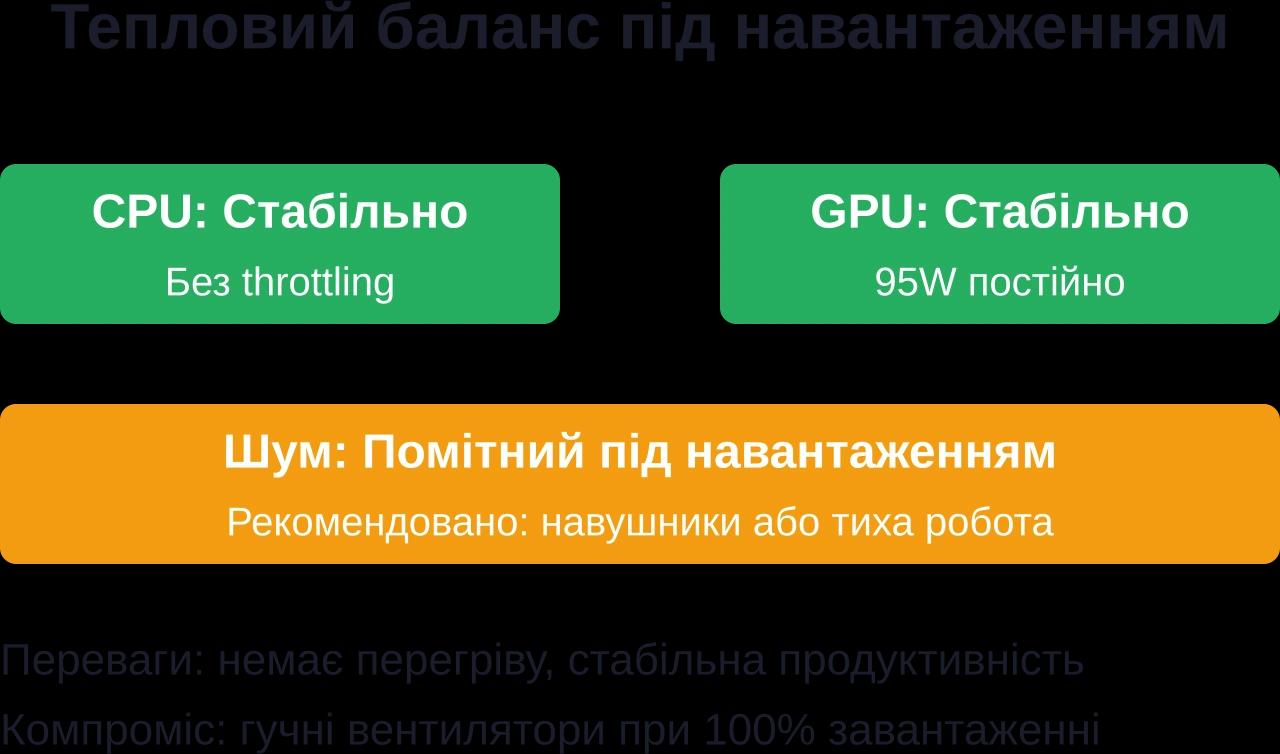
The Nitro V 16 AI cooling system efficiently dissipates heat, preventing throttling, although fan noise is noticeable.
Battery Life: Impressive for a Gaming Laptop
One of the biggest surprises is battery life. Notebookcheck praises the battery as first-class. During Wi-Fi web browsing tests at 150 nits of brightness, the laptop lasted for more than 11 hours.
This is rare for gaming laptops. Most gaming machines drain their batteries within 2–3 hours. Here, the energy-efficient AMD Ryzen processor and effective NPU workload management make a significant difference.
Of course, battery life drops to around 1.5–2 hours during gaming. However, for travel between locations (home to university, hotel to conference, etc.), this is a major advantage.
Memory and Storage
The base configuration includes 16 GB of DDR5 RAM running in dual-channel mode. According to Acer’s official recommendations, 16 GB is sufficient for students and office workers. For gaming, content creation, and programming, 32 GB is the better option.
Storage consists of a 1 TB NVMe SSD. PCIe 4.0-level read and write speeds ensure fast game and file loading. There is also a second M.2 slot for expanding total storage capacity up to 2 TB.
It is worth keeping in mind that some modern AAA games occupy 100–150 GB of storage. Call of Duty: Warzone, Microsoft Flight Simulator, and Red Dead Redemption 2 each require more than 100 GB. As a result, a 1 TB drive can fill up quickly if you keep many games installed simultaneously. A second SSD or external storage device can easily solve this issue.
Audio and Webcam: Weak Points
The built-in speakers are one of the laptop’s weakest areas. Notebookcheck notes that sound quality could be better. Bass is lacking, and maximum volume is relatively low. This is acceptable for single-player gaming, but for streaming or music, headphones or external speakers are recommended.
The webcam is also fairly basic. The resolution is typical for budget laptops (720p), and video quality is average. It works fine for Zoom calls, but for professional Twitch or YouTube streaming, a dedicated 1080p webcam with autofocus is a better choice.
Price and Availability in Ukraine
Acer officially operates in Ukraine through its partner network. The official Acer website and community pages provide contact information for service centers in Kyiv, Kharkiv, Dnipro, and other cities.
Current pricing should be checked on Acer’s official website or through authorized partners. According to Notebookcheck (tested model ANV16-42-R860), the RTX 5050 configuration costs approximately €1,100.
Promotions and discounts are occasionally available. Acer also offers the International Travelers Warranty (ITW), which allows the laptop to be serviced at authorized centers in different countries. A list of ITW-supported locations is available on Acer’s official website.
Comparison with Competitors
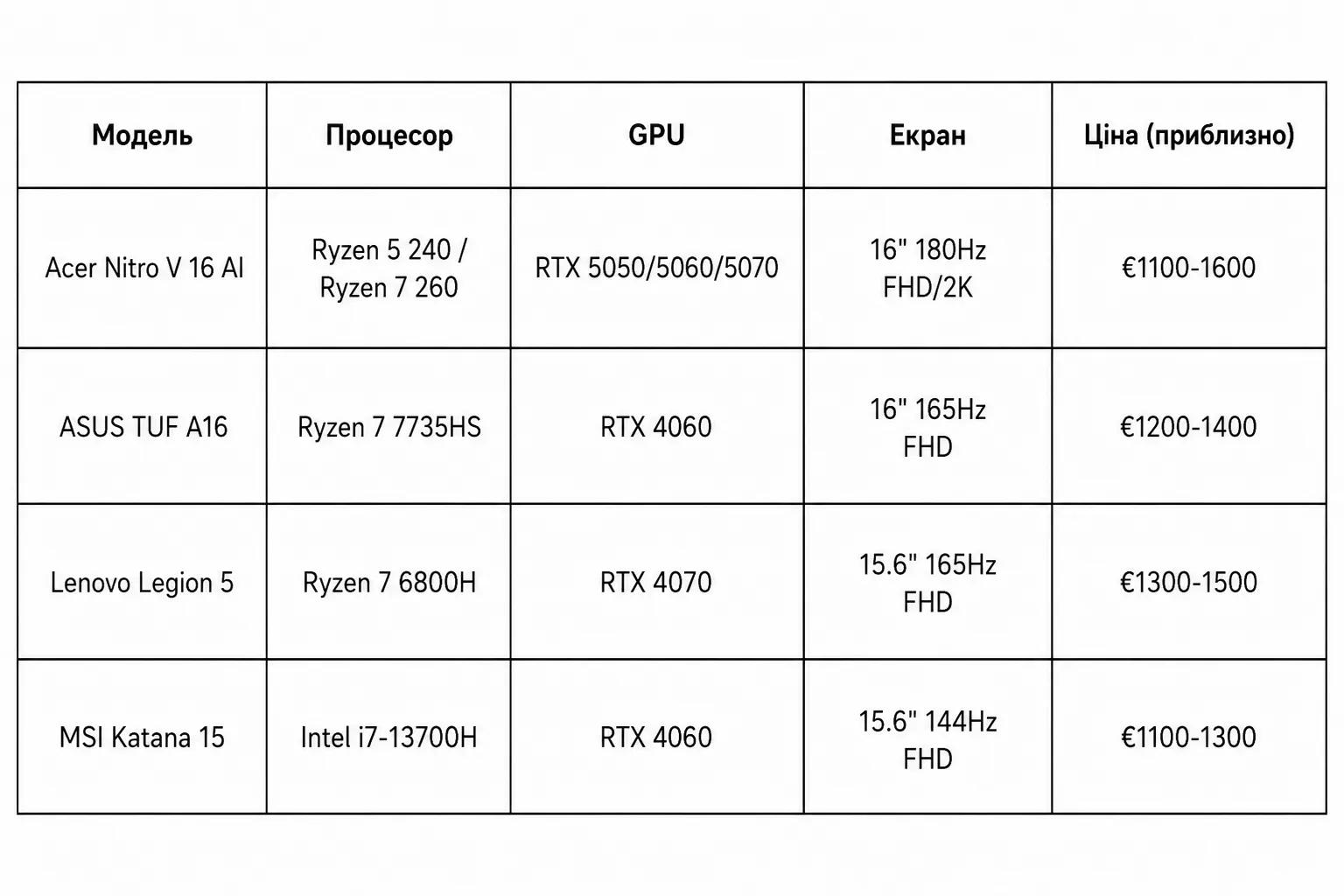
The Nitro V 16 AI stands out thanks to its newer hardware (RTX 5000 series, GDDR7) and AI capabilities. Competitors often offer older GDDR6-based GPUs, although sometimes at a slightly lower price.
Who Is the Acer Nitro V 16 AI For?
This laptop is an excellent choice for:
Student gamers: The understated design does not scream “I game all day,” while the long battery life allows you to work without a power outlet during classes.
Competitive players: The 180 Hz display delivers smooth gameplay in shooters and MOBA titles.
Beginner streamers: RTX 5050/5060 configurations can handle NVENC encoding without significant FPS drops.
Content creators: 1080p video editing in DaVinci Resolve or Adobe Premiere is comfortable, while AI features accelerate rendering tasks.
AI/ML developers: The built-in NPU enables experimentation with AI models without relying on cloud-based services.
It is not ideal for professional creators who require a 4K display with 100% Adobe RGB coverage, or for users who expect complete silence under heavy workloads.
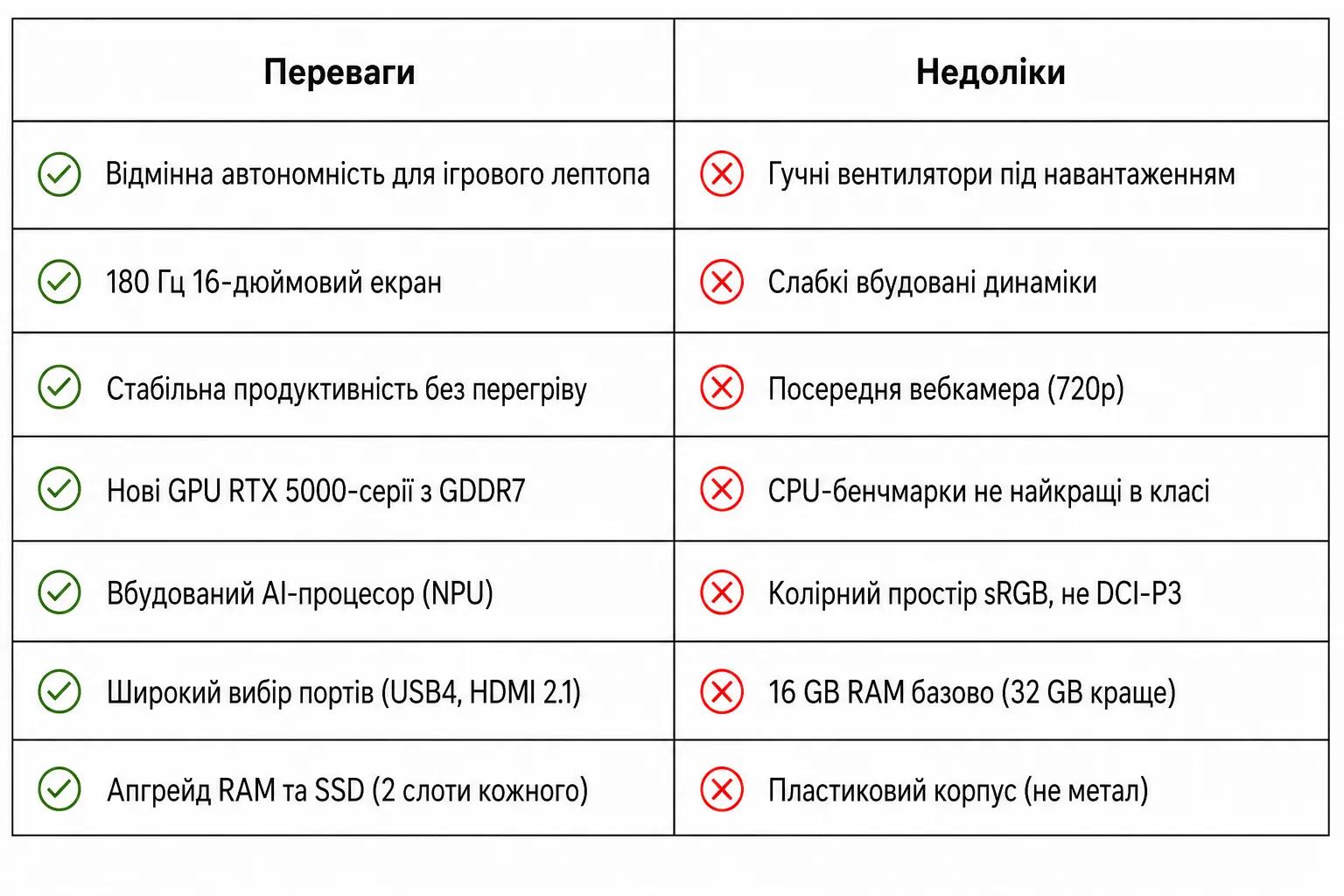
Pros and Cons
Usage and Upgrade Tips
If you decide to buy the Nitro V 16 AI, here are a few recommendations:
1. Upgrade the RAM to 32 GB. According to Acer’s official community recommendations, 32 GB is the sweet spot for gaming and content creation. This allows you to keep dozens of browser tabs, Discord, OBS, and a game running simultaneously without slowdowns.
2. Add a second SSD. Modern games take up a lot of storage space. The second M.2 slot allows you to install an additional 1–2 TB SSD for games, projects, and backups.
3. Buy a cooling pad. Although the built-in cooling system performs well, an external cooling pad with fans can reduce temperatures by 3–5°C and lower fan noise.
4. Use external peripherals. The webcam and speakers are average. A dedicated 1080p webcam and quality headphones or speakers will significantly improve the overall experience.
5. Clean the fans regularly. Dust accumulates quickly. Every 3–6 months, remove the bottom cover and clean the cooling system with compressed air. This helps maintain optimal cooling performance.
AI Capabilities for Ukrainian Developers and Gamers
The Ukrainian gaming industry continues to demonstrate strong momentum. According to AIN.ua, the Kharkiv-based startup Lobby9 is developing an AI-powered gaming assistant platform and has already attracted more than 60,000 users to its waitlist. Another Ukrainian deep-tech company, Zibra AI, develops AI-powered asset generation tools that are used by over 100,000 users worldwide.
The Nitro V 16 AI, equipped with a local NPU, enables Ukrainian developers to experiment with AI models offline. This is particularly valuable when internet access is unreliable or when users prefer to avoid cloud services. Support for LM Studio, Ryzen AI Software, and ONNX Runtime allows large language models (LLMs) to run directly on the laptop.
For gamers, this means access to local AI assistants for game guidance, automatic graphics settings optimization, and faster match analysis in competitive titles through third-party AI-powered tools.
Final Verdict: Is the Acer Nitro V 16 AI Worth Buying?
The Acer Nitro V 16 AI (ANV16-42) is a well-balanced gaming laptop designed for users who value performance, battery life, and affordability. New RTX 5000-series GPUs with GDDR7 memory, AMD Ryzen processors with AI support, a 180 Hz display, and an effective cooling system make it highly competitive in 2026.
Yes, there are compromises: loud fans, average speakers, and a plastic chassis. However, at a price range of €1,100–1,600, it remains one of the strongest options available for Ukrainian gamers, students, and aspiring content creators.
If you are looking for a laptop that stays cool under load, delivers smooth gameplay in competitive titles, and does not run out of battery within an hour, the Nitro V 16 AI is well worth considering.
Frequently Asked Questions (FAQ)
Does the Acer Nitro V 16 AI support international warranty coverage?
Yes. Acer offers the International Travelers Warranty (ITW) program, allowing the laptop to be serviced at authorized service centers in other countries. A list of supported service centers is available on Acer’s official website.
What FPS can I expect in popular games?
With the GeForce RTX 5050 configuration, you can expect approximately 150–180 FPS in Counter-Strike 2, over 200 FPS in Valorant, 60–70 FPS in Cyberpunk 2077 without ray tracing, and 120–140 FPS in Fortnite at Full HD resolution on high settings. RTX 5070 versions deliver even higher performance.
Can I upgrade the RAM and SSD myself?
Yes. The laptop features two DDR5 SO-DIMM memory slots and two M.2 slots for NVMe SSDs, making memory and storage upgrades straightforward.
How long does the battery last while gaming?
During gaming, the laptop typically lasts around 1.5–2 hours on battery power. During lighter tasks such as web browsing, document editing, or video playback, battery life can reach 6–8 hours.
Does it support Linux?
The laptop is compatible with popular Linux distributions, and both AMD Ryzen processors and NVIDIA graphics cards have driver support available. Before installation, it is recommended to back up your data and review the manufacturer’s documentation.
Should I choose the RTX 5050 or pay extra for the RTX 5070?
The RTX 5050 is a solid choice for modern games at Full HD resolution with high settings. The RTX 5070 is a better option for 1440p gaming, ray tracing, and demanding workloads such as 3D rendering or professional graphics work.