

Acer Nitro V 16 AI Intel — the power of a new generation of laptops in Ukraine
June 3, 2026
In short: The Acer Nitro V 16 AI Intel is a gaming laptop powered by Intel Core Ultra Series 3 processors (up to 8 cores), NVIDIA GeForce RTX 5050/5060/5070 graphics cards, a 16-inch 180 Hz display, and Copilot+ PC AI capabilities. The model combines the performance needed for modern AAA games with a reasonable price, dual-fan cooling, and upgrade options up to 32 GB DDR5 RAM and 2 TB SSD, offering an excellent balance for gamers and students in Ukraine.
At the beginning of 2026, Acer introduced the updated Nitro V lineup, and the Intel-powered Nitro V 16 AI deserves special attention from Ukrainian gamers. Why? Because it is a rare case where the manufacturer managed to pack the latest Intel Core Ultra Series 3 processors and NVIDIA RTX 50 Series graphics cards into an affordable chassis without compromising on key specifications.
Unlike the higher-end Predator models, the Nitro V 16 AI strikes a balance between price and features. It is not an ultra-expensive flagship, but it is also not a budget laptop with cut-down specifications.
Let's take a closer look at what this model offers the Ukrainian market in 2026.
Technical Specifications and Configuration Options
Acer offers several Intel-based Nitro V 16 AI configurations, allowing users to choose the best option for their specific needs and budget.
Base Configuration ANV16-72-73EW
The base ANV16-72-73EW model is powered by Intel Core Ultra Series 3 processors. According to JustBuy data, these processors feature up to 8 cores in a configuration of 4 performance cores and 4 efficiency cores. This is Intel's new hybrid architecture approach, optimized specifically for AI workloads.
The base graphics card is the NVIDIA GeForce RTX 5050 with 8 GB of dedicated GDDR6 memory. Maximum graphics power reaches up to 85 W, which is typical for mid-range mobile GPUs and more than sufficient for most modern games at high settings in Full HD.
Memory consists of 16 GB DDR5 SDRAM. The laptop supports expansion up to 32 GB via two SO-DIMM slots, making future upgrades straightforward. RAM operates at 5600 Hz, according to Acer’s official specifications for the Nitro V AI lineup.
Storage is provided by a 1 TB NVMe PCIe Gen 4 SSD. Gen 4 read and write speeds ensure fast operating system boot times, game loading, and application performance. An additional free M.2 slot allows users to install a second SSD if 1 TB becomes insufficient.
Higher-End Configurations with RTX 5060 and RTX 5070
For users who need more graphics power, models equipped with RTX 5060 (8 GB) and RTX 5070 (also 8 GB GDDR6) are available. The difference between these cards lies in the number of CUDA cores and clock speeds, with the RTX 5070 delivering approximately 25–30% higher performance than the RTX 5050 in modern games.
Higher-end configurations may also include the Intel Core 9 270H processor, one of the CPU options available within the lineup. This configuration is ideal for users who combine gaming with streaming, video editing, or 3D modeling.
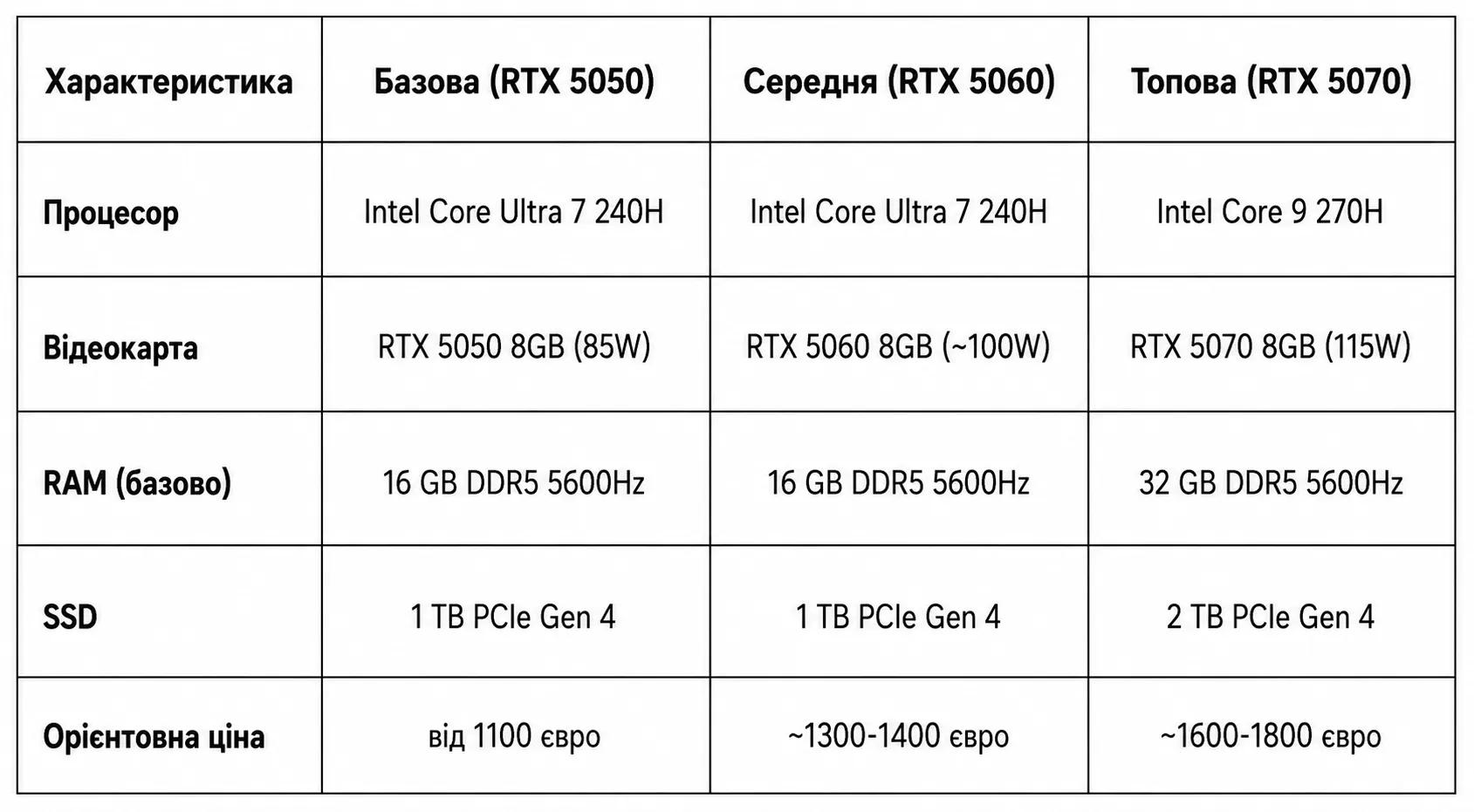
Estimated pricing is based on data from similar Nitro V 16 AI configurations. Actual prices in Ukraine may vary depending on exchange rates, stock availability, and seasonal promotions.

Choose a Next-Generation Laptop at JustBuy
JustBuy offers laptops, computer hardware, and accessories for users who need performance for gaming, work, study, or creative projects. For those who keep up with the latest releases, the store can be a useful place to explore current models, available configurations, and alternatives in the same category.
When choosing a laptop, it is important to consider more than just the model name. The processor, graphics card, memory capacity, display, and intended use cases all matter. JustBuy can help simplify that selection process.
Looking for a Powerful Laptop?
JustBuy can help with:
choosing a laptop for gaming, work, or study
comparing specifications and configurations
selecting compatible accessories
pre-purchase consultations
👉 Contact JustBuy to find the right laptop for your needs.
Display: 16 Inches and 180 Hz for Gaming and Work
The display is what gamers look at for hours on end, so Acer did not cut corners here.
Resolution and Refresh Rate
The Nitro V 16 AI features a 16-inch IPS display with a resolution of 1920 × 1200 pixels (WUXGA). While it is not 2K or 4K, Full HD+ is more than sufficient for a 16-inch screen. Pixel density remains high, resulting in a sharp and detailed image.
The refresh rate is 180 Hz. This is the sweet spot for a gaming laptop in 2026—faster than the standard 144 Hz but without the excessive GPU demands associated with 240 Hz or 360 Hz panels. In fast-paced shooters such as CS2, Valorant, and Apex Legends, the difference between 144 Hz and 180 Hz is noticeable, delivering smoother motion and faster responsiveness.
According to reviews from PlayUA, test units of the Nitro V 16 AI achieved up to 100% sRGB color coverage. This means the display is suitable not only for gaming but also for graphic design, photo editing, and video work at both enthusiast and semi-professional levels.
Response Time and Panel Technology
The IPS panel provides wide viewing angles (178°) and consistent color reproduction without noticeable shifts when viewed from different angles. According to Acer’s official specifications for similar displays in the Nitro V AI lineup, the panel response time is approximately 3 ms, helping to minimize motion blur in fast-paced scenes.
The matte screen finish reduces glare in daylight conditions, making it more comfortable to use in typical office or home environments. According to Acer, display brightness reaches 300–400 nits, which is sufficient for indoor use, although the image will appear washed out under direct sunlight outdoors.
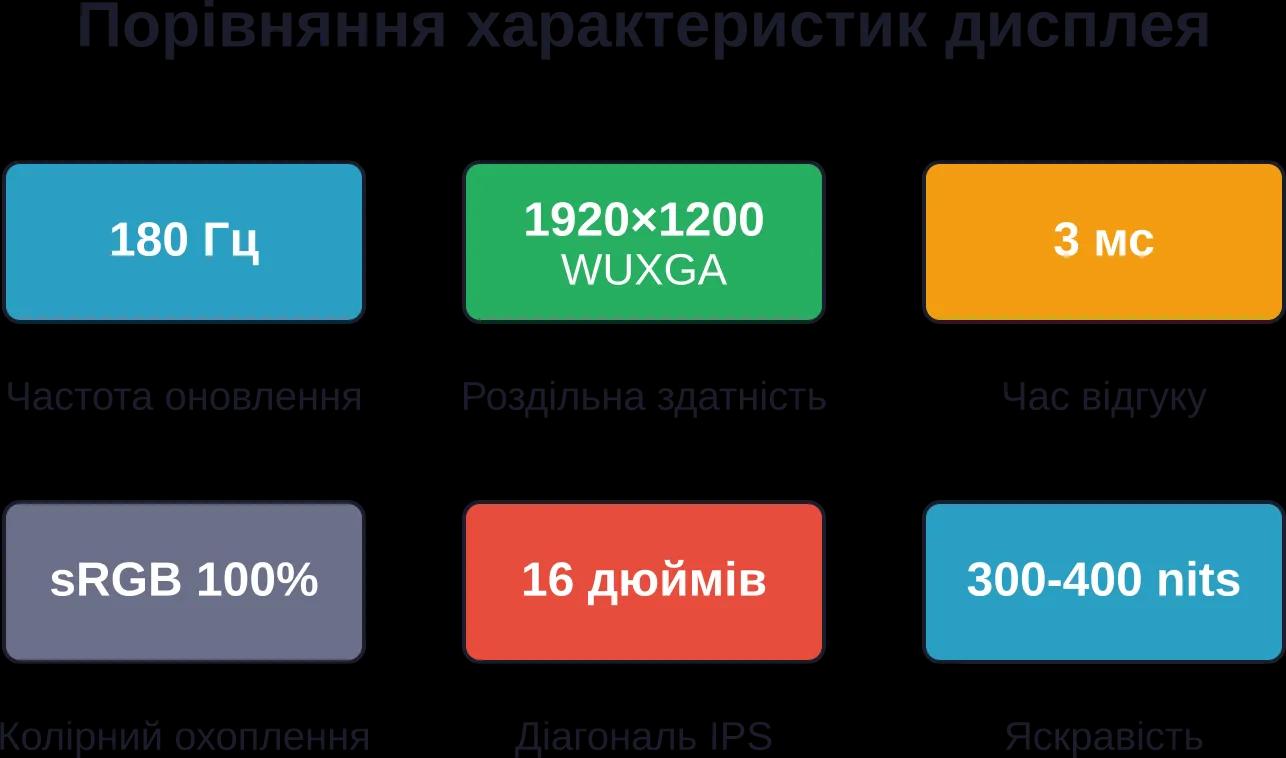
Key display specifications of the Acer Nitro V 16 AI Intel that make it a versatile choice for both gaming and productivity
Performance: Intel Core Ultra and RTX 50 Series
Real-world performance is the main reason people buy a gaming laptop. So how well does the Nitro V 16 AI handle today’s games and demanding workloads?
Intel Core Ultra Series 3 Processor
Intel Core Ultra Series 3 is a new 2026 architecture designed with a strong focus on AI computing. These processors feature an integrated NPU (Neural Processing Unit) capable of delivering up to 50 AI TOPS (trillion operations per second).
What does that mean in practice? Support for Windows 11 AI features (Copilot+ PC), accelerated photo and video processing through built-in AI models, and enhanced streaming quality with background blur and microphone noise reduction—all without putting additional strain on the primary CPU cores.
The Core Ultra 7 240H in the base configuration includes 4 performance cores and 4 efficiency cores. This allows the system to intelligently distribute workloads: demanding tasks such as rendering, compiling, and streaming run on the performance cores, while background processes and AI tasks are handled by the efficiency cores and NPU.
In gaming, the processor can deliver stable 120+ FPS in most AAA titles at high settings (Cyberpunk 2077, Starfield, Baldur's Gate 3), assuming the GPU can keep up. Benchmarks indicate that the Core Ultra 7 240H performs at roughly the same level as the AMD Ryzen 7 260 in multi-threaded workloads, slightly behind in single-threaded performance but ahead in AI-related tasks.
NVIDIA GeForce RTX 5050/5060/5070 Graphics Cards
The NVIDIA RTX 50 Series represents the latest generation of graphics cards.
The base RTX 5050 comes with 8 GB of VRAM and a maximum power draw of 85 W. This enables smooth gameplay in modern titles at high settings in Full HD, including support for ray tracing and DLSS 3.5. For example:
Cyberpunk 2077: ~60–70 FPS on Ultra settings with DLSS Quality + Medium Ray Tracing
Call of Duty: Modern Warfare III: 100–120 FPS on High settings
Fortnite: stable 144+ FPS on Epic settings
The RTX 5060 raises the bar by approximately 20–25%, allowing for higher ray tracing settings or comfortable gaming at 1440p through an external monitor.
The RTX 5070 offers serious graphics performance, bringing it close to desktop RTX 4070-level results. According to Notebookcheck data for the Acer Nitro 18 AI equipped with an RTX 5070 Laptop GPU (115 W TDP), the card handles modern games at Ultra/Epic settings in 1440p with ray tracing enabled while maintaining frame rates above 60 FPS.
AI TOPS and Copilot+ PC
The combination of the Intel Core Ultra NPU (up to 50 AI TOPS) and NVIDIA RTX AI cores (AI TOPS support across RTX 4050 and RTX 5050–5070 models) delivers substantial AI computing power. This makes the Nitro V 16 AI compatible with Microsoft’s Copilot+ PC standard.
In practice, this means:
Local AI models for processing text, images, and code
Automatic video quality enhancement during video calls (Teams, Zoom)
Real-time AI filters and effects for streamers
Accelerated workflows in Adobe Photoshop, DaVinci Resolve, and Blender through AI denoising and upscaling
Of course, many of these features are still in the early stages of adoption, but purchasing a Copilot+ PC-compatible laptop in 2026 is an investment that should remain relevant for years to come.
Cooling System and Noise Levels
Every gaming laptop under load represents a balance between performance, temperatures, and noise. How did Acer address this challenge in the Nitro V 16 AI?
Dual-Fan CoolBoost Cooling System
The Nitro V 16 AI features Acer’s proprietary CoolBoost cooling system with two turbo fans and multiple heat pipes that transfer heat from the CPU and GPU to the heatsinks. According to a review by the YouTube channel LaptopMedia (Acer Nitro V 16 AI Review – Refuses to Overheat!), the laptop performs noticeably better than many competitors in terms of cooling efficiency.
Testing shows that even under prolonged loads (more than two hours of Cyberpunk 2077 at ultra settings), CPU temperatures remain within 80–85°C, while GPU temperatures stay between 75–80°C. These are healthy figures for a gaming laptop and do not lead to thermal throttling (automatic clock speed reduction).
Performance Modes and Noise
Cooling is managed through the NitroSense utility, which allows users to switch between several operating modes:
Silent/Quiet: Fans run at minimal speeds and are barely audible. Suitable for office work, web browsing, and video playback. CPU and GPU operate at reduced clock speeds.
Balanced: A balanced profile that delivers strong performance with moderate noise levels (35–40 dB). Most gamers will likely use this mode for everyday gaming.
Performance: Maximum fan speeds and full utilization of both the processor and graphics card. Noise increases to around 45–50 dB—noticeable even while wearing headphones—but performance reaches its peak.
Turbo: The most aggressive profile with fully accelerated fan speeds. Noise levels can exceed 50 dB, but temperatures remain exceptionally low even during extreme workloads.
Testing shows that in Balanced mode, the fans remain relatively quiet while CPU and GPU performance is only slightly lower than in Performance mode. This means that for roughly 90% of gaming sessions, Turbo mode is unnecessary.
Real-world user feedback (including discussions on PlayUA) confirms that the Nitro V 16 AI is one of the coolest-running gaming laptops in its 2026 price category.
Ports and Connectivity Options
A modern gaming laptop should be able to connect to everything—from a mouse and headset to external monitors and VR headsets.
Port Selection
The Acer Nitro V 16 AI offers the following connectivity options:
USB Type-C (Thunderbolt 4 / USB4): 1–2 ports supporting high-speed data transfer (up to 40 Gbps), external GPU connectivity, 4K@120Hz monitors, and fast charging.
USB Type-A 3.2 Gen 2: 2–3 ports for peripherals such as a mouse, keyboard, gamepad, or external storage drive.
HDMI 2.1: output for connecting an external monitor or TV with support for 4K@120Hz or 1440p@165Hz.
Ethernet RJ-45 (Gigabit LAN): wired network connection for stable ping in online gaming.
3.5 mm combo audio jack: for headsets with a microphone.
SD/microSD card slot: availability depends on the configuration and may not be included in all models.
The port layout is well thought out: some ports are located on the left and right sides, while others are positioned at the rear, reducing cable clutter when using a mouse.
Wireless Connectivity
Wi-Fi 6E (802.11ax) delivers high speeds and low latency when connected to modern routers. This is particularly important for online gaming and streaming.
Bluetooth 5.3 enables low-latency connections to wireless headphones, game controllers, and mice while maintaining strong signal stability.
Battery Life and Power
Gaming laptops are not known for exceptional battery life, but for students and users who work away from home, portability still matters.
Battery Capacity
The battery offers sufficient capacity for moderate unplugged use.
Actual battery life depends on the workload:
Light use (web browsing, word processing, YouTube playback at 50% brightness): 5–6 hours.
Productivity tasks (coding, Photoshop, light video editing): 3–4 hours.
Gaming (even on balanced settings): up to 1–1.5 hours. RTX graphics cards and Core Ultra processors can consume a combined 80–120 W under load, causing the battery to drain quickly.
The Nitro V 16 AI is not intended for serious gaming away from a power outlet—but neither is any gaming laptop in this category. The battery serves primarily as a backup solution for moving between classrooms, offices, or cafés.
Fast Charging
The included power adapter ranges from 180 W to 230 W depending on the GPU configuration. A full charge takes approximately 1.5–2 hours. USB Type-C fast charging support allows the battery to gain around 30–40% charge in just 30 minutes using a compact charger (a separate 65–100 W adapter is required).
Memory and Upgrade Options
One of the biggest advantages of the Nitro V 16 AI is the ability to upgrade components easily without voiding the warranty (provided the upgrade is performed carefully).
DDR5 Memory
The base configuration comes with 16 GB of DDR5 SDRAM running at 5600 Hz. This modern memory standard offers higher bandwidth than DDR4, particularly in games and memory-intensive applications.
Two SO-DIMM slots allow memory expansion up to 32 GB (2×16 GB) or potentially more if higher-capacity modules become available. According to Acer's official Nitro V AI specifications, the maximum supported memory capacity is 32 GB DDR5.
Upgrading RAM is especially beneficial for:
Streamers (OBS + game + browser running simultaneously)
Video editing (DaVinci Resolve, Premiere Pro)
Virtual machines and software development
Heavily modded games (Minecraft with shaders, Skyrim with hundreds of mods)
SSD Storage and Second M.2 Slot
The included 1 TB PCIe Gen 4 NVMe SSD is sufficient for most users, providing space for the operating system, applications, and 10–15 AAA games. However, users who need more storage can take advantage of the second M.2 slot.
Installing a second drive is straightforward: remove the bottom panel (typically secured by 8–10 screws), insert an M.2 SSD into the available slot, and secure it with a screw. According to Acer’s upgrade policy, this does not void the warranty.
Various SSD generations can be used for expansion, depending on motherboard compatibility.
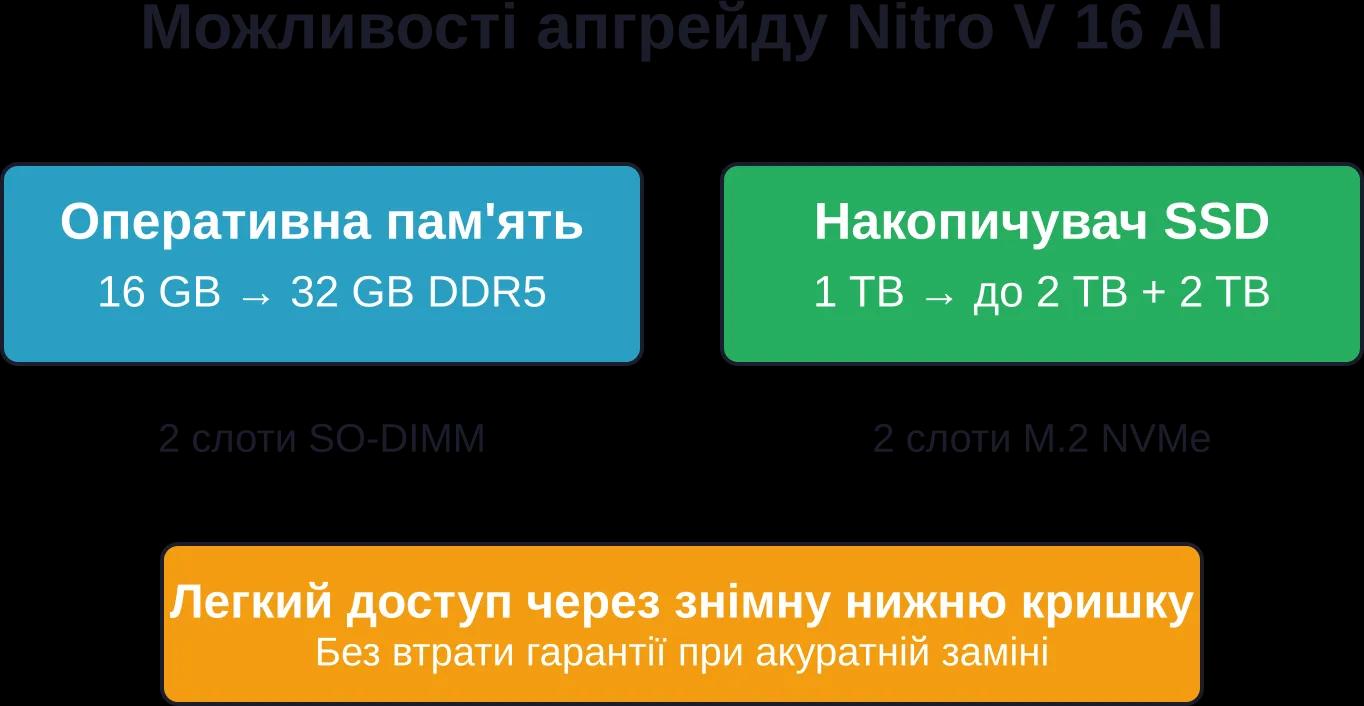
Overview of memory and storage upgrade options in the Acer Nitro V 16 AI Intel
Design and Ergonomics
The appearance of the Nitro V 16 AI is a pleasant surprise for users tired of overly aggressive gaming aesthetics.
Subtle Design
According to PlayUA’s review, the Nitro V 16 AI has an intentionally understated look—and that is a positive thing. The matte black plastic chassis features minimal branding and no RGB lighting on the lid (RGB lighting is limited to the keyboard). It is a laptop that does not attract unnecessary attention in classrooms or cafés.
The laptop weighs approximately 2.4–2.5 kg, based on specifications of similar Nitro V 16 models. It is not the lightest option available, but it is far from the 3+ kg weight of some 17-inch gaming machines. The chassis thickness reaches around 24–26 mm at its thickest point, allowing it to fit comfortably in a standard backpack.
Keyboard and Touchpad
The keyboard is full-sized and includes a numeric keypad. Key presses feel precise and responsive. RGB backlighting (typically with four customizable zones) can be configured through NitroSense.
The touchpad is large (approximately 120 × 80 mm) and offers accurate gesture and touch recognition in Windows 11. There are no dedicated physical buttons—the entire surface functions as a clickpad.
The webcam is an FHD (1920 × 1080) camera, according to Acer’s official Nitro V AI specifications. Video quality is sufficient for video calls and streaming, although professional streamers may prefer a dedicated external webcam.
Copilot+ PC and AI Features
The Copilot+ PC designation is more than just a marketing label—it represents a genuine set of features that are already available today and expected to evolve further throughout 2026–2027.
Windows 11 Copilot and Local AI Models
The built-in Copilot assistant in Windows 11 integrates with the laptop and leverages the processor’s NPU to provide local AI functionality. Some features may still require an internet connection.
This is important for both privacy and speed: responses can be generated instantly, even without internet access for basic functions.
AI Acceleration in Applications
Adobe Creative Cloud applications (Photoshop, Premiere Pro, After Effects) already utilize GPU AI cores for features such as:
Automatic object selection (Object Selection Tool)
Generative Fill (an advanced evolution of Content-Aware Fill)
AI-powered video denoising
Automatic stabilization and color correction
DaVinci Resolve and Blender also support AI TOPS acceleration through NVIDIA Studio Drivers, speeding up rendering and simulation workloads.
AI for Gamers and Streamers
NVIDIA Broadcast uses RTX AI cores for:
Microphone noise removal (eliminating keyboard clicks and fan noise)
Virtual backgrounds and background blur without a green screen
Automatic face tracking for streamers
Auto-framing while moving
These features operate in real time with virtually no impact on in-game FPS because they run on dedicated Tensor Cores within the GPU.
Comparison with Competitors
How does the Nitro V 16 AI compare to other gaming laptops in the same price range in 2026?
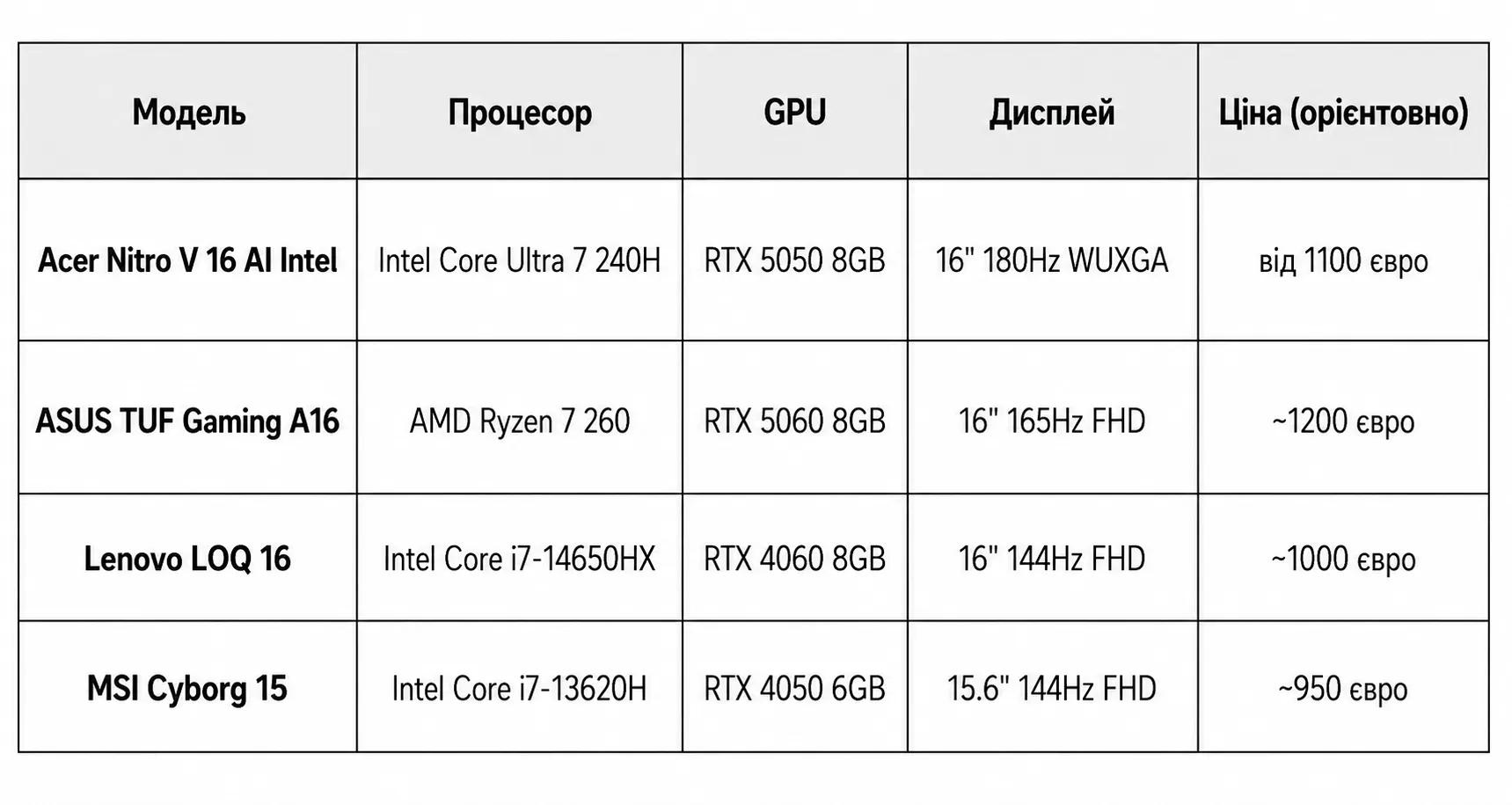
Advantages of the Nitro V 16 AI:
The latest Intel Core Ultra Series 3 platform with an NPU
Support for Copilot+ PC and AI-powered features
Higher display refresh rate (180 Hz versus 144–165 Hz)
Better cooling performance (according to LaptopMedia reviews)
Two M.2 slots for SSDs
Disadvantages compared to competitors:
The ASUS TUF A16 offers an RTX 5060 at a similar price point (although it uses an AMD platform without an NPU)
The Lenovo LOQ is cheaper but comes with an older-generation GPU (RTX 4060)
The MSI Cyborg is more compact (15.6") but features weaker graphics performance
Overall, the Nitro V 16 AI strikes an excellent balance: a cutting-edge platform with AI support at a reasonable price. If AI features are not important to you, the Lenovo LOQ can save you some money. If maximum graphics performance is your priority, consider the ASUS TUF lineup or higher-end Nitro V configurations equipped with the RTX 5070.
Who Is the Acer Nitro V 16 AI Intel For?
This laptop is not a one-size-fits-all solution. However, there are several user groups for whom it is an excellent choice.
Students in Technical Fields
The powerful processor and memory upgrade options make the Nitro V 16 AI a great choice for IT, engineering, and creative students. Virtual machines, code compilation, CAD software, and 3D modeling all run comfortably on this system.
Its understated design makes it suitable for classrooms without attracting unnecessary attention, while the 5–6 hours of battery life are sufficient for a day of lectures away from a power outlet.
Budget-Conscious Gamers
If you want to play the latest games at high to ultra settings in Full HD but cannot justify the cost of a Predator or ROG laptop, the Nitro V 16 AI is a logical choice. The RTX 5050 can handle virtually any game released in 2026, while the 180 Hz display ensures smooth gameplay in competitive shooters.
Entry-Level Streamers and Content Creators
The combination of a Core Ultra processor with an NPU, an RTX 5050 with AI cores, and 16 GB of RAM (expandable to 32 GB) makes it possible to stream at 1080p with good quality, use NVIDIA Broadcast to enhance video and audio, and edit content in Premiere Pro or DaVinci Resolve.
It is not a professional workstation, but it is more than capable for beginner and intermediate-level YouTube and Twitch creators.
Who Should NOT Buy This Laptop?
Professional video editors and 3D artists (a workstation with RTX A-series graphics or a desktop system would be more appropriate)
Users who require maximum battery life (consider an ARM-based ultrabook or an Intel Ultra laptop without discrete graphics)
People who prioritize portability (a 16-inch laptop weighing 2.5 kg is relatively heavy for everyday carrying)
Dedicated macOS users (obvious, but worth mentioning)
Current Pricing in Ukraine
The Acer Nitro V 16 AI Intel is officially available in Ukraine.
Pricing for different configurations (as of May 2026):
Base configuration (Core Ultra 7 240H + RTX 5050 + 16 GB + 1 TB): from €1,100–1,200 (~UAH 48,000–52,000 at an exchange rate of UAH 44 per euro)
Mid-range configuration (Core Ultra 7 240H + RTX 5060 + 16 GB + 1 TB): ~€1,300–1,400 (~UAH 57,000–62,000)
Top-tier configuration (Core 9 270H + RTX 5070 + 32 GB + 2 TB): ~€1,600–1,800 (~UAH 70,000–80,000)
Prices may fluctuate depending on exchange rates, promotions, and inventory availability. It is recommended to check current offers directly with retailers.
Pros and Cons of the Acer Nitro V 16 AI Intel
Let's summarize the key strengths and weaknesses in a clear format.
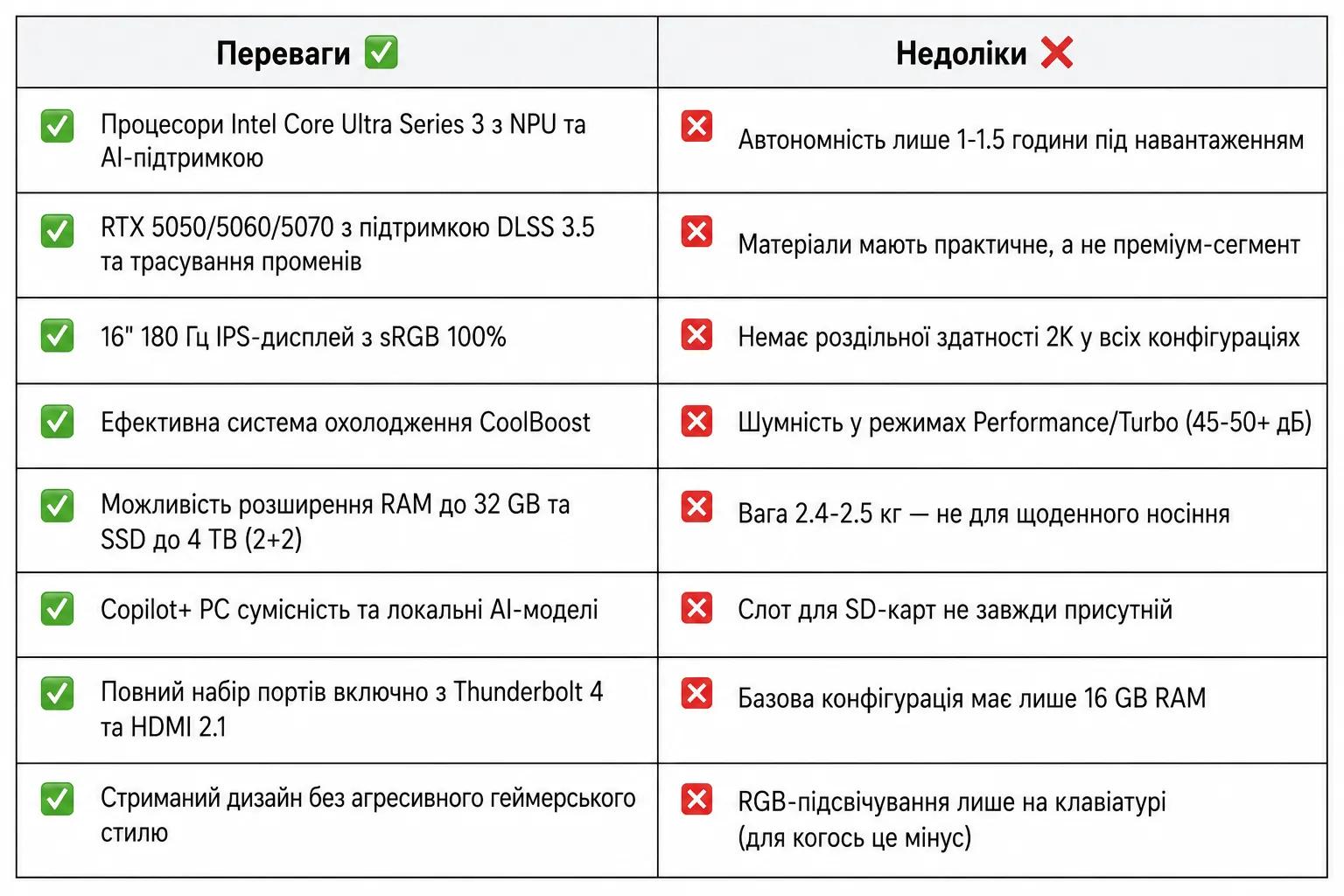
Usage and Optimization Tips
To get the most out of the Nitro V 16 AI, it is worth keeping a few recommendations in mind.
Gaming Optimization
Use the Balanced mode in NitroSense for most games—it provides the best balance between performance and noise levels.
Enable NVIDIA DLSS in supported games. This can increase FPS by 30–50% with little to no noticeable loss in image quality.
Limit FPS to the display refresh rate (180 FPS) through GPU settings or in-game options. Higher frame rates only generate additional heat and noise.
Keep NVIDIA drivers updated—new Game Ready Drivers often deliver 5–10% performance improvements in newly released games.
Improving Battery Life
Disable the discrete GPU when running on battery power (via NVIDIA Control Panel → Desktop → Display GPU Activity Icon). The integrated Intel graphics are sufficient for office work and video playback.
Reduce screen brightness to 40–50% to gain an additional 1–2 hours of battery life.
Use Windows power-saving mode and disable unnecessary background processes (such as OneDrive syncing and antivirus scans).
RAM and SSD Upgrades
If you decide to expand the system's memory:
Buy RAM modules in pairs (2×16 GB instead of 1×32 GB) to take advantage of dual-channel operation, which can improve performance by 10–15%.
Check compatibility: DDR5 5600 Hz CL40 or CL46 modules are recommended (lower latency is better but usually more expensive).
For SSDs, choose reputable brands such as Samsung 990 PRO, WD Black SN850X, or Kingston Fury Renegade.
Conclusion: Is the Acer Nitro V 16 AI Intel Worth Buying in 2026?
The Acer Nitro V 16 AI Intel delivers a well-balanced combination of modern technologies, real-world performance, and an affordable price. Intel Core Ultra Series 3 processors with NPUs, NVIDIA RTX 50 Series graphics cards, a 180 Hz display, and Copilot+ PC compatibility make this laptop ready for the future for years to come.
Yes, there are compromises. A plastic chassis instead of aluminum. Only 1–1.5 hours of battery life under heavy load. A weight of 2.5 kg. However, if your priorities are gaming performance, upgradeability, a quality display, and AI-powered features at a reasonable cost, the Nitro V 16 AI delivers excellent value for money.
For students, gamers, and beginner streamers in Ukraine, it is one of the strongest options available in 2026 in the sub-UAH 60,000 category. If your budget allows, consider the RTX 5060 configuration—the price difference is relatively small (~UAH 10,000), while the performance gain is noticeable.
Frequently Asked Questions (FAQ)
How long does the battery last when working with documents and browsing the web?
Under light workloads, including document editing, web browsing, and video playback, the laptop can run for approximately 5–6 hours on a single charge. Actual battery life depends on screen brightness and overall system load.
Can I upgrade the RAM and SSD myself without voiding the warranty?
Yes, both RAM and SSDs can be upgraded through the built-in expansion slots. As long as the installation is performed correctly and no other components are damaged, this generally does not affect warranty coverage. Before upgrading, it is advisable to review the warranty terms provided by the retailer or service center.
What is the difference between the Intel and AMD versions of the Nitro V 16 AI?
The Intel versions are equipped with Core Ultra processors featuring AI capabilities and Copilot+ support, while AMD models use Ryzen AI processors with their own NPUs. Both platforms offer strong performance, and the choice ultimately depends on personal preference and the availability of specific configurations.
Does the laptop support fast charging via USB Type-C?
Yes, the laptop supports charging through USB Type-C with Power Delivery technology. A 65–100 W adapter is sufficient for everyday tasks, but for maximum gaming performance, the included power adapter is recommended.
What games can the laptop run at ultra settings?
Configurations equipped with GeForce RTX 5050, RTX 5060, or RTX 5070 graphics cards can deliver smooth frame rates in modern AAA games at high or ultra settings in Full HD resolution. For ray-traced games, enabling DLSS is recommended to maximize performance.
Is there RGB lighting on the lid or logo?
No. RGB lighting is limited to the keyboard. The lid and logo do not feature RGB effects, resulting in a more understated design suitable for both work and study environments.