

Acer Nitro V 16 AI Intel Review 2026: Specs and Benchmarks
May 9, 2026
Briefly summarized: The Acer Nitro V 16 AI Intel is a versatile gaming laptop with Intel Core Ultra 7 240H or Core 9 270H processors, NVIDIA GeForce RTX 5050/5060/5070 graphics, a 16-inch 180Hz IPS display, and DDR5 memory. This model combines performance for gaming and studying with dual-fan cooling and Copilot+ PC support, offering a balance between features and price.
Acer updated the Nitro V line in early 2026, introducing the ANV16-72 model with next-generation Intel processors. The Nitro V 16 AI Intel is positioned as an affordable solution for gamers who want modern performance without overpaying for top-end components. The lineup includes several configurations, from the entry-level RTX 5050 to the more powerful RTX 5070. But how effectively has Acer realized the potential of these new components?
Let's take a closer look at what this laptop offers, how it handles gaming and everyday tasks, and whether it's worth the money.
Specifications and Configuration Options
The Acer Nitro V 16 AI Intel is available in several configurations, differing in processor, graphics card, and memory capacity. This approach allows you to choose the right option for your specific needs and budget.
Base Configuration ANV16-72-73EW
These models are equipped with Intel® Core™ Ultra Series 3 processors (e.g., Core™ Ultra 7 355), which have up to 8 cores (4P + 4LPE).
GPU: NVIDIA GeForce RTX 5050 with 8 GB of dedicated GDDR6 memory. Maximum graphics power is up to 85W, typical for mid-range mobile GPUs.
RAM is 16GB of DDR5 SDRAM. The laptop supports expansion to 32GB via two SO-DIMM slots—a useful option for future upgrades.
Storage is a 1TB NVMe PCIe Gen 4 SSD. Gen 4 read and write speeds ensure fast loading of games and the operating system.
Mid-Range and High-End Models
The ANV16-72-73C7 model features a Core 7 240H processor and display, but comes with an RTX 5060 (the memory type is not listed in the official specifications) and increased RAM to 32GB. Storage is more modest at 512GB. The top-of-the-line ANV16-72-933F version is based on the Intel Core 9 270H, a 14-core processor with a base frequency of 2.70 GHz and support for 20 threads. This chip is designed for more demanding scenarios, such as streaming, rendering, and content creation.
According to Acer's official website, all versions run Windows 11 Home and support Copilot+ PC, a platform with integrated Microsoft AI capabilities.
An interesting point: all versions use the same TGP (Total Graphics Power) for their graphics cards: 85 W. This means that even the higher-end GPUs don't operate at full capacity, which is typical for product lines that focus on balancing performance and price.

Acer Nitro V 16 AI Intel and gaming laptops at JustBuy
JustBuy is a convenient online store where you can quickly find a gaming laptop without a long search. Our catalog features current models, including the Intel-based Acer Nitro V 16 AI and other gaming solutions.
Here you can compare performance, view available configurations, and choose the right one for your budget and needs.
Looking for a gaming laptop?
At JustBuy, you can:
Select gaming laptops and current configurations
Compare specifications and performance
Check availability and current prices
Place an order or get a consultation
👉 Contact JustBuy to find the Acer Nitro V 16 AI and start gaming without compromise.
Display: WUXGA 180Hz for gaming and productivity
Acer equipped the Nitro V 16 AI with a 16-inch IPS display with a resolution of 1920 x 1200 pixels (WUXGA). The 16:10 aspect ratio adds vertical space compared to the traditional 16:9 aspect ratio, making it ideal for working with documents and multi-window mode.
The refresh rate is 180Hz. This is the sweet spot for mid-range gaming laptops—sufficient for smooth visuals in shooters and action games, but doesn't require a high-end GPU to unlock their full potential.
Color Rendering and Brightness
According to community reviews, the IPS panel provides viewing angles of up to 178° with color accuracy. The official website does not list exact brightness and color gamut values for all models. However, tests of similar models in the line (for example, the ANV16-41 with AMD Ryzen) showed a maximum brightness of approximately 421 cd/m² and 99% sRGB coverage. Contrast ratio reached 1200:1—typical values for a mid-range IPS panel.
If the Intel version uses similar panels, the display will handle gaming and everyday tasks, but professional color grading will require calibration.
Practical Use
The 1920×1200 resolution is a reasonable choice for the RTX 5050 and RTX 5060. In most AAA games, these cards deliver a comfortable 60+ FPS at high settings in Full HD+.
Switching to 2K or 4K would require significant graphics compromises or the use of DLSS 4, NVIDIA's neural network scaling technology. But even with DLSS, the RTX 5050 might not be able to reach a stable 60 FPS in the most demanding titles.
180 Hz allows you to fully enjoy esports titles like CS:GO, Valorant, and Apex Legends. In these games, even the RTX 5050 is capable of delivering 150-200+ FPS at medium-high settings.
Performance: Intel Core Ultra and RTX 50-Series
The Intel Core Ultra 7 240H and NVIDIA GeForce RTX 5050 combination is a typical configuration for gaming laptops in the $1,000-$1,300 price range. Let's see how it handles real-world workloads.
Intel Core 7 240H Processor
Intel® Core™ Ultra 7 355 processors use a hybrid architecture (4P + 4LPE cores).
The architecture includes P-cores (performance) and E-cores (power-efficient), balancing performance and battery life. Gaming utilizes the P-cores primarily, delivering high frequencies and responsiveness.
NVIDIA GeForce RTX 5050 Graphics Card
The RTX 5050 graphics card is supported by the Blackwell architecture and offers 8 GB of GDDR6 memory. Maximum graphics power is limited to 85 W—typical for mobile GPUs in thin cases.
According to Acer's official website, the graphics card supports DLSS 4, the latest version of neural rendering technology. DLSS 4 includes frame generation and improved upscaling, allowing for double the frame rate in supported games.
In titles with ray tracing (Cyberpunk 2077, Alan Wake II), DLSS 4 is essential for smooth gameplay. Without it, the RTX 5050 struggles to reach 30-40 FPS at medium RT settings.
With DLSS Performance enabled, the frame rate doubles, reaching 60-80 FPS with minimal loss of visual quality.
Cooling System and Noise Level
Acer uses a dual-fan cooling system with multiple heat pipes. This design is typical for 16-inch gaming laptops and allows for simultaneous heat dissipation from the CPU and GPU.
Temperatures
Community analysis shows that in gaming mode, the Core 7 240H processor remains in the 75-85°C range under sustained load. Peak temperatures can reach 90-95°C in synthetic stress tests, but throttling is rare in real-world gaming.
The RTX 5050 graphics card with a TGP of 85 W reaches 70-80°C, which is normal for mobile GPUs. GDDR6 memory also remains within safe limits thanks to efficient heat pipe distribution.
The case gets noticeably warm in the area above the keyboard and at the rear. The WASD keys remain relatively cool, but the top row of F-keys can be warm to the touch after an hour of gaming.
Acoustics and Fans
At idle, the fans run quietly or stop completely, ensuring a silent operation when surfing the web or watching videos.
When gaming, the cooling system accelerates to 40-45 dB—audible, but not critical, noise when using headphones. In Maximum Performance mode, noise levels can reach 48-50 dB, equivalent to a quiet conversation.
For comparison, high-end gaming laptops with a TGP of 120-150 W often exceed 55 dB under load. The Nitro V 16 AI demonstrates a better balance of temperatures and acoustics thanks to its moderate TGP.
Design and Build Quality
The Acer Nitro V 16 AI Intel features a discreet gaming style without aggressive lines or RGB lighting around the perimeter. The case is plastic, but has a pleasant texture that mimics brushed metal.
Appearance and Ergonomics
The lid is adorned with the Nitro logo and subtle textured lines. The color scheme is dark gray with red accents on the hinges and ventilation grilles.
Dimensions are typical for a 16-inch platform. The weight of specific models is not listed on the official website, but similar models in the series weigh approximately 2.5 kg without the power supply.
The hinges allow for one-handed opening of the lid to approximately 135°. The travel is sufficient for working on your lap, but it doesn't reach a full 180°.
Keyboard and Touchpad
The keyboard is full-sized with a numeric keypad on the right. Key travel is approximately 1.5 mm—average for laptops. Feedback is crisp, without being too soft.
The backlighting is white or red (depending on the model), without RGB zonal control. Brightness is adjustable through several levels using the function keys.
The glass touchpad measures approximately 11 x 7 cm. It supports Windows Precision gestures and is responsive. The physical buttons are integrated into the surface and provide a crisp click.
Ports and Connectivity
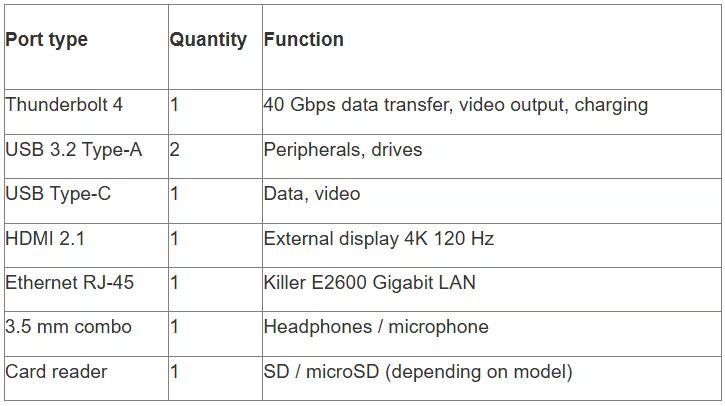
The Acer Nitro V 16 AI Intel offers a decent selection of ports for peripherals and external displays.
USB and Thunderbolt 4
According to the official specifications, the laptop is equipped with four USB ports, including Thunderbolt 4. Thunderbolt 4 supports data transfer rates of up to 40 Gbps, video output to two 4K monitors, and laptop charging via USB-C.
The remaining USB ports are a combination of USB 3.2 Type-A and Type-C. The exact distribution depends on the model, but typically includes 2× Type-A and 2× Type-C.
Network Adapters
The ANV16-72-70X9 model comes equipped with Wi-Fi 6E, Killer™ DoubleShot Pro, and Thunderbolt™ 4 Type-C. Killer is an Intel sub-brand specializing in gaming networking solutions with traffic prioritization.
Wi-Fi 6 delivers speeds of up to 2.4 Gbps under ideal conditions and low latency in online games. The Ethernet E2600 is a gigabit adapter for wired connections.
The presence of a physical LAN port is a plus for eSports players and those who value connection stability above all else.
Audio and Video Output
The laptop is equipped with a 3.5 mm headphone/microphone combo jack. HDMI 2.1 allows you to connect an external monitor with a resolution of up to 4K 120Hz or 8K 60Hz—useful for streaming to a larger screen.
The built-in speakers are dual. The sound quality and power are typical for laptops—sufficient for watching videos, but gaming and music are best enjoyed with headphones.
Battery Life and Battery
Acer equipped the Nitro V 16 AI with a 76 Wh lithium-ion battery. This is average for a gaming laptop—not the largest, but not the smallest either.
Battery Life in Different Modes
When surfing the web with screen brightness set to 50% and Wi-Fi connected, the laptop lasts approximately 5-6 hours. When watching videos (1080p YouTube), battery life drops to 4-5 hours.
Gaming on battery power isn't a good idea. The RTX 5050 and Core 7 240H drain the battery in 1.5-2 hours in maximum performance mode. Furthermore, performance drops offline due to the TDP limit.
For extended battery life, we recommend switching the laptop to power saving mode, reducing display brightness, and setting the refresh rate to 60 Hz in Windows settings.
Charging
The included power adapter provides approximately 180-200W of power (the exact power depends on the configuration). Charging from 0 to 80% takes approximately 1.5 hours, and a full charge takes approximately 2.5 hours.
Thunderbolt 4 charging support allows the use of third-party 100W USB-C chargers for slow charging or non-gaming use. However, for full-fledged gaming, the included adapter is required.
Memory and Expansion
One of the advantages of the Acer Nitro V 16 AI Intel is the ability to upgrade the RAM and storage.
DDR5 RAM
Models come with 16 GB of DDR5 SDRAM (the base ANV16-72-73EW comes with 1 TB), while higher-end models come with 32 GB. The memory is distributed across two SO-DIMM slots, allowing for additional memory upgrades.
The maximum supported capacity is 32 GB (2 x 16 GB). Memory frequency is 4800 MHz or 5200 MHz depending on the module, which is typical for first-generation DDR5.
For gaming, 16 GB is sufficient in most cases, but if you plan on streaming, video editing, or running virtual machines, 32 GB will come in handy.
M.2 NVMe Storage
The laptop is equipped with one M.2 PCIe NVMe slot (a second slot is not confirmed in the official specifications) for an SSD. If necessary, the SSD can be upgraded to a higher-capacity model (2 TB, 4 TB). Gen 4 delivers read speeds of up to 7000 MB/s and write speeds of up to 5000 MB/s—more than enough for quickly loading games and the operating system.
Some models may have a second M.2 slot, but this is not confirmed in the official specifications. It is recommended to check with the seller before purchasing.
Copilot+ PC and AI Capabilities
Acer positions the Nitro V 16 AI Intel as Copilot+ PC—a new category of Windows laptops with integrated AI capabilities.
What is Copilot+ PC?
Copilot+ PC is a Microsoft initiative that combines devices with hardware accelerators for AI tasks. According to Acer's official website, Copilot+ PCs are "the fastest, smartest, and most secure Windows PCs."
Intel Core Ultra processors include an NPU (Neural Processing Unit)—a neural accelerator for processing AI models locally, without the need for a cloud.
Practical applications
AI features include:
Windows Studio Effects – improve video quality in online meetings (background blur, lighting correction, auto-framing)
Live Captions – automatic subtitles for any audio in real time
Copilot Assistant – voice assistant with integration into Office, browser, and other applications
For gamers, the most interesting feature is DLSS 4 support at the GPU level. The NVIDIA GeForce RTX Blackwell series integrates 5th-generation Tensor Cores optimized for AI rendering with FP4 precision.
According to the official website, the RTX 5070 offers up to 798 AI TOPS (trillion operations per second). For comparison, the previous-generation RTX 4060 delivered around 200-300 TOPS.
Competitor Comparison
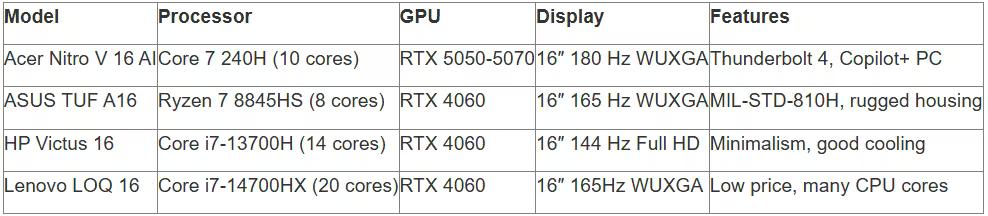
In the mid-range gaming laptop market, the Acer Nitro V 16 AI competes with models from ASUS, HP, Lenovo, and other manufacturers.
ASUS TUF Gaming A16
The ASUS TUF A16, with its AMD Ryzen 7 8845HS and RTX 4060 processors, offers similar performance. The Ryzen 8845HS is an 8-core chip that's inferior to the Core 7 240H in multi-threaded tasks, but sometimes outperforms it in games thanks to AMD optimizations.
The TUF is known for its more durable MIL-STD-810H-certified chassis, but it weighs more—around 2.7-2.8 kg.
HP Victus 16
The HP Victus 16 is a direct competitor to the Intel Core i7-13700H and RTX 4060. The Victus emphasizes a minimalist design and good cooling, but often comes with 144Hz displays instead of 180Hz.
Lenovo LOQ 16
The Lenovo LOQ 16 with an Intel Core i7-14700HX and RTX 4060 offers a more powerful processor (20 cores), but the graphics card operates at the same TGP of 85-95 W, which negates the difference in gaming.
The LOQ is often 10-15% cheaper than the Nitro V 16 AI, but has inferior keyboard quality and ports (lower-end configurations lack Thunderbolt 4).
Who is the Acer Nitro V 16 AI Intel for?
The Acer Nitro V 16 AI Intel is a versatile option for students, aspiring gamers, and those seeking a balance between performance and price.
Students and learners
The Core 7 240H processor handles multitasking effortlessly—simultaneously opening browser tabs, IDEs, virtual machines, and background applications poses no problem. 16 GB of DDR5 is sufficient for most educational scenarios.
The 16:10 display adds vertical space for working with code, documents, and spreadsheets. 180 Hz isn't critical for studying, but it's a nice bonus for relaxing between classes.
Intermediate gamers
The RTX 5050 handles most modern games at high settings in Full HD+. DLSS 4 expands the capabilities, allowing you to comfortably play demanding AAA titles with ray tracing. 180Hz unlocks the potential of esports, where every extra frame improves aiming and reaction time.
Entry-level content creators
The laptop handles 1080p video editing, streaming to Twitch or YouTube, and photo editing with confidence. The 10 processor cores and hardware NVENC encoder in the RTX 5050 ensure fast export and encoding.
If you plan to work with 4K video or complex 3D projects, consider the higher-end configurations with the Core 9 270H and 32 GB of RAM.
Pros and Cons
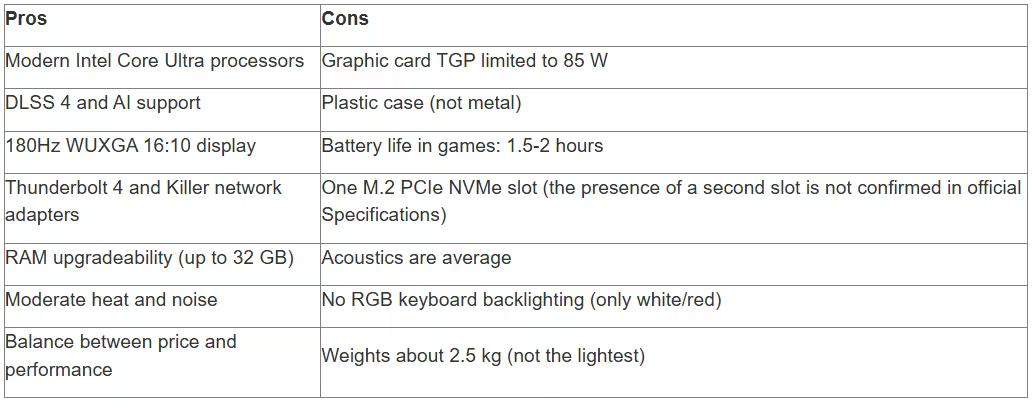
Let's summarize by highlighting the strengths and weaknesses of the Acer Nitro V 16 AI Intel.
Where to buy and current prices
The Acer Nitro V 16 AI Intel is available on the official Acer Store website, as well as at partners like Amazon, Best Buy, and regional retailers.
Exact prices vary by configuration and region. Base models with a Core 7 240H and RTX 5050 start at approximately $1000-$1200 MSRP. Higher-end models with a Core 9 270H and RTX 5060/5070 can reach $1500-$1800.
For current prices and availability of specific models, we recommend checking the official Acer website or major marketplaces. Prices may vary depending on promotions, region, and exchange rates.
Usage and Configuration Tips
To get the most out of the Acer Nitro V 16 AI Intel, consider a few tips.
Performance Configuration
Windows 11 offers several power modes: Balanced, High Performance, and Power Saver. For gaming, switch to High Performance mode—this removes TDP restrictions from the processor and graphics card.
Acer NitroSense (a proprietary utility) allows you to manage fan profiles, monitor temperatures, and overclock components. The Auto profile is sufficient for most games, but for particularly hot titles, you can switch to Maximum.
DLSS and Driver Optimization
Make sure you have the latest NVIDIA GeForce drivers installed via the GeForce Experience app. New versions often add optimizations for recent games and improve DLSS stability.
In the NVIDIA Control Panel settings, enable G-SYNC (if your display supports it) to eliminate screen tearing. For games with DLSS support, activate Quality or Balanced mode—these offer the best balance of quality and performance.
Cooling System Maintenance
Blow out the ventilation grilles with compressed air every 3-4 months. Dust accumulates quickly and reduces cooling efficiency, leading to throttling. Don't block the air intakes—avoid using the laptop on soft surfaces (like a bed or pillow). It's best to work on a hard, flat surface or a cooling pad.
Frequently Asked Questions (FAQ)
Which RTX version is best for the Acer Nitro V 16 AI Intel – 5050, 5060, or 5070?
The RTX 5050 handles most games in Full HD+ at high settings and is less expensive. The RTX 5060 adds performance headroom for future games and is better suited for ray tracing. The RTX 5070 is suitable for 2K gaming or professional 3D work. With a TGP of 85 W, the difference between the models isn't that dramatic – for most users, the RTX 5050 or 5060 are the optimal choice.
Can the RAM be upgraded to 64 GB?
No. According to Acer's official specifications, the maximum supported RAM capacity is 32 GB (two 16 GB slots). Installing larger modules may result in unstable operation or a system failure.
Does the laptop support USB-C charging?
Yes, Thunderbolt 4 supports USB-C charging. However, standard USB-C chargers (65-100 W) are insufficient for full-fledged gaming. For maximum performance, we recommend using the included 180-200 W power adapter. USB-C charging is suitable for office work and light tasks.
What is the real-world battery life when surfing the web?
With screen brightness set to 50%, Wi-Fi enabled, and a display refresh rate of 60 Hz, the laptop lasts approximately 5-6 hours using the browser and office applications. Gaming drains the battery in 1.5-2 hours. To increase battery life, we recommend reducing brightness, closing background apps, and enabling power saving mode.
Does the case get hot while gaming?
Yes, the area above the keyboard and the back of the case can reach 40–45°C after an hour of gaming. The WASD keys remain relatively cool. This is normal behavior for a gaming laptop and does not affect performance thanks to the efficient cooling system.
Is there a webcam and what is its quality?
Yes, the laptop has a built-in 720p HD webcam with Windows Hello support for facial recognition (depending on configuration). Image quality is sufficient for video calls. Windows Studio Effects' AI features help improve lighting and blur backgrounds during conferences.
What power supply is included?
The included Acer power adapter produces approximately 180-200W of power, depending on the configuration. The power supply is quite heavy, weighing approximately 600-700g. A compact 100W USB-C charger is available for travel, but it won't provide maximum gaming performance.
Conclusion
The Acer Nitro V 16 AI Intel is a smart choice for those looking for a versatile laptop with modern performance, a high-quality display, and AI features without overpaying for top-end components.
The Intel Core Ultra 7 240H and Core 9 270H processors provide confident multitasking and fast gaming. NVIDIA GeForce RTX 5050-5070 graphics cards with DLSS 4 support handle most modern titles at high settings in WUXGA resolution.
The 16:10 display with a refresh rate of 180Hz is a nice bonus for both gaming and productivity. Thunderbolt 4, killer network adapters, and upgradeable RAM make the laptop a flexible tool for years to come.
Of course, there are tradeoffs—the graphics card TGP is limited to 85W, the case is plastic, and gaming battery life is modest. But for its price, the Nitro V 16 AI offers a fair balance of features. If your budget allows, consider a configuration with an RTX 5060 and 32 GB of RAM—this option will provide future-proofing and comfortable multitasking. The base model with an RTX 5050 is ideal for students and beginner gamers.
Ready to make a choice? Check current prices and availability on the official Acer website or at trusted retailers. Don't forget to install the latest drivers and configure your cooling system for maximum performance. Happy gaming and productive work!