

Acer Swift 16 AI (SF16-71T): Review 2026
May 8, 2026
Here's the lowdown: The Acer Swift 16 AI (SF16-71T) is a premium laptop with a 16-inch 3K OLED display, an Intel Core Ultra X9 388H processor with a 180-TOPS NPU, a huge tactile touchpad, and a weight of just 1.55 kg. This model delivers excellent performance for creative tasks and everyday productivity, despite starting at $1,800.
Acer updated its Swift lineup with the introduction of the Swift 16 AI (SF16-71T) in early 2026. This laptop is positioned as a tool for creative professionals and anyone who values a combination of performance, portability, and outstanding display quality.
This new model features Intel Core Ultra Series 3 processors (codenamed Panther Lake), a 3K OLED display, and impressive AI capabilities thanks to a neural processing unit (NPU) delivering up to 180 TOPS. But is this laptop really worth the money?
Key Features of the Acer Swift 16 AI
The official specifications of the SF16-71T include several configuration options. Let's take a look at the top-of-the-line SF16-71T-97GV, which represents the best of the best.
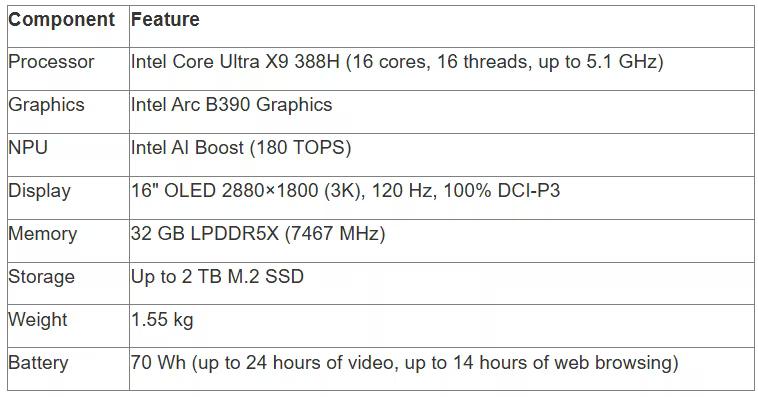
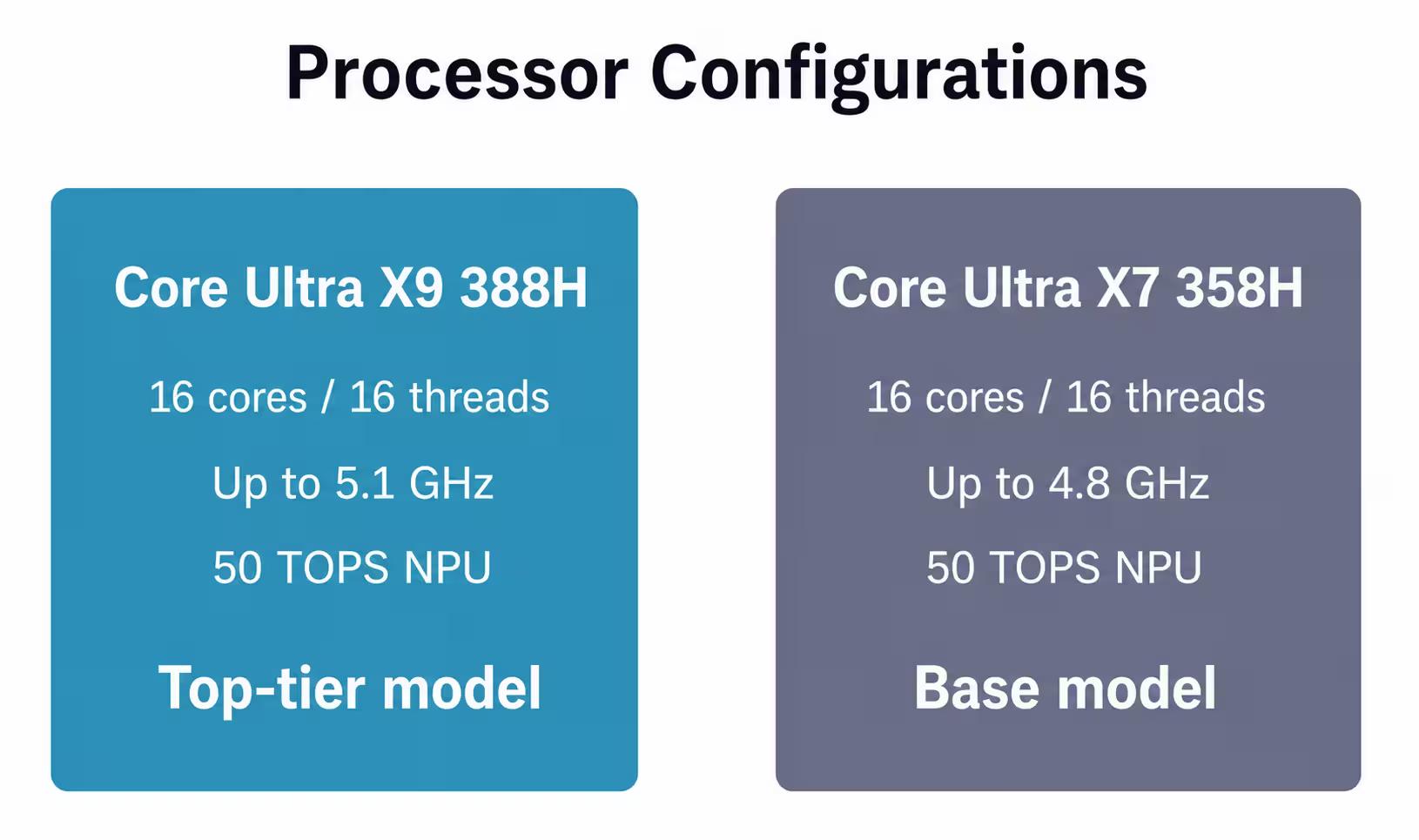
There's also the SF16-71T-70PN configuration with an Intel Core Ultra X7 358H processor (16 cores, up to 4.8 GHz), which will cost less with a slight reduction in peak clock speed.
Acer Swift 16 AI and modern laptops at JustBuy

JustBuy is a convenient place to find laptops and accessories without the hassle of searching. Our catalog features current models, including the Acer Swift 16 AI (SF16-71T) and other solutions for work, study, and creativity.
This device belongs to the new generation of AI laptops with powerful Intel Core Ultra processors, an OLED display, and a focus on performance and battery life. In-store, you can quickly compare specifications, check availability, and understand which models are currently available.
Looking for a laptop or an alternative?
At JustBuy, you can:
Select current laptop models
Compare specifications and find the right option
Check availability, price, and delivery options
Place an online order or get a consultation
👉 Contact JustBuy to find the Acer Swift 16 AI or a similar laptop to suit your needs.
Design and build: thin, light, premium
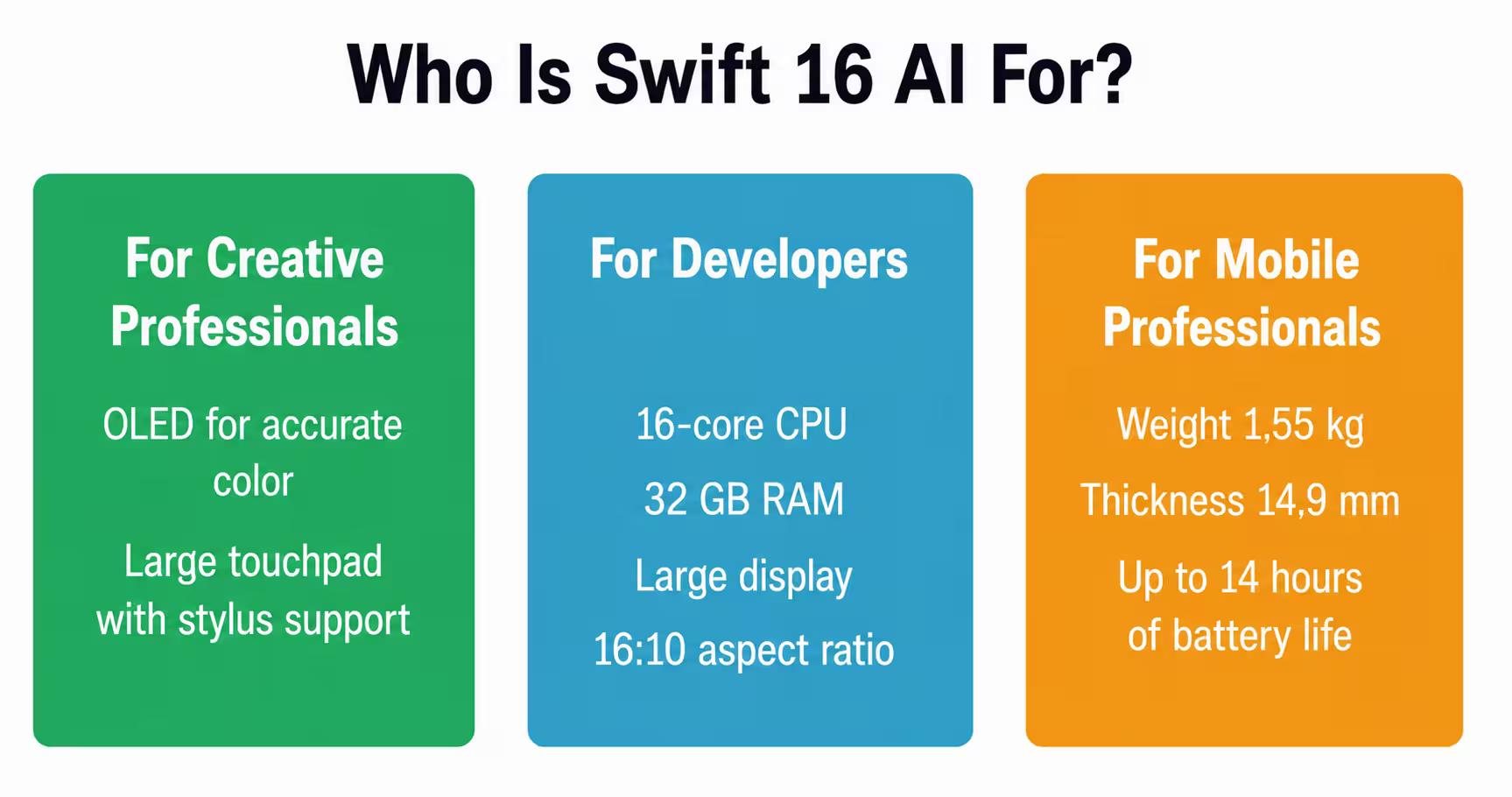
The first impression of the Swift 16 AI is one of amazement. How did Acer manage to squeeze a 16-inch display into a chassis just 14.9 mm thick and weighing 1.55 kg?
The aluminum chassis looks elegant and minimalist. The top lid opens a full 180 degrees, making it convenient for working in a variety of settings, from cafes to conference rooms. Moreover, the laptop can be opened with one hand, a testament to its well-balanced hinges.
Comparing dimensions to competitors: the Swift 16 AI measures approximately 13.99 x 9.66 x 0.59 inches. This is slightly larger than the 15.3-inch MacBook Air, but smaller than some 16-inch Windows laptops like the Dell 16 Premium.
World's Largest Tactile Touchpad
Acer markets the Swift 16 AI's touchpad as "the world's largest." It's truly huge—so much so that it takes some getting used to in the first few days.
The surface is made of Corning Gorilla Glass and supports the MPP 2.5 stylus with tilt detection. Haptic feedback is provided via vibration feedback, reminiscent of Apple's MacBook Pro.
This opens up interesting possibilities for designers and illustrators: they can quickly sketch directly on the touchpad without switching to the touchscreen. However, the problem is its size. The touchpad is so large that when typing, your palms sometimes touch its edges, causing accidental clicks.
Keyboard and Ergonomics
The keyboard features larger keys with individual backlighting. The key travel is average, and typing is comfortable, although the feedback is a little softer than I'd like for long periods of typing.
The layout is standard, and the function keys are logically placed. There's a dedicated Copilot button for quickly accessing the Windows 11 AI assistant.
Display: OLED beauty with impressive accuracy
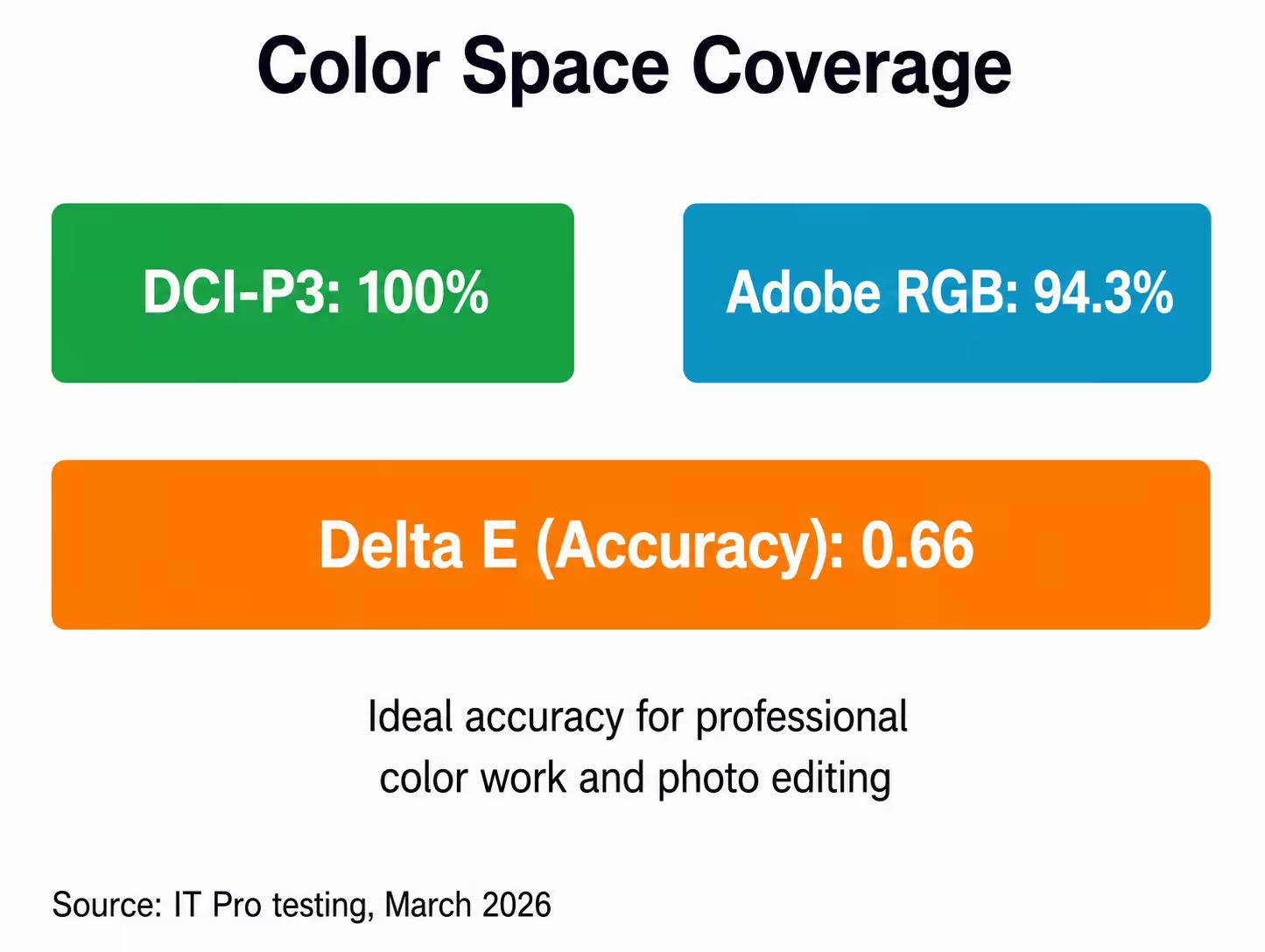
The display is the star of the Swift 16 AI. The 16-inch OLED panel with a 2880x1800 pixel resolution (16:10 aspect ratio) produces images that rival high-end professional monitors.
IT Pro tests showed impressive results: 100% DCI-P3 color space coverage with a 117% gamut, 94.3% Adobe RGB coverage with a 114% gamut. The average Delta E error is just 0.66, meaning near-perfect color accuracy.
Refresh Rate and Response
The display operates at 120Hz, making page scrolling smooth and interface animations responsive. For OLED technology, this also means virtually instantaneous pixel response times.
HDR content looks stunning thanks to OLED's ability to produce perfect blacks. Watching movies becomes a pleasure, with every frame rich in shadow and highlight detail.
Performance: Intel Panther Lake in Action
Swift 16 AI is built on Intel Core Ultra Series 3 processors (Panther Lake architecture). These are the first mainstream CPUs with a 180-TOPS neural processing unit (NPU)—enough for Microsoft's Copilot+ PC certification.
The Core Ultra X9 388H performs strongly in synthetic benchmarks. Its 16 cores (a mix of high-performance and energy-efficient cores) handle multithreaded tasks quickly. A frequency of up to 5.1 GHz ensures good single-thread responsiveness.
Intel Arc B390 Graphics
The integrated Arc B390 graphics are a pleasant surprise. They handle light gaming (games like CS2 and Fortnite at medium settings) and accelerate rendering in Premiere Pro and Blender.
For professional 3D work or demanding games, the Arc B390 isn't enough—a discrete GPU is needed. However, for an Ultrabook of this class, it's a more than worthy solution.
AI Performance and Copilot+
A 180-TOPS NPU unlocks exclusive Windows 11 Copilot+ features. These include Live Captions with real-time translation, Windows Studio Effects for improving video calls, and Recall for searching through your activity history (although this feature has sparked controversy due to privacy concerns).
In reality, most AI tasks are still performed on the CPU or GPU. The NPU offloads them in specific scenarios, such as video processing in Zoom, background blur, and audio noise reduction.
Flawless AI tools and up to 180-TOPS performance let you bring your ideas to life with ease and speed.
Temperature, Noise, and Battery Life
The thin design comes at a price. Under load, the Swift 16 AI can become uncomfortably warm on the underside. The keyboard remains relatively cool, but the bottom of the laptop is noticeably warm when rendering or compiling code. The cooling system handles heat well, but it's not silent. Under load, the fans are clearly audible—not critically loud, but distracting enough in a quiet office.
Battery Life
The 70 Wh battery provides up to 24 hours of video playback (according to the manufacturer). Real-world web surfing time in tests showed up to 14 hours under optimal conditions. These are optimistic scenarios with a WQXGA panel at low brightness.
In real-world use, the laptop lasts up to 14 hours of web surfing and 14 hours in the MobileMark 25 test.
Charging is via USB-C with fast charging support. The adapter is compact, making it easy to carry.
Ports and Connections
The port selection is balanced, though not excessive. Features:
Two USB Type-C ports with Thunderbolt 4 (data transfer, charging, connecting monitors)
Two standard USB Type-A ports (convenient for peripherals)
HDMI 2.1
3.5 mm audio jack
The lack of a built-in SD card reader may disappoint photographers. There's also no Ethernet port, although this is expected for an Ultrabook.
Wireless connections include Wi-Fi 7 (the latest standard) and Bluetooth 5.4. Connection speed and stability are excellent.
Sound and Camera: Weaknesses
DTS:X Ultra with dual speakers and a triple microphone array sounds impressive on paper. In practice, the speakers produce clear sound for podcasts and video conferences, but music and movies lack bass and dimension.
The maximum volume is sufficient for a small room, but no more. The anti-vibration system works – the speakers don't rattle even at peak volumes. The FHD IR webcam with Windows Hello support (IR sensor for facial recognition) handles basic tasks. Image quality is acceptable in good lighting, but noticeable noise appears in low light.
Both the camera and speakers are a compromise for the slim design. For serious video calls, an external webcam and headphones are worth considering.
Price and Availability
The Acer Swift 16 AI (SF16-71T) starts at $1,800 for a configuration with a Core Ultra X7 358H. Exact pricing and availability vary by region.
This is the premium segment. For comparison, the 15-inch MacBook Air M3 starts at a similar $1,299, but has a smaller screen and a different ecosystem. The Dell XPS 16 with similar specifications costs around $2,000-2,500. The Swift 16 AI makes sense if the Windows ecosystem, OLED display, and portability of a 16-inch format are critical. If your budget is limited or you don't need such a large screen, alternatives are worth considering.
Comparison with competitors
How does the Swift 16 AI compare to its competitors?
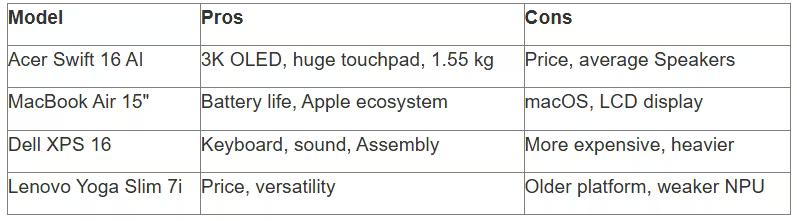
Apple MacBook Air 15"
The MacBook Air 15" offers a similar screen size, better battery life (up to 18 hours of real-world use), and a lower starting price. However, it runs macOS, which is critical for Windows users.
The Swift 16 AI's OLED panel outperforms the Air's LCD panel in contrast and saturation. Apple's touchpad remains the benchmark, but Acer tries to compete with its size and tactile response.
Dell XPS 16
The XPS 16 is a direct competitor with similar specifications and a premium build. The main differences are price (the XPS is more expensive) and design (the Dell is more angular, while the Acer is rounded).
Dell traditionally has a stronger keyboard and sound quality. Acer wins with its larger touchpad and slightly lighter weight.
Lenovo Yoga Slim 7i
The Yoga Slim 7i with Intel Series 2 processors (previous generation) will be cheaper, but will lack NPU performance and the latest CPU architecture.
If AI features aren't critical, the Lenovo could be a more affordable alternative with a good price/performance ratio.
Pros and Cons of the Acer Swift 16 AI
Let's summarize the strengths and weaknesses.
Pros
Stunning OLED display with 100% DCI-P3 and Delta E 0.66
Powerful Intel Core Ultra X9 388H processor with 180 TOPS NPU
World's largest haptic touchpad with stylus support
Lightweight at 1.55 kg with a 16-inch diagonal
Thin 14.9 mm premium aluminum body
Thunderbolt 4 and Wi-Fi 7 for high-speed connections
Good battery life for an OLED model
Cons
High price, starting at $1,800
Average speakers and webcam
Heat and fan noise under load
Huge touchpad can cause accidental touches
No SD card reader for photographers
AI capabilities are overrated for local tasks
Verdict: Is the Swift 16 AI worth buying?
The Acer Swift 16 AI (SF16-71T) is an excellent Ultrabook for those who value display quality, performance, and portability. Its OLED display with professional color accuracy makes it ideal for photographers, video editors, and designers.
The Intel Core Ultra X9 processor handles demanding tasks—from video rendering to compiling large projects. The 180-TOPS NPU enables exclusive Copilot+ features, although their practical value is currently limited.
But there are tradeoffs. The price is high, especially compared to the MacBook Air, which offers better battery life for less (albeit with a different OS). The speakers and camera aren't up to par.
Sound familiar? It's a typical tradeoff between Windows and macOS, prioritizing display over battery. The Swift 16 AI is worth buying if:
OLED display quality is critical for color work
You need the Windows ecosystem and Copilot+ features
You want the portability of a 16-inch model
Your budget allows you to invest in the premium segment
You should avoid it if:
Battery life is a priority (look at a MacBook)
Your budget is limited (consider a Lenovo or Asus Vivobook)
You need the best speakers and camera (Dell XPS)
You need discrete graphics for 3D/gaming
Overall, the Swift 16 AI holds a strong position in the premium Windows Ultrabook segment for 2026. It's not a perfect machine, but it's very good for its niche.
Frequently Asked Questions
Can RAM and SSD be upgraded in the Acer Swift 16 AI?
No. The LPDDR5X memory is soldered to the motherboard and cannot be replaced. The SSD is theoretically replaceable via an M.2 slot, but access is difficult due to the chassis design. It is recommended to choose the needed RAM and storage configuration from the start.
What is the real battery life of the Swift 16 AI during active use?
With mixed use such as browsing, office apps, and occasional rendering, the laptop lasts around 8–10 hours. Video playback can reach 14–16 hours at low brightness. Heavy tasks such as compilation or 3D work reduce battery life to around 4–5 hours.
Does the SF16-71T support external GPUs via Thunderbolt?
Yes. Both Thunderbolt 4 ports support external GPU connection. This can significantly improve graphics performance for gaming or professional rendering in a stationary setup.
How hot does the laptop get under load?
The bottom panel becomes noticeably warm during long workloads, making lap use uncomfortable. The keyboard stays relatively cool. The fans are audible but not critically loud. For demanding work, it is better to use the laptop on a desk or with a cooling stand.
What is the difference between Core Ultra X7 and X9 configurations?
The main difference is peak clock speed: 4.8 GHz on the X7 versus 5.1 GHz on the X9. The number of cores, threads, and NPU performance are identical: 16 cores, 16 threads, and 180 TOPS. In real-world tasks, the difference is usually around 5–10%, which may not always justify paying extra for the X9.
Is the Swift 16 AI suitable for gaming?
Yes, for casual and esports games such as CS2, Dota 2, and Fortnite at medium settings. Intel Arc B390 can handle 1080p gaming at medium to high settings in many modern titles. For AAA games at ultra settings or at the native 3K display resolution, an external GPU or a gaming laptop with a discrete graphics card is recommended.
Are there OLED burn-in issues?
OLED panels are theoretically vulnerable to burn-in when static elements such as taskbars or icons remain on screen for long periods. Modern OLED displays include protection features such as pixel shift and screen savers. With normal use and regular content changes, the risk is minimal over 3–5 years. For extra caution, enable auto-hide for the taskbar.
Conclusion
The Acer Swift 16 AI (SF16-71T) confirms that the company is serious about the premium segment. A professional-grade OLED display, an Intel Panther Lake processor with a 180-TOPS NPU, and a huge tactile touchpad—all packed into a 1.55-kilogram chassis—are an engineering achievement.
The laptop isn't without compromises. The speakers and camera could be better. The price is high. Heat buildup under load is noticeable.
However, if you need a Windows Ultrabook with a large display, exceptional image quality, and modern performance, the Swift 16 AI deserves a place on your shortlist.
Check Acer's official website for current prices and availability in your region. Configurations may vary by market.