

Review of Acer Swift Go 14/16 AI Intel 2026
May 10, 2026
In short: The Acer Swift Go 14/16 AI, powered by the Intel Core Ultra Series 2, is a line of thin and light notebooks with OLED displays, powerful AI capabilities (up to 120 TOPS), and multi-day battery life. These devices feature Intel Core Ultra 7 258V processors and higher, up to 32 GB of LPDDR5X memory, Copilot+ support, and weigh starting at 1.12 kg.
When it comes to AI-powered Ultrabooks, the Acer Swift Go 14 and 16 AI occupy an interesting position. These aren't just beautiful devices—they're truly designed for productivity, and for all-day use without a power outlet.
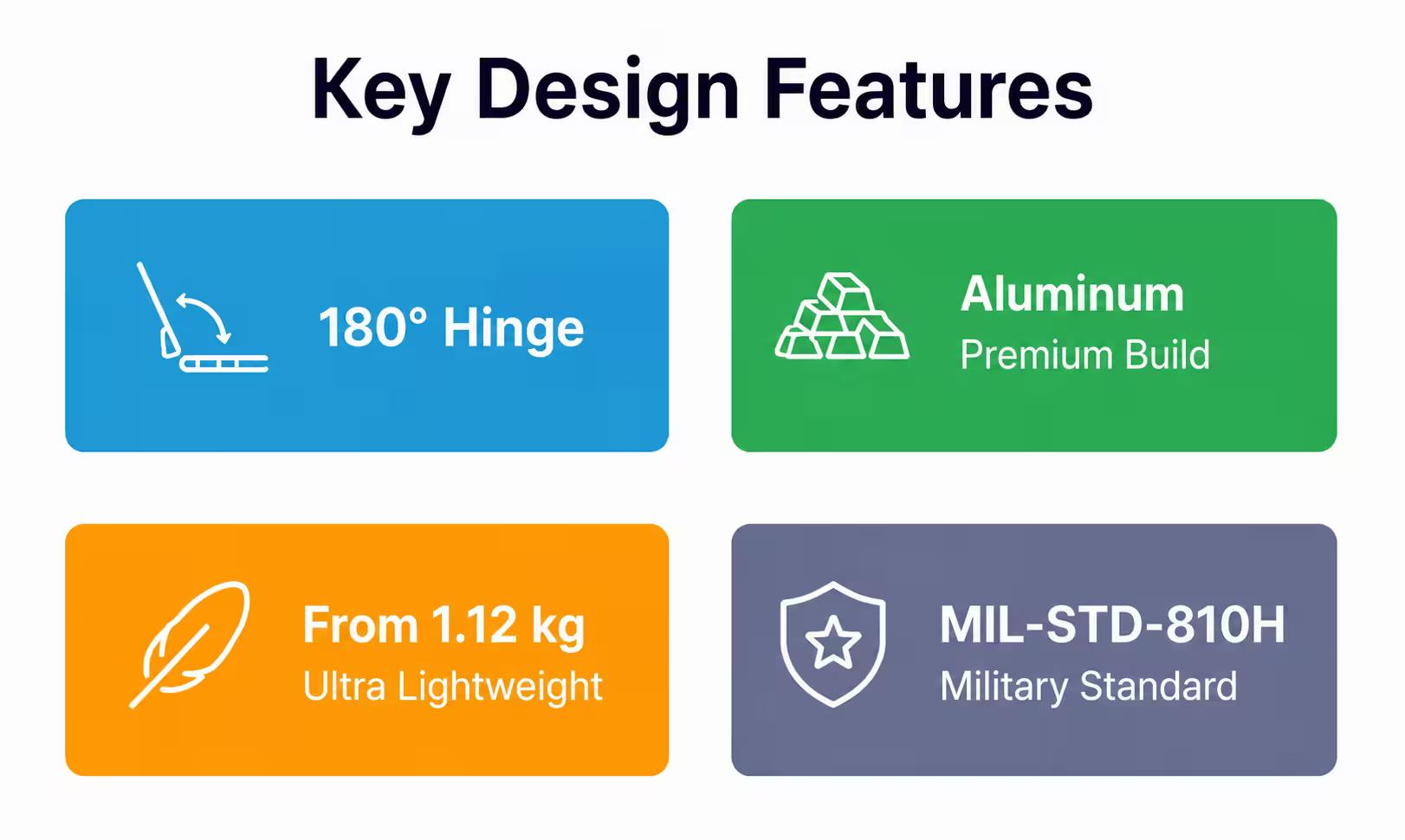
The Swift Go line received a major update in 2026. They feature Intel Core Ultra Series 2 processors, OLED displays, a 180-degree hinge, and weigh starting at 1.12 kg. But will this be enough to compete with the MacBook Air and other premium Ultrabooks?
Let's break it down.
Positioning and Configuration Options
Acer offers the Swift Go in two sizes – 14- and 16-inch. Both models feature Intel Core Ultra Series 2 processors, but there's a catch: the top-end configurations with the Intel Core Ultra X9 processor 388H are only available in the Copilot+ PC editions.
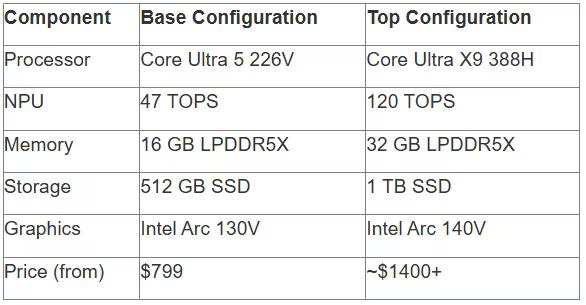
Base models start with the Intel Core Ultra 5 226V, the mid-range with the Core Ultra 7 258V, and the flagships are equipped with the Core Ultra X7 358H and X9 388H. The performance difference is noticeable: the NPU in the lower-end chips delivers 47 TOPS, while the top-end models deliver up to 120 TOPS.
Swift Go 14 AI: Compactness Above All
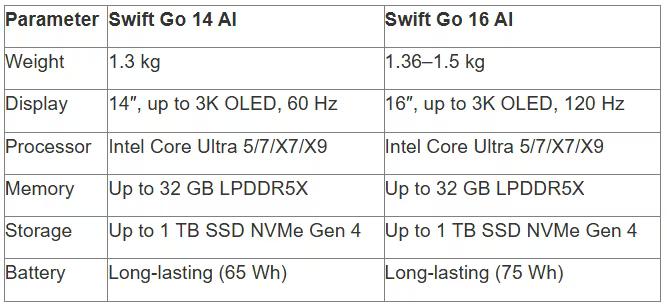
The 14-inch model weighs just 1.3 kg. According to Acer's official data, it's one of the lightest laptops in its class with an OLED display. There are three display options: 2K Touch IPS (2880×1800), 3K OLED 100% DCI-P3, and 2K OLED 100% DCI-P3. The OLED versions have a 60 Hz refresh rate, which is more than sufficient for working with text and graphics.
Swift Go 16 AI: Bigger Screen, More Possibilities
The 16-inch version weighs 1.59 kg according to Acer's official specifications (1.5 kg for some configurations). There are four display options: 2K Touch IPS, 3K IPS, 3K OLED up to 120 Hz, and 2K OLED up to 120 Hz.
The 120 Hz refresh rate makes scrolling smooth and provides a noticeable advantage in light gaming. But the truth is, 60 Hz is plenty for office tasks.
Acer Swift Go 14/16 AI at JustBuy

JustBuy is a convenient place to quickly find a laptop without searching. Our catalog features current models, including the Acer Swift Go 14/16 AI and other solutions for work and everyday tasks.
Here you can compare specifications, check availability, and immediately select the right configuration.
Looking for where to buy a laptop?
At JustBuy, you can:
select current models
compare specifications
check availability and price
place an order or get a consultation
👉 Contact JustBuy to find an Acer Swift Go 14/16 AI or a similar laptop.
Design and build: premium without pretense
Acer has gone for minimalism. The aluminum case with a laser-engraved lid looks understated yet high-quality. No unnecessary details—just the Acer logo. The 14-inch model is about 14.9 mm thick, while the 16-inch model is 15.7 mm. This is slim, especially considering it houses a full-fledged cooling system and a 65-75 Wh battery.
180° hinge: more than just marketing hype
The fully folding screen is no gimmick. In the office, you can lay the laptop flat and show a presentation to a client across the table. On a plane, you can recline the screen a little further than normal without hitting the back of the seat in front of you.
The hinge is rigid, with no play. After several weeks of use, no creaking or loosening was noticed.
OLED display: Acer didn't skimp here
The screen is what you look at all day, and Acer understands this. The OLED panels in the Swift Go are among the best in the Ultrabook class.
The 1920x1200 (WUXGA) resolution of the base OLED versions may seem low according to the specifications, but the 16:10 aspect ratio makes up for it. More vertical space means less scrolling in documents and spreadsheets.
Color and brightness: 100% DCI-P3 and HDR 500
According to a review on iguides.ru, the OLED panel covers 100% of the DCI-P3 color space. For comparison, conventional IPS panels produce 60-70% sRGB, which roughly corresponds to 45-50% DCI-P3. Brightness reaches 400 nits in standard mode and 500 nits in HDR mode. Readability in sunlight is good, although the glossy finish does produce glare.
OLED contrast is infinite (absolute black), making watching movies and editing photos a pleasant experience.
Refresh Rate: 60 Hz vs. 120 Hz
The 14-inch models have a maximum refresh rate of 60 Hz. The 16-inch models offer a 120 Hz option.
The difference is noticeable when scrolling long pages and in fast-paced scenes. However, 60 Hz is sufficient for most work tasks.
PWM and Flickering
As noted in the mobile-review.com review, the Swift Go 14 AI uses high-frequency pulse-width modulation (PWM) to regulate brightness. This means flickering occurs at a frequency above 240 Hz, which most people won't notice.
You can work on this screen for long periods without eye strain. But if you are sensitive to PWM, it is better to choose the IPS version.
Hardware: Intel Core Ultra Series 2 in Action
The second-generation Intel Core Ultra processors (Lunar Lake) aren't just an upgrade. They're a reimagined architecture for AI workloads.
The top-end configuration with the Core Ultra X9 388H delivers up to 180 TOPS of combined AI performance (CPU + GPU + NPU). This is serious power for running AI models locally, without the cloud.
Intel Core Ultra 7 258V: The Golden Mean
Most reviews tested this configuration. It features an 8-core processor (Octa-core) with a base frequency of 2.2 GHz and up to 4.8 GHz in turbo mode.
The Intel AI Boost NPU delivers 47 TOPS. This is enough for running Windows Copilot, background video processing, and AI filters in Photoshop without lag.
The Intel® Arc™ B390 handles light gaming at medium settings. CS:GO, Dota 2, and Valorant can reach 60+ FPS in Full HD.
Memory and Storage: Soldered LPDDR5X
The LPDDR5X RAM is soldered to the board. It runs at 8533 MHz, which is faster than standard DDR5.
Con: Upgrades are not possible. If you buy 16 GB, you'll have to keep it that way. 16 GB is sufficient for office tasks, but for video editing and 3D, it's better to get 32 GB.
NVMe Gen 4 SSD storage options: 512 GB or 1 TB. Some configurations include two M.2 slots, allowing for future storage expansion.
Keyboard and Touchpad: Where Acer Shine
The keyboard is backlit, with a key travel of approximately 1.3 mm. Typing is comfortable, quiet, and not spongy.
The layout is standard, with no surprises. The only thing is that the Copilot key has taken the place of the right Shift key on some models. This takes some getting used to.
Touchpad: 44% Larger
According to Acer's official data, the touchpad is more than 44% larger than the previous generation. This is noticeable: there's now plenty of room for gestures.
The OceanGlass™ surface is made from recycled ocean plastic. Marketing? Yes. But it's nice to know that Acer is at least trying to be eco-friendly.
Accuracy is excellent, and multitouch works flawlessly. Support for Windows Precision Drivers means all standard Windows 11 gestures are available out of the box.
Battery Life: Multi-Day Battery Life Is No Joke
Acer promises "multi-day battery life." And they're not lying. In a review on galaxus.be, the Swift Go 14 AI lasted 18 hours and 8 minutes in the PCMark 10 Video test.
This means that with light use (browsing, text editing, video conferencing), you can work for two full days without charging.
Fast Charging: 70% in 40 Minutes
A 100W charger (20V, 5A) charges the battery to 70% in about 40 minutes. A full charge takes about an hour.
This is convenient: before heading out, you can top up over breakfast and have enough power for the entire workday.
Intel Core Ultra and Power Efficiency
The Lunar Lake architecture is designed with energy savings in mind. The NPU takes over AI tasks, offloading the CPU and GPU, reducing power consumption. In standby mode, the laptop uses virtually no battery power. Overnight, the battery drains by 1–2%.
AI Features and Copilot+: What Really Works
Copilot+ PC is Microsoft's marketing term for devices with an NPU with a performance of 40 TOPS or higher. Swift Go 14/16 AI with Core Ultra 7/X7/X9 processors fall into this category.
Windows Copilot: An AI Assistant in Your System
The Copilot key on the keyboard invokes the Windows AI assistant. You can ask it to find a file, configure the system, explain an error, or write an email.
This works locally on the NPU, without sending data to the cloud (with the correct privacy settings). Response times are fast—1-2 seconds for simple queries.
Acer PurifiedVoice and PurifiedView
AI noise reduction and video enhancement filters work in all video conferencing apps.
PurifiedVoice removes background sounds (dog barking, children screaming, keyboard clicking), leaving only the voice. PurifiedView blurs or replaces the background and improves facial lighting. All of this runs on the NPU, without putting a strain on the processor. In Zoom or Teams, CPU load during a call is 10-15%, compared to 40-50% on laptops without an NPU.
AI indicator on the touchpad
Some configurations (especially those with Qualcomm Snapdragon, but this feature is also available on Intel models) have an LED indicator on the touchpad that lights up when the AI is running. This is not a required feature, but it does indicate that the NPU is active.
Performance: What to Expect in Real-World Use
The Swift Go 14/16 AI aren't gaming laptops or workstations. These are devices for productivity, content consumption, and light creative work.
Office tasks: no problem
Word, Excel, PowerPoint, Outlook, dozens of Chrome tabs—everything runs smoothly. No lag, no freezes.
32GB of memory is enough for 99% of tasks. Even with Photoshop, Lightroom, and Premiere Pro open simultaneously, the system runs smoothly.
Photo and video editing: depends on complexity
Photoshop works great. AI filters (Neural Filters) are accelerated by the NPU. RAW files (24 MP) take 2-3 seconds to process.
Premiere Pro handles Full HD video on a 4-6 track timeline. Rendering a 10-minute 1080p video takes about 8-10 minutes.
But wait. 4K video with multiple layers and effects is beyond the capabilities. A discrete graphics card like the RTX 4060 or higher is required for this.
Games: Casual games are fine, but AAA titles are not.
Intel Arc Graphics 140V is integrated graphics. Dota 2, CS:GO, Valorant, and League of Legends can achieve 60-80 FPS at medium-high settings at 1080p. In Cyberpunk 2077 or Elden Ring, the frame rate is 20-30 FPS at minimum settings, which is uncomfortable. This is not a gaming laptop.
Sound and camera: better than expected
The speakers are 2x louder than the previous generation. Bass is still lacking (due to the small chassis), but it's fine for podcasts, video calls, and background music.
1440p QHD webcam (5MP IR Camera according to official specifications)
5 megapixel resolution (approximately 2560×1920, but 2560×1440 is used for video) is better than standard 720p.
The image is clear and detailed. AI enhancement (PurifiedView) adds a bit of sharpness and evens out exposure.
The three-microphone system with AI noise reduction makes voices clear even in a noisy cafe.
Disadvantages: Where the Swift Go falls short
No laptop is perfect. The Swift Go 14/16 AI has its weaknesses.
Easily soiled case
The matte aluminum finish attracts fingerprints. After a day of use, the case looks dirty. You'll need to wipe it down with a microfiber cloth regularly.
Soldered memory
The LPDDR5X is soldered to the board. There's no upgrade. If you bought 16 GB and need 32 GB a year later, you'll have to replace the entire laptop.
Glossy screen
The OLED panel is glossy. Glare is a problem in sunlight. Indoors, it's fine, but outdoors, comfort is reduced.
Comparison with competitors
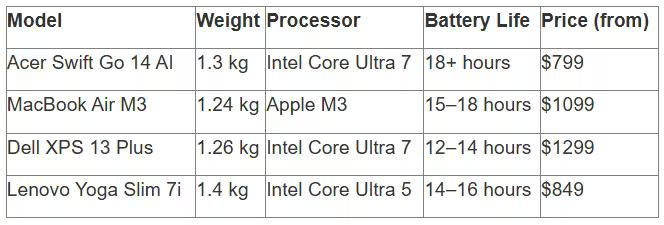
The MacBook Air M3 is the main competitor. It's lighter (1.24 kg), quieter (passive cooling), and has a better ecosystem for Apple users. But the Swift Go is cheaper (starting at $799 versus $1,099 for the base Air), has a touchscreen, more ports, and works with the Windows ecosystem.
The Dell XPS 13 Plus and HP Dragonfly G4 are more expensive and don't always offer OLED as standard. The Lenovo Yoga Slim 7i is a similarly priced alternative, but doesn't offer the same battery life.
Who should use the Swift Go 14/16 AI?
This laptop is for people who need a reliable, no-frills workhorse.
Students will appreciate its lightweight design and long battery life. You can take it to class in the morning without needing to charge it—the battery will last a full workday.
Office workers will get a powerful multitasking tool. 32 GB of memory, a fast SSD, and an excellent display—everything they need for productivity.
Creatives (photographers, designers, and simple content editors) will find a balance between performance and mobility. But for heavy 4K editing, it's better to look at a MacBook Pro or gaming laptops with RTX.
Travelers and digital nomads will appreciate the 1.3 kg weight and 180° hinge. It's convenient for use on a plane, in a cafe, or in a coworking space.
Price and Availability
Base configurations of the Swift Go 14 start at $799 (based on data and reviews). Top-end models with a Core Ultra X9, 32GB of memory, and a 1TB SSD will cost $1,400+.
16-inch versions are $100–$200 more expensive due to the larger screen and battery.
FAQ: Frequently Asked Questions
Is the memory in the Swift Go 14/16 AI upgradeable?
No, the LPDDR5X RAM is soldered to the motherboard and is not upgradeable. When purchasing, we recommend choosing the configuration with the required memory capacity—16 or 32 GB.
What is the battery life of the Swift Go 14 AI in real-world use?
With office workloads (browsing, documents, video calls), the laptop lasts approximately 14-16 hours. In the PCMark 10 Video playback test, it lasts up to 18 hours and 8 minutes. Under heavy loads, such as rendering or gaming, battery life drops to 4-6 hours.
Does the Swift Go 14 AI support USB-C charging?
Yes, the laptop supports USB-C / Thunderbolt 4 charging. However, the included 100W adapter charges the device faster. A full charge via 65W USB-C Power Delivery takes approximately 1.5-2 hours.
Can I game on the Swift Go 14/16 AI?
Casual and esports games like Dota 2, CS:GO, Valorant, and League of Legends run at 1080p at medium-high settings and 60+ FPS. AAA games like Cyberpunk 2077 or Elden Ring only run at minimum settings with 20-30 FPS.
Is there a difference between the 14-inch and 16-inch models other than screen size?
Yes. The 16-inch version is heavier (approximately 1.5 kg versus 1.3 kg), has a larger 75 Wh battery instead of 65 Wh, and some OLED configurations support a 120 Hz refresh rate. Performance-wise, there's virtually no difference—they use the same processors.
What is Copilot+ PC and why is it important?
Copilot+ PC is Microsoft's designation for laptops with an NPU capable of at least 40 TOPS. These devices are capable of performing AI tasks locally: noise reduction, video enhancement, Windows Copilot functions, and other AI capabilities run directly on the neural network processor without placing a heavy load on the CPU.
Is the OLED version worth the extra cost?
If you work with photos, videos, or frequently watch content, an OLED display is truly worth the extra cost thanks to its better color reproduction, high contrast, and deep blacks. For office tasks, an IPS version is a more rational choice and will save you around $100–$150.
Verdict: A practical choice for real-world work.
The Acer Swift Go 14/16 AI aren't laptops that try to impress with records. They simply do their job, and do it well.
The OLED display is beautiful, the battery life is impressive, and the performance is sufficient for 90% of tasks. The weight, thickness, and build quality are all premium.
There are some drawbacks, but they're not critical. The case is easily soiled—we'll wipe it clean. The glossy screen means we'll work indoors. With soldered memory, we'll go with 32 GB.
If you need a reliable Ultrabook without paying a premium for the brand name, the Swift Go 14/16 AI is a great option. Check the official Acer website for current prices and configurations.