

Acer Swift Go 16 AI AMD Review 2026: OLED and Ryzen Power
May 10, 2026
At a glance: The Acer Swift Go 16 AI AMD is a thin and light Copilot+ PC notebook featuring an AMD Ryzen™ AI 9 465 processor (up to 50 TOPS NPU), a stunning 16-inch OLED display with 2048x1280 pixels at 120Hz, and 100% DCI-P3 coverage. Weighing just 1.6 kg, offering up to 32 GB of LPDDR5X memory and Windows 11 Home, it's perfect for productivity, creative work, and light gaming.
AI-powered notebooks are set to become the new standard in 2026, and the Acer Swift Go 16 AI AMD is firmly at the forefront of this segment. Powered by AMD Ryzen AI 400 Series processors, it promises a powerful NPU with up to 50 TOPS performance, a stunning OLED display, and portability that rivals its premium competitors. But is this Copilot+ PC really that good in practice? Let's take a closer look.
What is the Acer Swift Go 16 AI AMD
The Swift Go 16 AI on the AMD platform is a version of Acer's popular business laptop, equipped with AMD Ryzen AI 9 465 or Ryzen 7 350 processors. According to Acer's official information, the device is positioned as an ultraportable AI PC with Copilot+ features and is designed for users who need performance, a high-quality display, and battery life in a slim, 1.6 kg chassis.
This model differs from the Intel version of the Swift Go 16 AI in that it uses AMD processors with an NPU with 50 TOPS performance (versus 40 TOPS on the Intel Core Ultra 5 226V) and AMD Radeon 860M graphics.
Specifications
Here are the key parameters of the model, using the SFG16-61-R5E5 configuration as an example, according to Acer's official specifications:
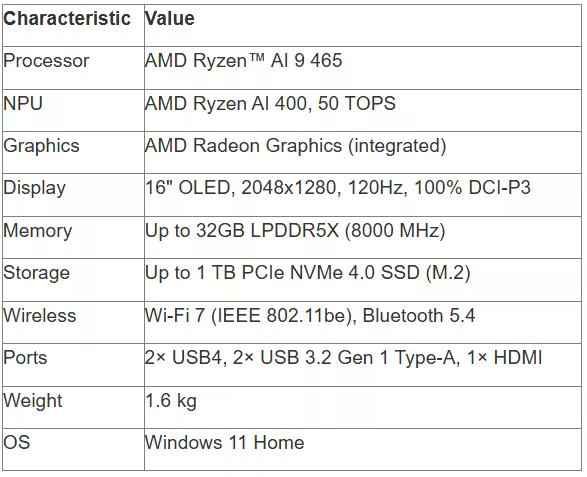
Please note: this model is available in various configurations. The higher-end version with the AMD Ryzen AI 9 465 offers slightly higher clock speeds and improved multithreading.

Acer Swift Go 16 AI AMD and laptops at JustBuy
JustBuy is a convenient place to quickly find a laptop without searching. Our catalog features current models, including the Acer Swift Go 16 AI AMD and other solutions for work, school, and everyday tasks.
Here you can compare specifications, check availability, and immediately select the right configuration.
Looking for where to buy a laptop?
At JustBuy, you can:
Select current models
Compare specifications
Check availability and price
Place an order or get a consultation
👉 Contact JustBuy to find the Acer Swift Go 16 AI AMD or a similar laptop.
Design and Build Quality
Acer has chosen the path of understated elegance. The aluminum body with a laser-etched lid gives the device a premium look. At 1.6 kg, the Swift Go 16 AI is one of the lightest 16-inch laptops in its class.
Its thickness is just 1.59 cm, making it easy to carry in a backpack or bag. The hinge opens 180°, providing comfortable working in a variety of positions—from classic desk mode to presentation mode, where the screen lies flat.
Cons: The case is easily soiled. Fingerprints show up on the lid and around the touchpad, especially noticeable on the black version. However, this is more a consequence of the premium finish.
OLED Display: Its Main Advantage
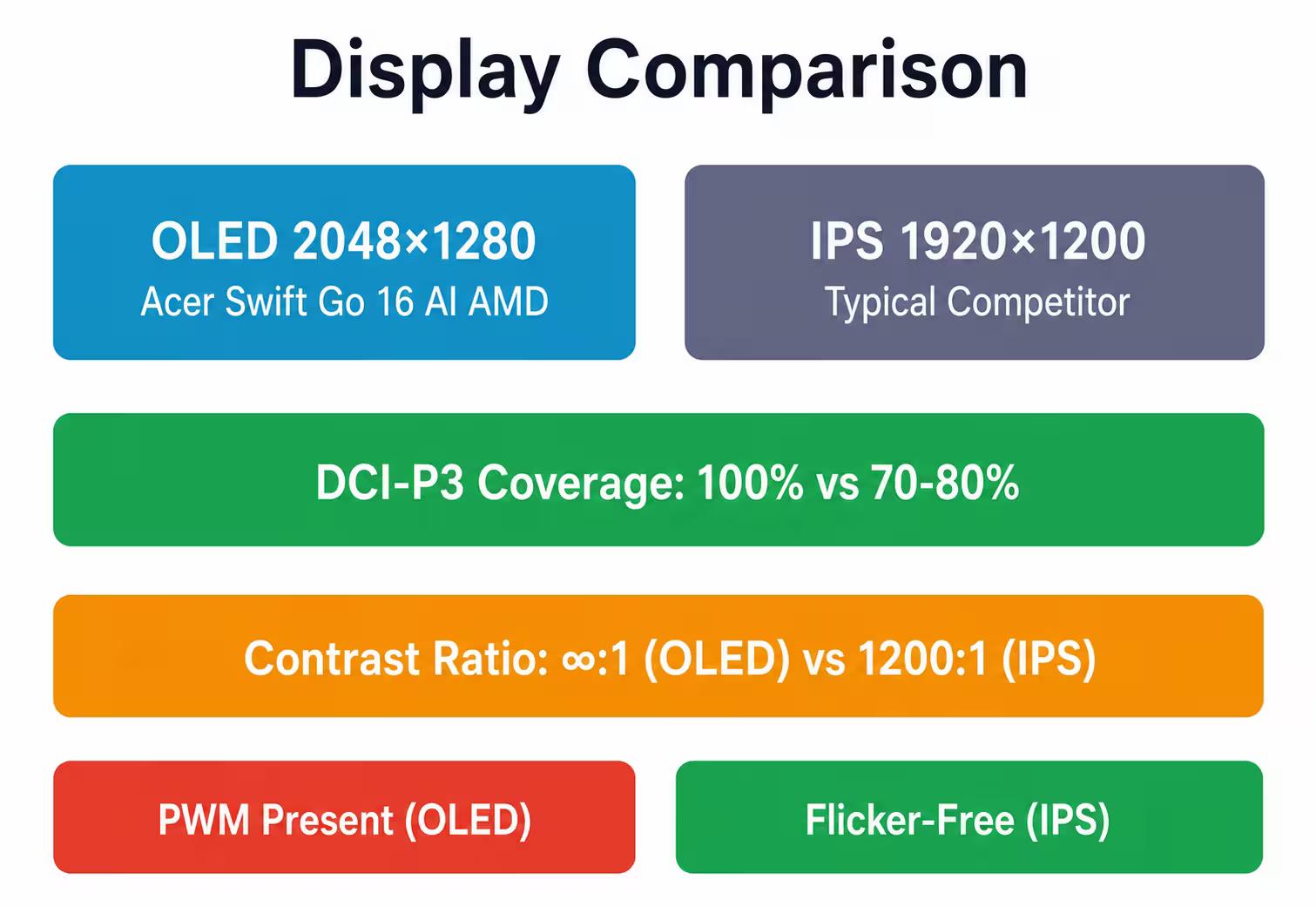
The 16-inch OLED display with a resolution of 2048 x 1280 pixels (16:10 aspect ratio) is the hallmark of this laptop. The 120 Hz refresh rate ensures smooth scrolling and animations, which is especially noticeable when working with documents and surfing the web. Acer's official specifications indicate 100% coverage of the DCI-P3 color gamut, which is confirmed by user reviews. OLED panels offer near-infinite contrast thanks to perfect black levels, and viewing angles reach 170°.
The display brightness reaches up to 400 nits in SDR mode and up to 500 nits in HDR. This is sufficient for comfortable indoor use, but the glossy finish can create glare in bright sunlight.
PWM Issue
OLED panels traditionally use pulse-width modulation (PWM) to regulate brightness. According to tests of similar Swift Go 16 models, the PWM frequency can vary depending on brightness level, which can cause eye fatigue in sensitive users during prolonged use.
If you are sensitive to flickering, we recommend working at maximum brightness or considering the Intel version with an IPS display.
Performance: AMD Ryzen AI in Action
AMD Ryzen AI 400 Series processors are built on a new architecture with a focus on artificial intelligence. The Ryzen 7 350 features 8 cores and 16 threads with a base frequency of 2 GHz, while the higher-end Ryzen AI 9 465 offers even higher performance.
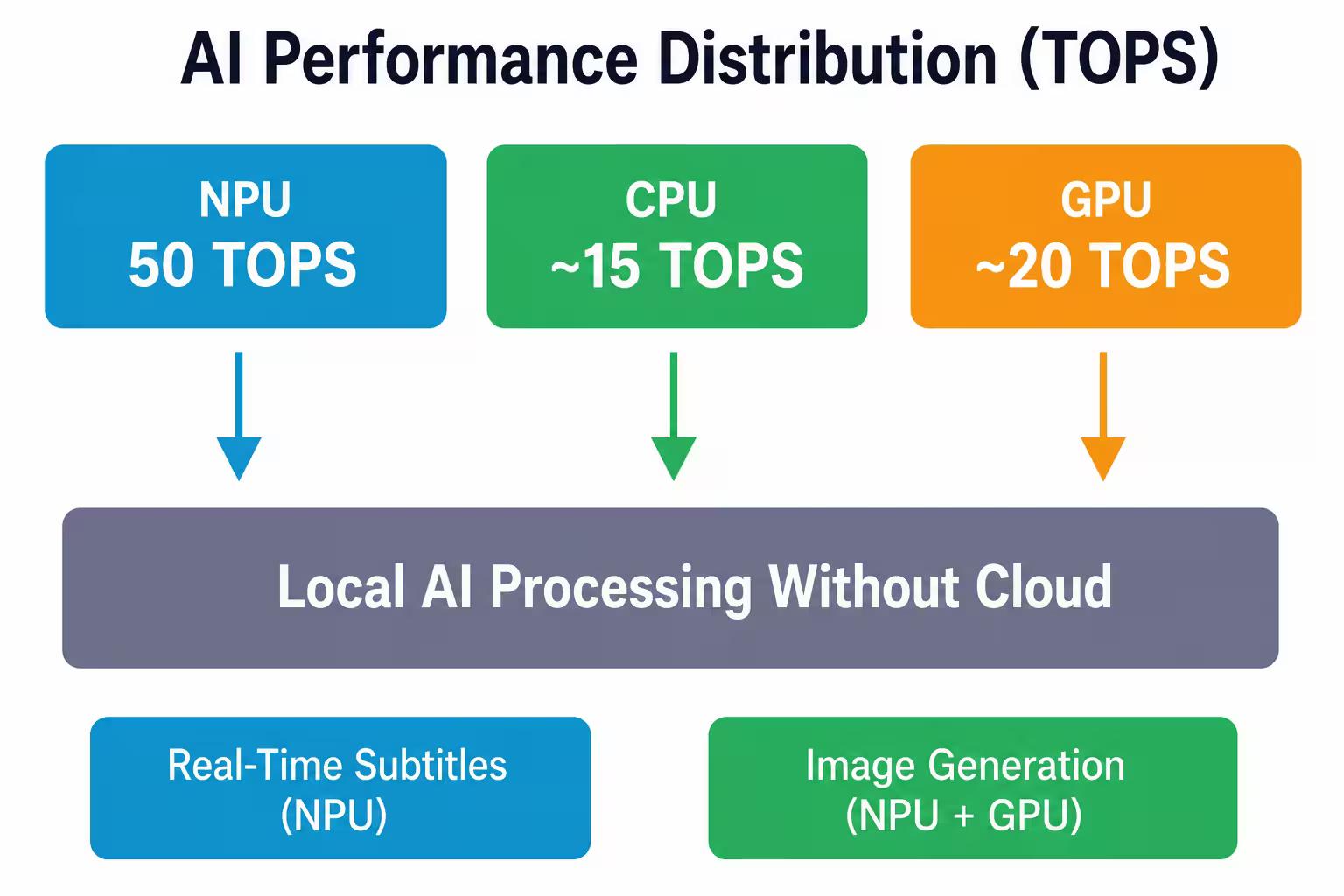
An NPU with 50 TOPS enables fast processing of AI tasks locally on the device—from real-time subtitling in Windows 11 to image generation and video enhancement. According to AMD, this delivers a significant improvement in AI performance compared to the previous generation.
Real-World Performance
For everyday tasks—browsing, working with Microsoft Office documents, and video conferencing—the Swift Go 16 AI AMD performs flawlessly. Multitasking with dozens of Chrome tabs and multiple applications simultaneously causes no slowdowns.
The device is also suitable for creative tasks. Adobe Photoshop and Lightroom run smoothly thanks to 16 GB or 32 GB of LPDDR5X memory. Video editing in DaVinci Resolve or Premiere Pro is possible, but for demanding 4K projects, a model with discrete graphics is better.
Light gaming on the integrated AMD Radeon 860M Graphics is acceptable for undemanding games at medium settings. AMD Radeon graphics on the integrated architecture delivers a significant improvement over the previous generation, resulting in noticeable performance gains in games and 3D applications.
Copilot+ PC: What It Offers
Copilot+ PC status means the laptop is certified by Microsoft to run advanced AI features in Windows 11. Available features include:
Real-time subtitles – automatic speech recognition for videos and calls in 40+ languages
Windows Studio Effects – background, lighting, and eye contact enhancement for webcams
AI-powered application acceleration – automatic use of the NPU for image, video, and text processing
Paint Cocreator and Photos Background Blur – local image generation and photo processing without the cloud
Important: According to AMD, users receive free updates to new Copilot+ features as they become available, extending the lifespan of the device.
Keyboard, Touchpad, and Input Devices
The keyboard features a full-size numeric keypad, a rarity for 16-inch ultraportables. Key travel is moderate and response is crisp. The backlighting is adjustable, although the light distribution could be more even.
The touchpad deserves special praise. Acer uses a larger multi-control touchpad with Windows Precision gesture support. The surface is smooth, the response is precise, and the physical buttons are integrated into the touchpad and operate silently.
The fingerprint reader is integrated into the power button, allowing for quick login via Windows Hello without entering a password.
Ports and Connections
The port selection is well-balanced for a modern laptop:
2× USB4 (up to 40 Gbps, supports DisplayPort and charging)
2× USB 3.2 Gen 1 Type-A (for peripherals)
1× HDMI (for connecting external monitors)
1× 3.5 mm audio jack (combo)
1× microSD card reader
Wi-Fi 7 (IEEE 802.11be) and Bluetooth 5.4 provide fast wireless connectivity. Wi-Fi 7 is especially useful in dense environments, offering lower latency and a more stable connection.
The lack of Thunderbolt 4 is the only drawback. USB4 is functionally close, but some docking stations and external GPUs may not operate at full capacity.
Battery Life
The battery provides enough battery life to last a full day with moderate use. User reviews indicate several hours of battery life with mixed usage. The OLED display consumes more power on light-colored interfaces, so using Dark Mode for Windows and apps can extend battery life by 10-15%.
Charging is via USB-C, which is convenient if you already have a compatible charger for your phone or tablet.
Webcam and Audio
A Full HD webcam with Windows Studio Effects support provides a clear picture for video calls. The NPU is used for background blur, autoframing, and real-time lighting correction without straining the CPU.
The two built-in speakers produce decent sound for a laptop of this class. The volume is sufficient for watching videos in a small room, but the bass is lacking. For music or movies, headphones or external speakers are better.
Comparison with competitors
How does the Swift Go 16 AI AMD compare to other alternatives? Here's a quick comparison:
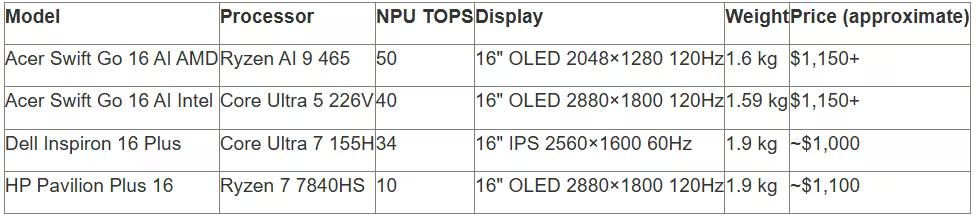
The Swift Go 16 AI AMD wins thanks to its high NPU performance, lightweight design, and Copilot+ PC certification. However, if AI features aren't critical, more affordable models without an NPU may be more reasonable.
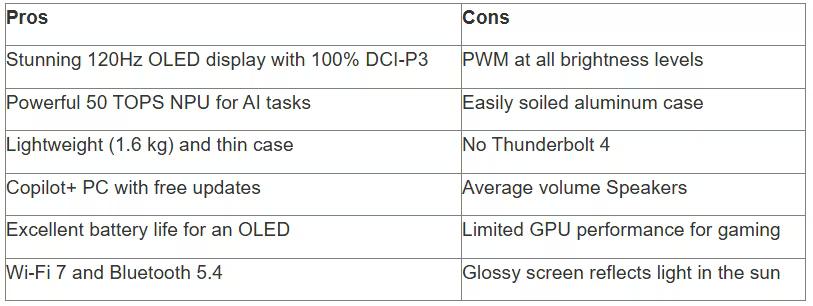
Pros and Cons
Let's summarize the strengths and weaknesses:
Who is this laptop for?
The Acer Swift Go 16 AI AMD is ideal for:
Professionals working with photo, video, and graphics—OLED with 100% DCI-P3 ensures accurate color reproduction
Developers and data scientists using AI tools—the 50-TOPS NPU accelerates machine learning models locally
Business users who need portability and a premium look
Students and teachers who value a high-quality display for reading and presentations
Not suitable for gamers or those working with heavy 3D rendering—this requires a discrete graphics card. It's also not the best choice for users sensitive to PWM.
Worth buying in 2026
According to a CNET review, the Acer Swift Go 16 (2025) is priced at approximately $1,150. For a laptop with an OLED display, a Copilot+ PC processor, and a weight of 1.6 kg, this is a competitive proposition.
Alternatives like the MacBook Air 15" are more expensive with comparable specifications (though they offer longer battery life). Windows competitors with OLED displays are often heavier or more expensive.
If you want a portable AI PC with a gorgeous display and don't mind a glossy finish, the Swift Go 16 AI AMD is worth serious consideration. Check current prices on the official Acer website, as the model lineup is frequently updated.
Where to buy and what to look for
The laptop is available at the official Acer store, as well as at major electronics retailers. When purchasing, inquire about the specific configuration:
Processor model (Ryzen 7 350 or Ryzen AI 9 465)
RAM capacity (16 GB or 32 GB)
SSD capacity (512 GB or 1 TB)
Preinstalled software (sometimes versions vary for different markets)
The warranty is typically 1 year, but can be extended to 3 years for an additional fee. Please note: OLED panels can burn out over time if static elements are displayed for long periods of time. Use screensavers and hide the taskbar.
Frequently Asked Questions
What is the NPU performance of the Acer Swift Go 16 AI AMD?
The AMD Ryzen AI NPU in the Swift Go 16 AI AMD delivers up to 50 TOPS of performance, according to Acer's official specifications. This allows for local AI tasks, including image generation, real-time captioning, and video enhancement, to be performed without cloud services.
Does the Swift Go 16 AI AMD support Copilot+ PC?
Yes, the laptop is Copilot+ PC certified. Windows 11 AI features are supported, including Windows Studio Effects, Paint Creator, and Photos Background Blur, as well as future Microsoft AI updates.
What is the weight and thickness of the laptop?
The Acer Swift Go 16 AI AMD weighs approximately 1.6 kg and is 1.59 cm thick. Despite its 16-inch OLED display, it remains one of the lightest in its class. The hinge opens 180° for comfortable viewing.
Is there a PWM issue with the OLED display?
Yes, the OLED panel uses pulse-width modulation (PWM) to regulate brightness. The PWM frequency ranges from approximately 28% to 43%, depending on the screen brightness. Sensitive users may experience eye strain, so we recommend using high brightness or choosing the IPS version.
What ports does the Swift Go 16 AI AMD have?
The laptop is equipped with 2× USB4 (up to 40 Gbps), 2× USB 3.2 Gen 1 Type-A, HDMI, a 3.5 mm audio jack, and a microSD card reader. Wi-Fi 7 and Bluetooth 5.4 are also available for modern wireless connectivity.
How long is the battery life?
In mixed usage (browsing, documents, video), the Swift Go 16 AI AMD lasts approximately 8-10 hours at 50% brightness. Using the dark theme can increase battery life by 10-15%, as the OLED display consumes less power on dark interfaces.
How does the AMD version of the Swift Go 16 AI differ from the Intel version?
The AMD version uses Ryzen AI 9 465 or Ryzen 7 350 processors with up to 50 TOPS NPUs and Radeon 860M graphics. The Intel version is equipped with a Core Ultra 5 226V with a 40 TOPS NPU and Intel Arc Graphics 130V. The screen resolution also differs: the AMD version has 2048×1280 pixels, while the Intel version has 2880×1800 pixels.
Conclusion
The Acer Swift Go 16 AI AMD offers a compelling combination of portability, performance, and visual quality. The OLED display with 100% DCI-P3 coverage and a 120Hz refresh rate takes content creation to a new level, while the 50-TOPS NPU makes the laptop a promising tool for AI tasks in the Copilot+ era.
Yes, there are tradeoffs: PWM on the OLED, a case prone to fingerprints, and the lack of Thunderbolt 4. But for business users, creatives, and anyone looking for a lightweight, premium laptop with modern features, the Swift Go 16 AI AMD deserves a place on the shortlist.
Before purchasing, check the current prices and configurations on the official Acer website—the model range is updated, and special offers may be available.