

ASUS ROG Ally vs Steam Deck: comparison of portable gaming consoles
February 28, 2026
Portable gaming has long ceased to be a compromise. It is no longer a "travel option," but a full-fledged alternative to a stationary console or even a gaming PC. The question now is not whether you can play seriously on a portable device, but which model to choose.
ASUS ROG Ally and Steam Deck look similar in format, but feel very different. They have different philosophies, different systems, different approaches to launching games. And it is precisely in these nuances that the real choice most often lies - not in dry numbers, but in how the device fits into your gaming rhythm.
Which format is closer to you: Steam or Windows
Externally, the devices are similar: screen, sticks, buttons, portable body. But inside - different operating logic. One option bets on a ready-made ecosystem and minimal settings. The other gives more freedom, but requires a bit more involvement. Here it is not about "which is more powerful," but which is more convenient in your specific scenario.
Steam: clear ecosystem without extra settings
Steam Deck was originally built around SteamOS. The interface is adapted for gamepad control, the library is right at your fingertips, most popular games are already optimized for the device. Turn it on - select - play.
This format feels cohesive. It resembles a mini-PC less and a dedicated gaming system more, where everything is gathered in one place.
Advantages of the Steam format:
Interface fully optimized for stick and button control
Quick access to the Steam library
Minimum manual setup to start playing
Out-of-the-box optimization for many games
This option is more often chosen by those who do not want to deal with launchers and system parameters, but simply launch a game and spend time playing it.
Windows: flexibility and maximum compatibility
ASUS ROG Ally runs on Windows. This means a familiar environment, access to all launchers and services - Steam, Xbox Game Pass, Epic Games, and others. Essentially, it is a compact gaming PC in a portable form factor.
Here you get more freedom. You can install additional programs, customize the system to your liking, connect accessories, and use the device not only for gaming.
Advantages of the Windows format:
Support for various gaming services and subscriptions
Ability to install third-party software
More universal usage
Flexible performance tuning
This approach suits those who want to control the process and not be limited to one platform. Yes, sometimes it takes a little more time to set up, but in return you get a wider choice of games and usage scenarios.
Overview of models worth considering
When comparing ASUS and Steam, it is more correct to look at specific versions rather than brand names. The difference is felt precisely in the details: screen type, system, focus on ecosystem or configuration flexibility.
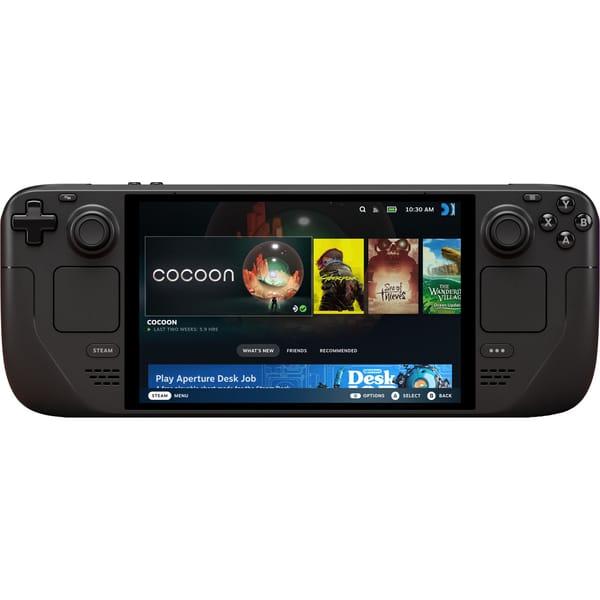
1. Portable gaming console Valve Steam Deck OLED 512 GB
Steam Deck OLED 512 GB is considered a compact system for running PC games in portable format. The model runs on SteamOS and is focused on the Steam library, which simplifies access to already purchased games. The 7.4-inch OLED display with 1280x800 resolution and 90 Hz refresh rate provides a stable picture, while the touchscreen complements classic stick and button controls.
Inside it uses an AMD APU 6nm on Zen 2 architecture with RDNA 2 graphics, combined with 16 GB of RAM and a 512 GB NVMe SSD. The device supports Wi-Fi 6E and Bluetooth 5.3, has built-in speakers and a 50 Whr battery. The format is designed for those who play mainly in the Steam ecosystem and prefer a cohesive system without switching to Windows.
Key features:
7.4" OLED display 1280x800, 90 Hz
SteamOS 3.0 based on Arch
NVMe SSD 512 GB
Wi-Fi 6E and Bluetooth 5.3 support
Built-in sticks, triggers and control buttons
Specifications:
Storage capacity: 512 GB
RAM: 16 GB
Processor: AMD APU 6nm
Controller: Built-in
USB: 1xUSB Type-C 3.2 Gen 2
Video output: USB-C with DisplayPort 1.4 Alt-mode support
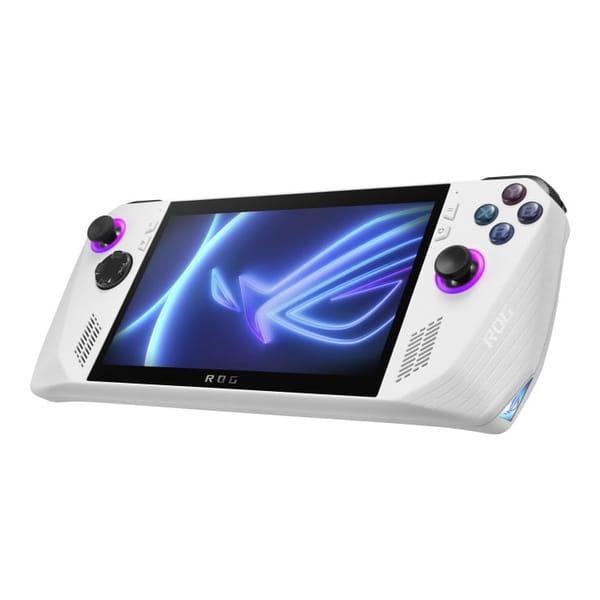
2. Portable gaming console ASUS ROG Ally 2023 RC71L 512 GB
ASUS ROG Ally 2023 runs on Windows 11 and is logically closer to a compact gaming PC. The console provides access to various launchers: Steam, Xbox, Epic Games and other services. The 7-inch IPS display with 1920x1080 resolution and 120 Hz refresh rate is designed for more detailed visuals in portable format.
At its core is the AMD Ryzen Z1 Extreme processor with RDNA 3 graphics, along with 16 GB of RAM and a 512 GB SSD. The device supports Wi-Fi 6 and Bluetooth 5.2, features built-in gamepad-style controls and a 40 Whr battery. This format suits those who want to keep the familiar Windows environment and configuration flexibility.
Key features:
7" IPS display 1920x1080, 120 Hz
Windows 11 Home
AMD Ryzen Z1 Extreme processor
Support for various gaming services
Built-in sticks, ABXY buttons and triggers
Specifications:
Storage capacity: 512 GB
RAM: 16 GB
Processor: AMD Ryzen Z1 Extreme Zen4
Controller: Built-in
USB: 1xUSB Type-C 3.2 Gen 2
Video output: 1xROG XG Mobile Interface and USB 3.2 Gen2 Type-C combo port (support DisplayPort 1.4)
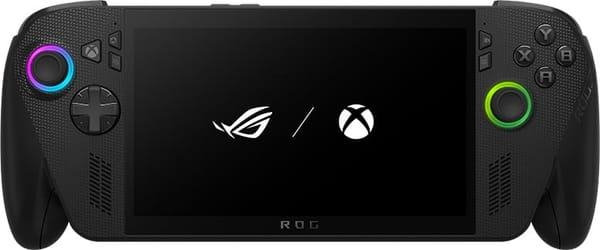
3. Portable gaming console ASUS ROG Xbox Ally X 1 TB
ASUS ROG Xbox Ally X is targeted at users who actively use the Xbox ecosystem and Game Pass subscription. The device runs on Windows 11 and combines access to PC games with an interface familiar to Xbox players. The 7-inch IPS screen with 1920x1080 resolution and 120 Hz refresh rate ensures smoothness in dynamic scenes.
The model is equipped with an AMD Ryzen Z-series processor and 24 GB of LPDDR5X RAM, as well as 1 TB storage. It supports Wi-Fi 6E and Bluetooth 5.2, features built-in Xbox-style gamepad controls. The 60 Whr battery is designed for long gaming sessions without being plugged in.
Key features:
7" IPS display 1920x1080, 120 Hz
Windows 11 with Xbox orientation
1 TB built-in storage
Game Pass and PC games support
Controls modeled after Xbox gamepad
Specifications:
Storage capacity: 1000 GB
RAM: 24 GB
Processor: AMD Ryzen Z2 A
Steam Deck OLED and ASUS ROG Ally - what is the practical difference
Comparison of these models usually comes down to numbers, but in reality everything feels simpler. They approach games, the system, and daily user interaction differently.
1. System approach
Steam Deck OLED revolves around its own Steam ecosystem. The interface is originally designed for button control, everything looks like a unified gaming environment. Turn on the device - select a game - start playing. The logic is clear and cohesive.
ASUS ROG Ally and ROG Xbox Ally use Windows. This is already a mini-PC format: more freedom, more options, but also more manual configuration. You can install different services and launchers, switch between them, and customize the system to your needs.
2. Screen experience
Steam Deck OLED focuses on rich visuals and comfortable perception. The screen feels softer, colors are deeper, especially in dark scenes.
ROG Ally and Xbox Ally offer more detailed images and high smoothness. In dynamic games this feels slightly different - movements look faster and sharper. The difference is not about better or worse, but about which type of image the user is accustomed to.
3. Performance and flexibility
Steam Deck is focused on stable operation within its own system. It is predictable: Steam games launch without complicated steps, everything works within one consistent logic.
ROG Ally and Xbox Ally are more like universal devices. They suit not only Steam but also other gaming services. However, you need to be prepared for some settings to be done manually.
4. Usage format
All three models remain portable. They are taken on trips, used at home on the couch, or connected to an external screen. The difference lies in how exactly the user wants to play: in a closed and understandable system or in a more flexible environment with the ability to choose platforms and services.
How to choose between Steam Deck and ROG Ally for your needs
When devices are similar in format, the decision usually comes down not to the brand, but to the usage scenario. Below are several typical situations that make the choice easier.
Games from your Steam library without extra configuration: Steam Deck OLED 512GB. Suitable for those who already use Steam and want to launch games in a familiar environment.
Universal access to different launchers: ASUS ROG Ally. Convenient if you use Steam, Game Pass, Epic Games and other services at the same time.
Game Pass subscription and Xbox ecosystem: ASUS ROG Xbox Ally. Logical choice for those who play on Xbox and want to keep the same logic in portable form.
Minimum system configuration and cohesive environment: Steam Deck OLED. The interface is originally adapted for button control.
Windows flexibility and extra capabilities: ROG Ally and ROG Xbox Ally. Suitable for those who do not limit themselves to gaming only and use the device more broadly.
Which format suits which player style
The choice between Steam Deck and ROG Ally often depends not on specs, but on habits. Some people launch one game and play it calmly until the end. Others constantly switch between services and try new releases. The device format should match this rhythm.
For those who play on Steam and do not want extra configuration
Steam Deck OLED suits players who have long used Steam and value a cohesive system. Everything is gathered in one environment, the interface is designed for button control, and launching games requires no extra steps.
Suitable if:
Your main library is on Steam
You do not want to configure Windows and third-party services
Clear and stable operation without extra actions is important
For those who use different services and subscriptions
ASUS ROG Ally is chosen by those who are not limited to one platform. Today it is Steam, tomorrow Game Pass or another service. Windows provides flexibility, but requires a bit more attention to settings.
Suitable if:
You use several launchers at the same time
You have a Game Pass subscription
Preserving mini-PC format in portable body is important
For those who play on Xbox and are used to its logic
ASUS ROG Xbox Ally is targeted at players already in the Xbox ecosystem. The interface and controls are closer to console style, while still retaining Windows flexibility.
Suitable if:
You actively use Game Pass
Familiar control layout is important
You need a portable device with access to PC games and Xbox services
In the end, the format is chosen not by model name, but by habits. For some, a cohesive system without extra steps is important. For others - freedom of choice and the ability to install any services.
Conclusion
Steam Deck OLED and ASUS ROG Ally solve the same task - to enable playing PC games in portable format. But they do it differently. One option is closer to a cohesive system with clear logic and minimal setup. The other - to a compact PC with Windows flexibility and access to various services.
If simplicity is important and your main library is on Steam, it makes sense to look toward Steam Deck OLED. If you want more freedom, subscriptions, and different launchers - ROG Ally or ROG Xbox Ally offer more options. There is no universal answer here. It all comes down to habits and exactly how you plan to play.
Frequently asked questions
1. Can Windows be installed on Steam Deck?
Yes, technically it is possible. But the device is originally designed for SteamOS, so some convenience and system logic may change.
2. Does ASUS ROG Ally support Steam games?
Yes. Since the device runs on Windows, you can install the Steam client and launch games just like on a regular PC.
3. What is better suited for Game Pass?
ASUS ROG Ally and especially ROG Xbox Ally. Windows simplifies access to the subscription and games from the Xbox ecosystem.
4. Can these devices be connected to a TV?
Yes. All models support connection via USB-C with video output. They can be used not only as portables, but also as a system for playing on a large screen.
5. Can a portable replace a full gaming PC?
For many scenarios - yes. But when it comes to maximum graphics settings and the most demanding projects, a stationary PC still remains more powerful.