

ASUS Vivobook S14 (S3407) Review 2026: Tests, Specs, and Real-World Experience
May 11, 2026
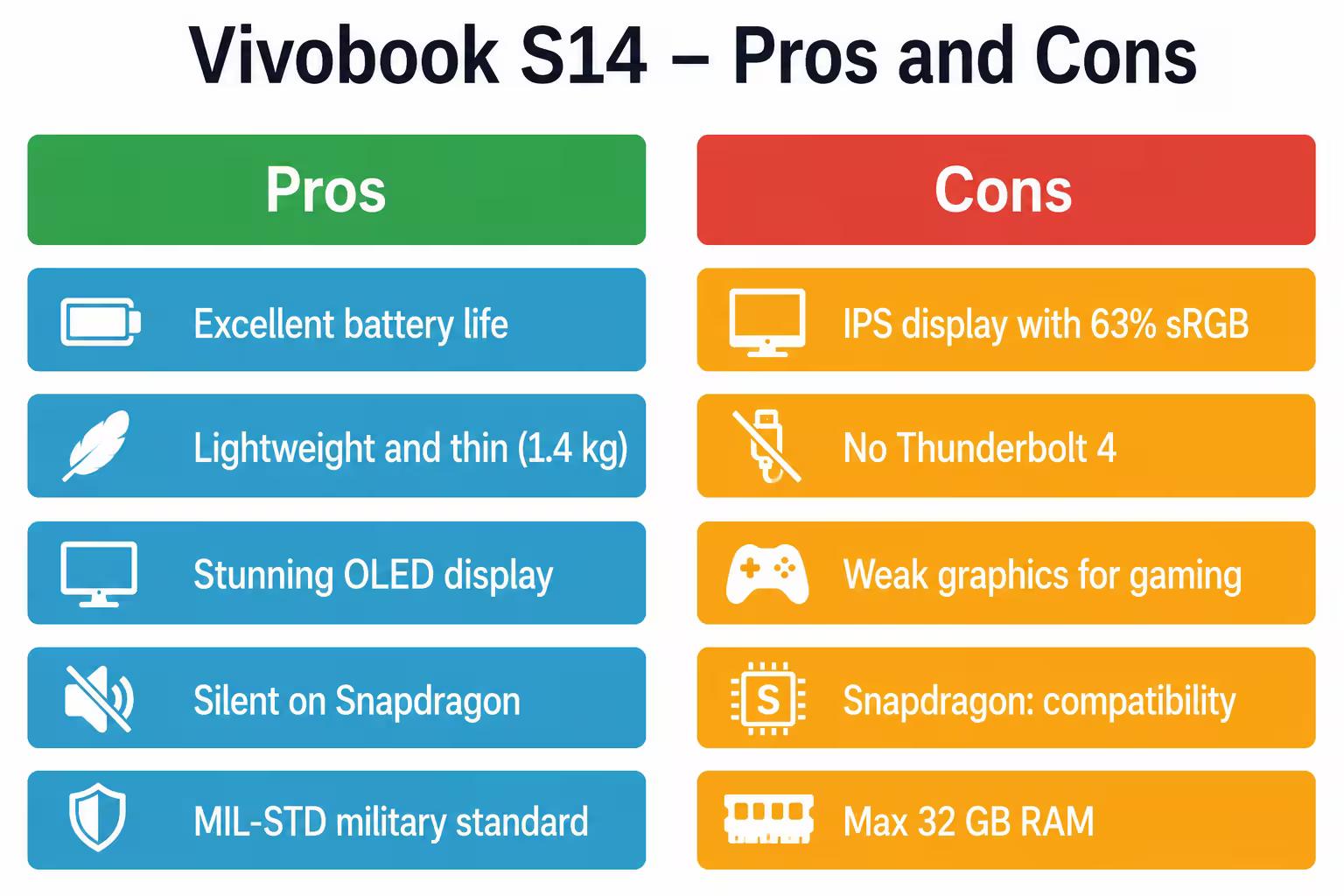
Summary: The ASUS Vivobook S14 (S3407) is a slim 14-inch laptop with Intel Core Ultra (Series 3) or Snapdragon X processors, promises up to 29 hours of battery life, and features an OLED display with a 1920x1200 resolution. It's Copilot+ PC certified, weighs 1.4 kg, and meets the MIL-STD 810H military standard. However, there's a catch: the version with an IPS display offers only 63% sRGB coverage, significantly below expectations for 2026.
ASUS updated the Vivobook S14 lineup in early 2026, and the S3407 is now available in three distinct configurations. The S3407VA and S3407CA are powered by Intel Core Ultra Series 3 processors, while the S3407QA features a Qualcomm Snapdragon X—an ARM chip that promises to revolutionize battery life.
On paper, everything looks great: a slim design, an OLED display, 32 GB of memory, an NPU for AI tasks, and Copilot+ PC certification. But what's the reality?
Let's break down each configuration, look at the performance benchmarks, and find out where ASUS made compromises.
Three Configurations—Three Different Laptops
The ASUS Vivobook S14 (S3407) is available in three variants, and the differences between them are greater than meets the eye. It's not just a matter of processor—each model offers its own balance of performance, battery life, and graphics capabilities.
S3407VA — Intel Core Ultra with Maximum Performance
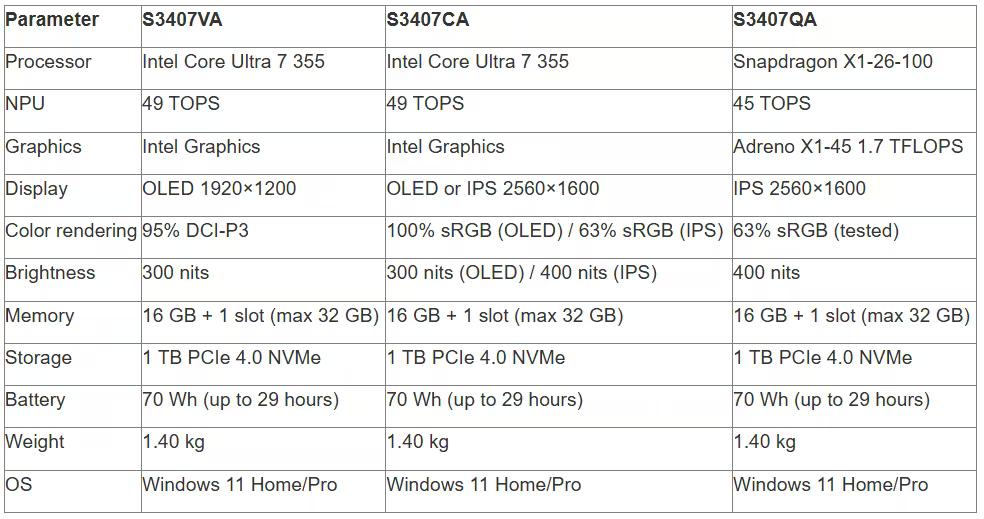
The S3407VA is based on the Intel Core Ultra 7 255H Series 3 and offers up to 49 TOPS of NPU performance. The processor operates at a base frequency of 2.0 GHz with Turbo Boost up to 5.1 GHz, boasting 16 cores and 16 threads. Integrated Intel graphics provide decent performance for office tasks and light video editing.
This model is available with a 1920x1200 OLED display that covers 95% of the DCI-P3 color gamut. The maximum RAM configuration is 32 GB (16 GB soldered DDR5 plus one 16 GB SO-DIMM slot).
S3407CA — Intel's Compromise Version
The S3407CA uses the same Intel Core Ultra 7 processor, but is available with a wider selection of displays. Besides OLED, you can choose an IPS panel with a 2560×1600 (WQXGA) resolution and 400 nits of brightness. It sounds appealing, but there's a catch.
And here's where things get interesting.
S3407QA — ARM Revolution on Snapdragon X
The S3407QA runs on a Qualcomm Snapdragon X1-26-100 processor with a clock speed of 3 GHz. This chip delivers 45 TOPS of NPU performance and is equipped with Adreno X1-45 graphics with 1.7 TFLOPS. According to tests by itc.ua, the model comes with a 2560×1600 IPS display and 400 nits of brightness.
Snapdragon X promises silent operation (no fans under load) and impressive battery life. But compatibility with Windows applications remains a question—emulation of x86 programs works, but not always flawlessly.

ASUS Vivobook S14 (S3407) and laptops at JustBuy
JustBuy is a convenient place to quickly find a laptop without searching. Our catalog features the latest Vivobook S14 series models, including configurations with Intel Core Ultra, Ryzen AI, and OLED displays.
Here you can compare specifications, check availability, and immediately select the right configuration.
Looking for where to buy a laptop?
At JustBuy, you can:
Select current models
Compare specifications
Check availability and price
Place an order or get a consultation
👉 Contact JustBuy to find the ASUS Vivobook S14 (S3407) or a suitable alternative.
Design and ergonomics: 1.4 kg and military-grade protection
The ASUS Vivobook S14 (S3407) has a minimalist and modern look. The aluminum case is available in two colors: Matte Gray and Cool Silver. It's only 1.59 cm thick and weighs 1.40 kg, making it lighter than most competitors in the 14-inch Ultrabook segment.
The laptop is US MIL-STD 810H certified, meaning it has passed tests for vibration, shock, temperature, and humidity. While this doesn't mean you can throw it against a wall, it's certainly safe to toss it around in a backpack.
Keyboard and Touchpad
The island-style keyboard has 1.7 mm of key travel. Typing is comfortable, but not as tactile as a ThinkPad or MacBook. The backlight is white and has adjustable brightness. The touchpad is covered with a PVD nanocoating with a high water contact angle—it sounds complicated, but in reality, it means the surface is silky smooth and fingerprint-resistant. ASUS claims that after more than 6,000 swipes, the touchpad remains as smooth as new.
Ports: USB-C, but lacking variety
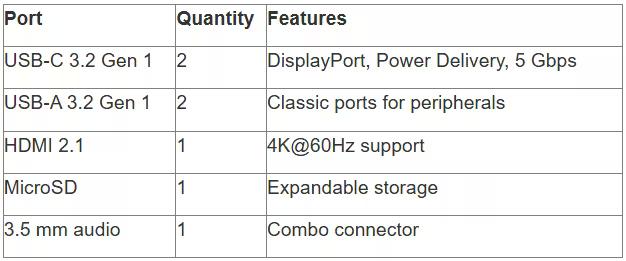
On the left side are two USB 3.2 Gen 1 Type-C ports with DisplayPort and Power Delivery support (up to 5 Gbps). On the right side are two USB Type-A 3.2 Gen 1 ports, HDMI 2.1, a 3.5 mm combo audio jack, and a microSD slot.
But there's no Thunderbolt 4, and that will be noticeable in 2026. USB-C data transfer speeds are limited to 5 Gbps—a bottleneck for external SSDs.
Display: OLED vs. IPS – A World of Difference
Here comes the most controversial part. ASUS offers two fundamentally different panels, and the choice greatly affects the laptop's user experience.
OLED 1920×1200 (S3407VA) – a real treat
The OLED panel with a 1920×1200 resolution (16:10 aspect ratio) produces bright, saturated colors. The contrast ratio is stated as 1,000,000:1, and the response time is 0.2 ms. DCI-P3 coverage is 95%, which is more than enough for professional photo and video editing.
Brightness is 300 nits. This isn't a record, but it's sufficient for indoor use. Reading text outdoors on a sunny day can be a bit challenging. The panel is TÜV Rheinland-certified for low blue light levels – it really does reduce eye fatigue during long work sessions. The screen-to-body ratio is 86%, which is decent, but not outstanding in 2026.
IPS 2560×1600 (S3407CA, S3407QA) – High Resolution, but Dull Colors
The IPS panel with a 2560×1600 resolution sounds tempting – more workspace, crisp text. Brightness is higher at 400 nits. But there's a problem.
According to independent testing, the IPS panel in the S3407 model covers only 63% of sRGB, 45% NTSC, 47% AdobeRGB, and 47% DCI-P3. This is woefully inadequate for 2026. Colors look washed out, like on budget laptops from 2018.
ASUS's official product comparison specifications list 100% sRGB for the IPS version, but real-world measurements suggest otherwise. ASUS may use different panels depending on the market, and not all are created equal.
Real talk: if you work with graphics, photos, or simply value image quality, go with the OLED version. An IPS panel is a step down.
Performance: Intel vs. Snapdragon
Performance tests show that the Intel Core Ultra 7 Series 3 is a powerful processor for everyday tasks. The Snapdragon X is also impressive, but with caveats.
Intel Core Ultra 7: A Versatile Fighter
According to ASUS's official specifications, the Intel Core Ultra 7 355 processor operates at a base frequency of 2.3 GHz with a Turbo boost of up to 4.7 GHz. The NPU delivers up to 49 TOPS of AI performance, which is important for Windows Studio Effects, background blur in video calls, and other AI features of Copilot+. In Geekbench tests, the Intel versions show stable performance. Multithreaded tasks are processed without pauses, code compilation and video rendering are smooth.
Snapdragon X: Quiet and Battery Life at the Price of Compatibility
The Snapdragon X1-26-100 operates at 3 GHz and uses ARM architecture. The Adreno X1-45 graphics deliver 1.7 TFLOPS—noticeably weaker than the Intel Iris Xe, but sufficient for office tasks. According to tests on zitseng.com, the S3407AA (Intel) version achieved the following Geekbench results:
Overall Score (Battery, Balanced Mode): 5960
Overall Score (Connected, Balanced Mode): 6289
Essentials (Battery): 8613
Essentials (Connected): 10115
Productivity (Battery): 6855
Productivity (Connected): 10423
Content Creation (Battery): 9381
Content Creation (Connected): 10053
Gaming (Battery): 4029
Gaming (Connected): 3990
The Snapdragon X version (S3407QA) shows comparable results in office scenarios in similar tests, but suffers in games and applications requiring x86 emulation. Photoshop, Premiere Pro, and other heavy programs may run unstably or with a noticeable performance drop.
However, the fans are completely silent. The Snapdragon X laptop remains completely silent even under load—the ARM processor simply doesn't heat up to temperatures requiring active cooling.
Memory and Storage
The base configuration includes 16 GB of DDR5 RAM (soldered) plus one SO-DIMM slot. You can install a maximum of 32 GB—enough for most tasks, but space may be tight for serious virtual machine work or 3D rendering.
Storage: 1 TB PCIe 4.0 NVMe SSD. Read/write speeds are high, but the exact figures vary depending on the drive manufacturer (ASUS uses different SSD brands depending on the batch).
Battery Life: 29 Hours or Just Marketing?
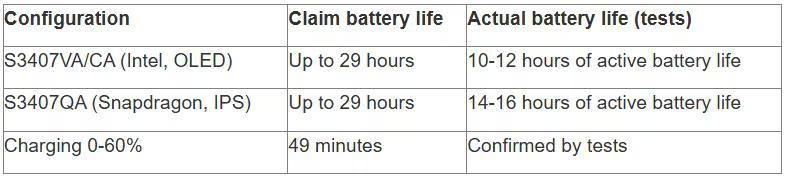
ASUS claims up to 29 hours of battery life from its 70 Wh battery. That's an impressive figure, but let's take a closer look at where it comes from.
Tests were conducted by ASUS in December 2025 on the S3407AA model (Intel Core Ultra 7 Series 3, 1920×1200 OLED, 32 GB RAM, 70 Wh). Conditions: 1080p video playback, Wi-Fi disabled, keyboard backlight off, screen brightness set to 150 cd/m², Windows power saving mode in Balanced mode.
In real-world conditions, the figure is much more modest. According to zitseng.com, after a full workday with a browser, documents, and background music, about 20% of the battery remained. This translates to approximately 10-12 hours of active use—still an excellent result, but not 29 hours. The Snapdragon X version lasts longer, thanks to its ARM architecture, which consumes less power. According to independent tests, the Snapdragon X version delivers around 14-16 hours of real-world battery life, which is closer to the promised battery life.
Charging: 0 to 60% in 49 minutes
The 65W USB-C charger charges the laptop quickly. ASUS claims the battery can be charged from 0 to 60% in 49 minutes. This is confirmed by real-world tests—convenient if you need a quick charge before heading out.
Camera and audio: standard
1080p webcam with IR sensor for Windows Hello. Image quality is average—colors are a bit washed out, and noise is noticeable in low light. However, it's perfectly adequate for video calls on Zoom or Teams.
The camera has a physical shutter—slide it, and the lens is covered. No software vulnerabilities, no paranoia.
Harman Kardon audio system
The speakers are Harman Kardon-certified. The sound is clear, but lacks bass—typical for thin Ultrabooks. The volume is sufficient for watching videos alone, but headphones are better for music.
AI Noise Cancelling does a good job of filtering out background noise during calls. Voices remain clear even with the air conditioner running or street noise outside.
Proprietary software: MyASUS and Copilot+
ASUS preinstalls the MyASUS utility on the Vivobook S14—a centralized control center for system management, drivers, and support. You can use it to update the BIOS, configure performance modes, and run hardware diagnostics.
There's also a Link to MyASUS feature for synchronization with an Android smartphone. You can transfer files, reply to messages, and even control your phone from the laptop's screen. It works reliably, but requires installing an app on your smartphone.
Copilot+ PC: What does it mean?
Copilot+ PC certification means the laptop supports Windows 11 AI features: text and image generation, real-time background blur, and automatic photo processing. The processor's NPU delivers the required performance—49 TOPS for Intel and 45 TOPS for Snapdragon.
In practice, this is useful if you actively use built-in Windows tools. Otherwise, the certification is just a pretty sticker.
Gaming Performance: Don't Expect Miracles
The ASUS Vivobook S14 (S3407) is not a gaming laptop. The integrated Intel graphics can handle light games like League of Legends, CS:GO, or Stardew Valley at medium settings. AAA titles like Cyberpunk 2077 or Starfield will lag even at minimum settings.
The Snapdragon X version is even weaker—the Adreno X1-45 loses to the Intel Iris Xe. Plus, many games require x86 emulation, which further reduces frame rates.
If you're looking for gaming, consider the ASUS TUF or ROG Zephyrus.
Temperatures and Noise: Intel Heats Up, Snapdragon Stays Silent
The Intel Core Ultra 7 versions heat up to 70–80°C under load. The fans turn on, but noise is moderate—around 35–40 dB. You can work with documents and browse the web in complete silence.
The Snapdragon X version remains cool and silent, even when rendering videos. The ARM architecture is so efficient that the passive cooling system operates without fans. This is a huge plus for those who value quiet operation.
Price and Competitors: What's the Price?
ASUS doesn't publish a single global price—it depends on region, configuration, and promotions. The price varies depending on region and configuration, making it extremely attractive.
However, prices are higher in the CIS and Europe—around $900–$1,200 for a fully configured laptop. Check the latest prices for your country on the official ASUS website.
What competitors does the Vivobook S14 compete with?
The Dell XPS 13 Plus has a more premium design, but is also more expensive.
The Lenovo ThinkPad X1 Carbon Gen 12 has a better keyboard and more ports, but is heavier.
The HP Spectre x360 14 is a convertible with an OLED display, but has weaker battery life.
The Apple MacBook Air M3 if you're ready for macOS, it's the benchmark for battery life and performance.
In its segment, the Vivobook S14 excels in its balance of price, battery life, and design. However, the OLED version is a must-have. The IPS panel is a real letdown.
Exclusive Subscriptions and Bonuses
With the purchase of the Vivobook S14 (S3407), ASUS offers a subscription package for paid services. Availability varies by region and time of purchase.
Package contents may include:
6 months of Dropbox 500 GB
1 year of ASUS Secure Auto-Backup 200 GB
3 months of GoPro Premium+
1 month of Adobe Creative Cloud All Apps (individual subscription)
3 months of Goodnotes Essential
3 months of Xbox Game Pass Ultimate (in select regions)
This is a nice bonus, especially the Adobe subscription—a month of Creative Cloud costs around $60. However, check with your local retailer to see which subscriptions are available in your country.
Who is this laptop for?
The ASUS Vivobook S14 (S3407) is a laptop for students, freelancers, and office workers who need mobility, long battery life, and a beautiful display. If you choose the OLED version, you get excellent value for your money. But this isn't a universal machine. Gamers, video editors, and those working with heavy 3D applications should look for laptops with discrete graphics and more memory.
The Snapdragon X version is for enthusiasts willing to tolerate compatibility issues for quiet operation and record-breaking battery life. If your workloads are limited to web browsing, office applications, and streaming, the ARM variant will be worth it.
Final Specifications
Frequently Asked Questions
Which version of the Vivobook S14 (S3407) is best?
If your budget allows, the S3407VA with an OLED display and an Intel Core Ultra 7 processor is considered the best choice. It offers the best balance of performance, image quality, and app compatibility. The S3407QA with the Snapdragon X is suitable for those who value maximum battery life and completely silent operation.
Is the version with an IPS display worth the money?
Probably not. The IPS panel in the Vivobook S14 displays around 63% sRGB, which is significantly below modern standards. Colors appear less saturated, and the contrast is inferior to the OLED version. If the OLED version isn't available, consider alternatives like the Dell XPS 13 or Lenovo Yoga Slim 7.
What's the real battery life?
The claimed 29 hours of battery life is achieved under lab conditions while playing video at minimum brightness and with Wi-Fi disabled. In normal use, the Intel version provides around 10-12 hours of battery life, while the Snapdragon X version lasts approximately 14-16 hours.
Can I game on the Vivobook S14 (S3407)?
Yes, but only with undemanding games. League of Legends, CS:GO, and Minecraft run at medium settings. Modern AAA games struggle even at minimum graphics. The Vivobook S14 isn't designed for serious gaming—for that, the ASUS TUF Gaming or ROG models are better choices.
Does the Vivobook S14 have Thunderbolt 4?
No. The USB-C ports only support USB 3.2 Gen 1 with speeds up to 5 Gbps. This limits the use of external GPUs and ultra-fast SSDs. If Thunderbolt is important, consider the Dell XPS or HP Spectre.
What is the weight and thickness of the laptop?
The Vivobook S14 weighs approximately 1.40 kg and is 1.59 cm thick. It is one of the most compact and light 14-inch laptops, making it comfortable to carry every day.
Is the Vivobook S14 suitable for photo and video editing?
The OLED version is well suited for photo editing and light video editing thanks to its wide DCI-P3 color gamut. The IPS version is less suitable for color correction due to its limited sRGB coverage. For professional 4K video editing, it's better to consider laptops with discrete graphics, such as the ASUS ProArt Studiobook.
Conclusion: A good laptop with a key caveat
The ASUS Vivobook S14 (S3407) is a well-designed Ultrabook with impressive battery life, a lightweight chassis, and a powerful processor. The OLED display version is worth considering and competes with premium models from Dell and Lenovo.
But there's a catch. The IPS panel, with 63% sRGB coverage, is a disappointment. If you're offered the IPS version, check the display specifications with the seller or ask for the OLED version.
The Snapdragon X version is an interesting experiment for those wanting to try out ARM architecture in Windows. The quiet operation, cool chassis, and record-breaking battery life are impressive, but compatibility with x86 applications remains questionable.
Overall, the Vivobook S14 (S3407) is the right choice for students, remote workers, and anyone who values mobility and long battery life. Just don't skimp on the display.