

DualSense vs Xbox Controllers - Feel and Comfort Comparison
February 27, 2026
Choosing a gamepad often seems like a minor detail - until you start playing every day. After a couple of hours it becomes clear: the shape, weight, button response and even trigger resistance are felt much more strongly than the difference in specifications on paper. That's why comparing DualSense and Xbox Controller is not about numbers, but about the feel in your hands.
Both controllers have long outgrown being "just an accessory". DualSense focuses on haptic feedback and immersion. Xbox Controller focuses on versatility and familiar ergonomics that require no adjustment. Different approaches, different gaming experiences - and the choice here is more about style than formal advantages.
What to look for when choosing a gamepad
A controller is not just a way to press buttons. It is constantly in your hands, and how comfortable the game will be depends directly on it. The difference between models becomes noticeable faster than you might think. So before buying, it's worth calmly evaluating several basic points.
Platform: The very first question - for which system the gamepad is being purchased. DualSense fully shines on PlayStation 5, while Xbox Controller works equally reliably with Xbox and PC.
Ergonomics and stick placement: Sony has symmetrical sticks, Xbox has offset ones. For some people this is a dealbreaker. It's better to choose the layout your hand adapts to faster.
Haptic feedback and triggers: If in-game feel matters - resistance, vibration, different response levels - pay attention to whether these features are supported in the games themselves and on the chosen platform.
Battery life and power: Built-in battery or replaceable batteries - a matter of convenience. Some find it easier to pop in new batteries, others prefer charging the controller via cable.
Compatibility with PC and other devices: If you plan to play not only on console, check Bluetooth support and correct operation with Windows or other systems in advance.
Additional features: Built-in microphone, speaker, headset jacks, button remapping - not always critical, but sometimes these details make usage noticeably more convenient.
In the end, the choice more often depends not on loud specifications, but on exactly how and where you plan to play. A controller is a tactile object, and that's its main feature.
Sony DualSense - more attention to detail
DualSense puts emphasis on sensations during gameplay. Adaptive triggers change resistance depending on the action, and haptic feedback delivers different types of response - from light pulses to more pronounced effects. In supported projects this adds depth to controls and makes the experience more tactile.
The body feels slightly denser and more solid in the hands, while the symmetrical stick placement remains familiar to PlayStation users. Full functionality is unlocked when used with a PS5 console, whereas connecting to other devices may limit some features.
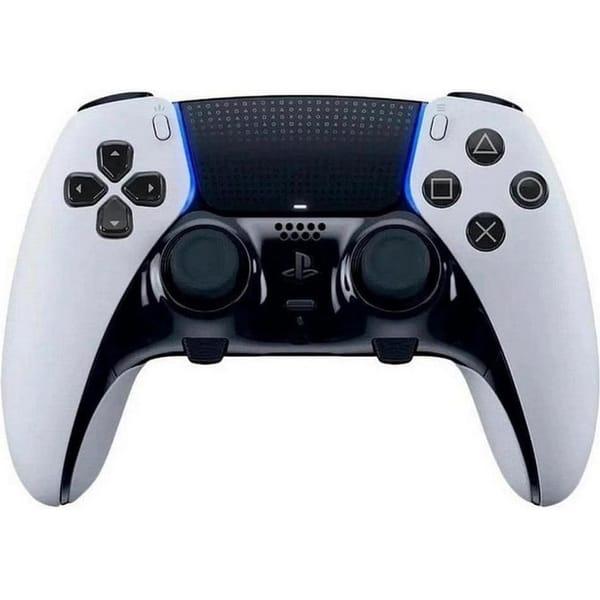
Sony DualSense Edge
Sony DualSense Edge is considered an enhanced version of the standard controller for PlayStation 5. The model retains the familiar shape and basic control logic but adds more customization options and elements. Adaptive triggers and haptic feedback remain at the core, conveying differences in in-game actions. It also includes a built-in microphone and 3.5 mm headset jack.
What sets it apart from the standard version is the increased number of buttons and more flexible customization for a specific playstyle. These controllers are aimed at players who want to adjust sensitivity, remap controls and tailor the gamepad to themselves rather than using it only in its base form.
Key features:
Adaptive triggers with variable press force
Haptic feedback
Advanced control customization options
Built-in microphone
3.5 mm headset jack
Increased number of buttons
Specifications:
Compatible platforms: PlayStation 5, PC
Connection type: Wireless
Number of buttons: 19
Gyroscope: Yes
3.5 mm jack: Yes
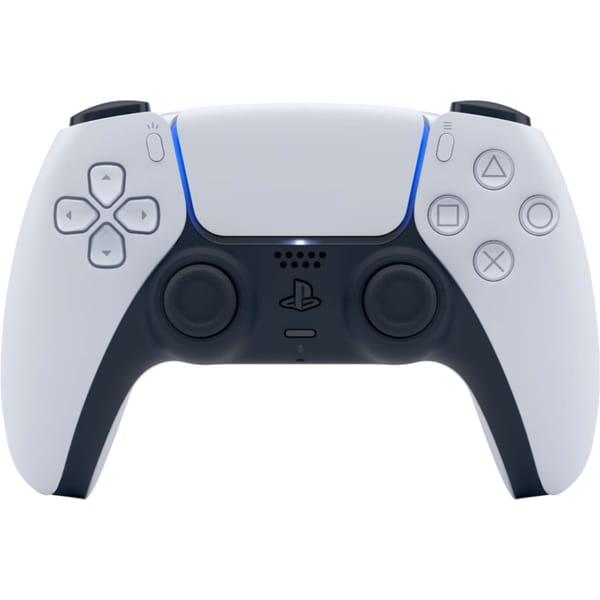
Sony DualSense White
Sony DualSense White is the base version of the controller for PlayStation 5, made in classic white color. It keeps the familiar shape with symmetrical stick placement and is designed for long gaming sessions. Haptic feedback and adaptive triggers remain the key features that make controls feel more varied.
The controllers support wireless connection and are compatible not only with PS5 but also with PC. The built-in microphone allows communication without extra equipment, and a headset can be connected via the 3.5 mm jack if needed. Overall, this is a standard solution for those who use PlayStation 5 without needing extra customization.
Key features:
Adaptive triggers
Haptic feedback
Built-in microphone
Headset connection via 3.5 mm
Wireless connection
Specifications:
Compatible platforms: PlayStation 5, PC
Connection type: Wireless
Number of buttons: 18
Gyroscope: Yes
3.5 mm jack: Yes
Strengths of DualSense that remain relevant
DualSense was created not just as an update, but as a step toward more "sensitive" control. Its key features are not about button count, but about how precisely it conveys what's happening in the game.
Adaptive triggers: Resistance changes depending on in-game actions - presses can feel soft or more springy.
Next-level haptic feedback: Vibration became more detailed and varied, especially in fully supported titles.
Deep integration with PlayStation 5: System features and PS5 exclusives actively use the controller's capabilities.
Built-in battery and USB-C charging: No need to buy batteries - just plug in the cable.
Well-thought-out body shape: The controller feels solid and balanced, which matters during long sessions.
Limitations of DualSense you should know in advance
DualSense offers advanced features, but along with them come certain nuances. They are not critical, yet they can affect comfort depending on how you play.
Full functionality only available on PS5: On PC and other devices adaptive triggers and advanced haptics work in a limited way or not at all.
Lower battery life than some competitors: Active features drain the battery faster, so the controller needs more frequent charging.
Bulkier body: For users with smaller hands the shape may feel large during extended use.
Not all games utilize the controller's features: In titles without full support the difference in feel becomes minimal.
Built-in battery with no quick swap: When it dies you must connect a cable - instant power source replacement is impossible.
Xbox Wireless Controller - universal approach to control
Xbox Wireless Controller emphasizes familiar ergonomics and stable performance across devices. The offset stick placement feels comfortable for many during long sessions, and the body shape remains recognizable with virtually no learning curve. Controls feel predictable and clear from the first moments.
The controllers support wireless connection and work correctly not only with Xbox consoles but also with PC. Haptic feedback here is classic, without complex scenarios, but reliable in most games. This format is often chosen for its versatility and compatibility, especially when playing across multiple platforms.
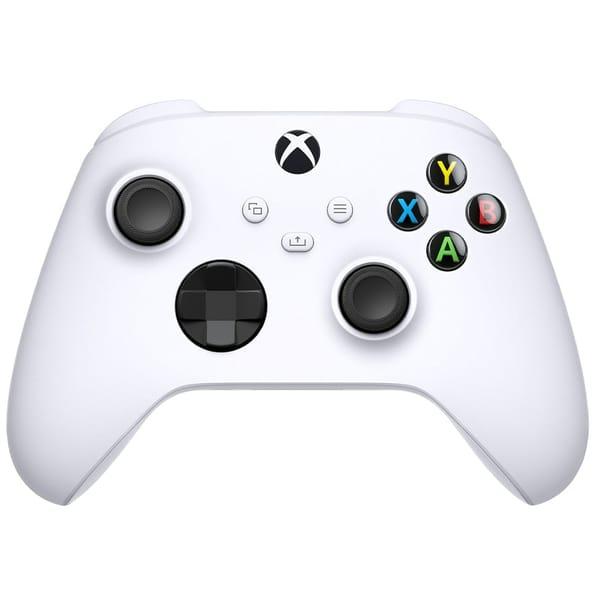
Microsoft Xbox Series X|S Wireless Controller Robot White
Microsoft Xbox Series X|S Wireless Controller Robot White serves as the standard gamepad for next-generation consoles. It retains the familiar shape with asymmetrical stick placement and a redesigned D-pad. The body features a textured surface, so the device sits more confidently in the hands during long play. The Share button allows quick capture of gameplay moments without extra setup.
The controllers connect via Bluetooth and are compatible not only with Xbox Series X and S but also with Xbox One and PC. A 3.5 mm jack is provided for headsets, and power comes from AA batteries. This format suits those who use the gamepad across multiple devices and prefer not to rely on a built-in battery.
Key features:
Wireless Bluetooth connection
Compatibility with Xbox Series X|S, Xbox One and PC
Redesigned D-pad
Share button for content capture
3.5 mm headset jack
AA battery power
Specifications:
Compatible platforms: PC, Xbox One, Xbox Series X|S
Connection type: Wireless
Number of buttons: 11
Gyroscope: Yes
3.5 mm jack: Yes
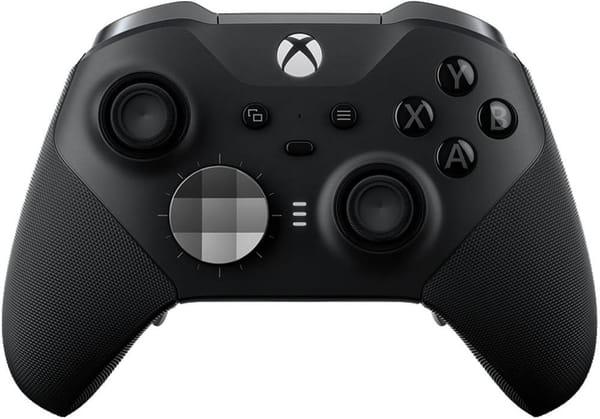
Microsoft Xbox Elite Wireless Controller Series 2 Black
Microsoft Xbox Elite Wireless Controller Series 2 Black is designed for more flexible control customization. It supports both wireless and wired connections, which is convenient across platforms. The model features remappable buttons and shorter trigger travel, allowing response tuning for specific genres or playstyles.
The built-in battery is designed for long use without frequent recharging. Gyroscope and haptic feedback provide standard response in supported games, and the 3.5 mm jack allows direct headset connection. This model is often chosen by those who prefer to customize control elements to match their habits.
Key features:
Wired and wireless connection support
Remappable buttons
Shorter trigger travel
Built-in battery
3.5 mm headset jack
Compatibility with Xbox One and PC
Specifications:
Compatible platforms: PC, Xbox One
Connection type: Wired, wireless
Number of buttons: 15
Gyroscope: Yes
3.5 mm jack: Yes
Strengths of Xbox Controller that remain relevant
Xbox Controller is valued for its consistency and clear control logic. The layout barely changes between generations, so adaptation takes minimal time. It's a controller that performs confidently on both console and PC.
Ergonomics with asymmetrical stick placement: Comfortable grip for long sessions and familiar control layout.
Wide compatibility: Works with Xbox and PC without complicated setup or extra software.
Wireless Bluetooth connection: Connects to various devices without cables.
Classic haptic feedback: Reliable response in most games without depending on special modes.
Flexible power options: Use AA batteries or a rechargeable pack.
3.5 mm headset jack: Direct headphone connection to the controller without adapters.
Limitations of Xbox Controller worth considering
Despite its versatility and familiar shape, Xbox Controller has features that may matter when choosing. They don't make it worse, but they do affect the experience compared to alternatives.
No adaptive triggers: Triggers operate in standard mode without resistance changes based on in-game events.
Simpler haptic feedback: Response is consistent but lacks advanced scenarios and extra effects.
Battery-powered in base version: Requires AA batteries or a separate rechargeable pack.
Fewer customization options in standard model: Button remapping and advanced settings are not available in all versions.
Minimal changes between generations: Control format stays nearly identical, which is a plus for some and a lack of progress for others.
DualSense or Xbox Controller - which one to choose for you
The choice between these controllers often depends not on specs, but on what platform and how you plan to play. They take different approaches to control, and you feel it within the first minutes.
If you're using PlayStation 5
DualSense truly shines when paired with PS5. Adaptive triggers and haptic feedback are supported in system features and games, so the controller works as originally intended.
If you plan to play on multiple devices
Xbox Controller is convenient because it connects to Xbox and PC without complicated setup. For those who switch between console and computer, it's the more universal option.
If in-game feel is important
DualSense emphasizes tactile effects and variable trigger resistance. In supported games it adds variety to controls.
If you want a clear and stable format
Xbox Controller is chosen for its familiar ergonomics and predictability. It requires no long adjustment period and works consistently in most games without extra modes.
Conclusion
Comparing DualSense and Xbox Controller by "better or worse" is difficult. They solve the same task but do it differently. One focuses on sensations and extra haptic feedback, the other on versatility and familiar ergonomics. The difference becomes noticeable not in spec sheets, but during actual play.
If you're using PlayStation 5, it makes sense to look at DualSense - it fully unlocks with that console. If PC compatibility and various Xbox generations matter, Xbox Controller is more convenient. Ultimately the choice depends more on the platform and personal feel in the hands than on the feature list.
Frequently Asked Questions
1. Does DualSense work on PC?
Yes, the controller connects to PC via Bluetooth or cable. However, some features like adaptive triggers may not be supported in all games.
2. Can you use Xbox Controller on PlayStation?
No, there is no standard compatibility with PlayStation consoles. The controller is designed for Xbox and PC.
3. Which controller holds charge longer?
In its base version Xbox Controller runs on AA batteries, allowing quick power source replacement. DualSense has a built-in battery and requires cable charging.
4. Is there a difference in comfort?
DualSense has symmetrical stick placement, Xbox has offset. It's a matter of habit. People who previously played on one