

Review of the new 14- and 16-inch MacBook Pro models with M5 Pro and M5 Max
May 6, 2026
Short Summary: MacBook Pro 14 and 16 inches with M5 Pro and M5 Max (announced March 3, 2026, available March 11, 2026) offer breakthrough performance: 18-core CPU (in M5 Pro/Max), GPU from 16 to 40 cores depending on configuration, up to 3.5 times faster AI video processing (according to Topaz Video tests on M5 Max vs M4 Max), up to 24 hours of battery life. Ukrainian stores offer base MacBook Pro 14 M5 models starting from 88,999 UAH; M5 Pro/Max model prices require checking with local retailers, installment plans, Trade-In, and delivery are available.
On March 3, 2026, Apple introduced the updated MacBook Pro lineup with M5 Pro and M5 Max processors, setting a new performance standard for professional laptops. These models became the culmination of the M5 series development, which started with the base M5 chip in the iPad Pro and entry-level MacBook Pro at the end of 2025.
The new MacBook Pro models are not just faster than their predecessors - they rethink the very concept of a professional portable workstation. For the Ukrainian market, this is especially relevant: designers, developers, video editors, and content creators have received a tool capable of handling any tasks without compromise.
Let's break down exactly what the new models offer, whether they are worth their price, and where it is more profitable to buy a MacBook Pro in Ukraine.
What has changed: key improvements of the M5 Pro and M5 Max generation
According to Apple's official press release dated March 3, 2026, the M5 Pro and M5 Max represent a significant step forward compared to the previous M4 generation. But let's look specifically at what this means in practice.
Processor architecture: the fastest core in the world
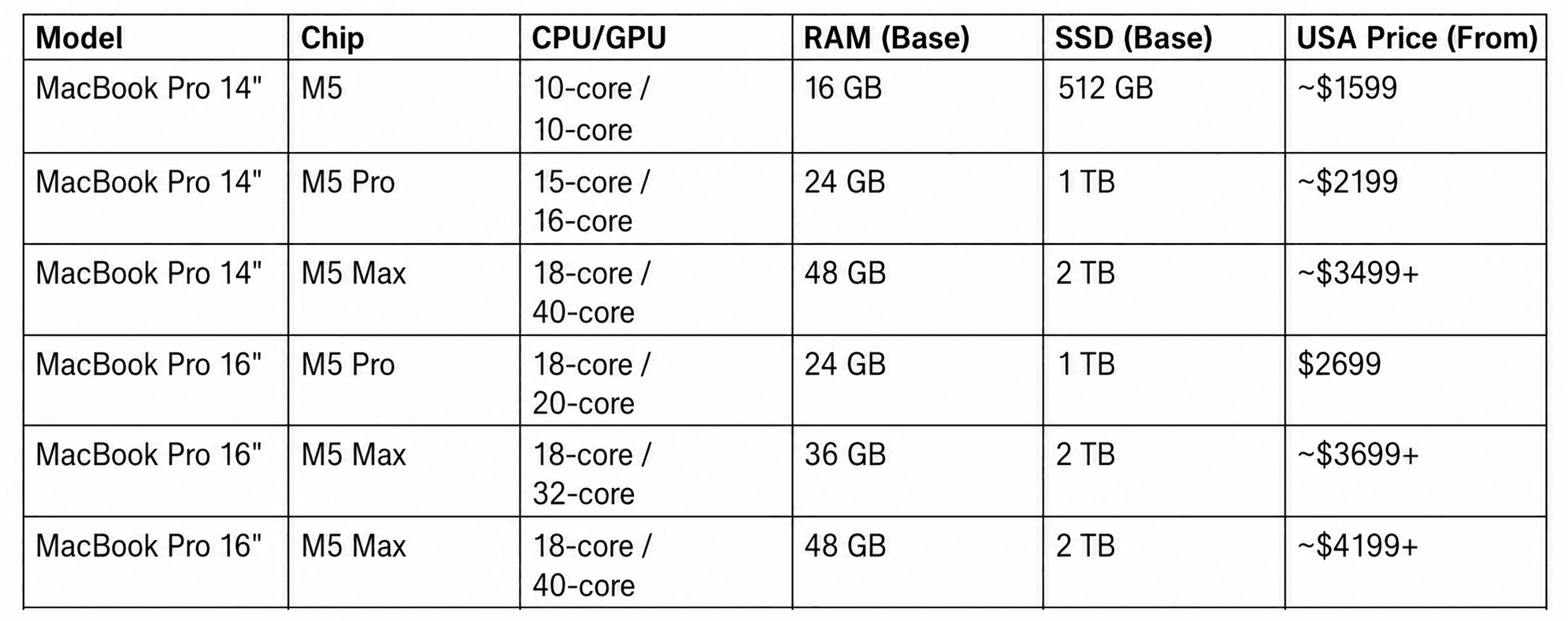
Both chips are built on a multi-core CPU architecture: the M5 Pro has a 15-core configuration, the M5 Max has an 18-core configuration with 6 super-powerful performance cores (super cores) and 12 efficiency cores (performance cores). Apple claims this is "the fastest processor core in the world".
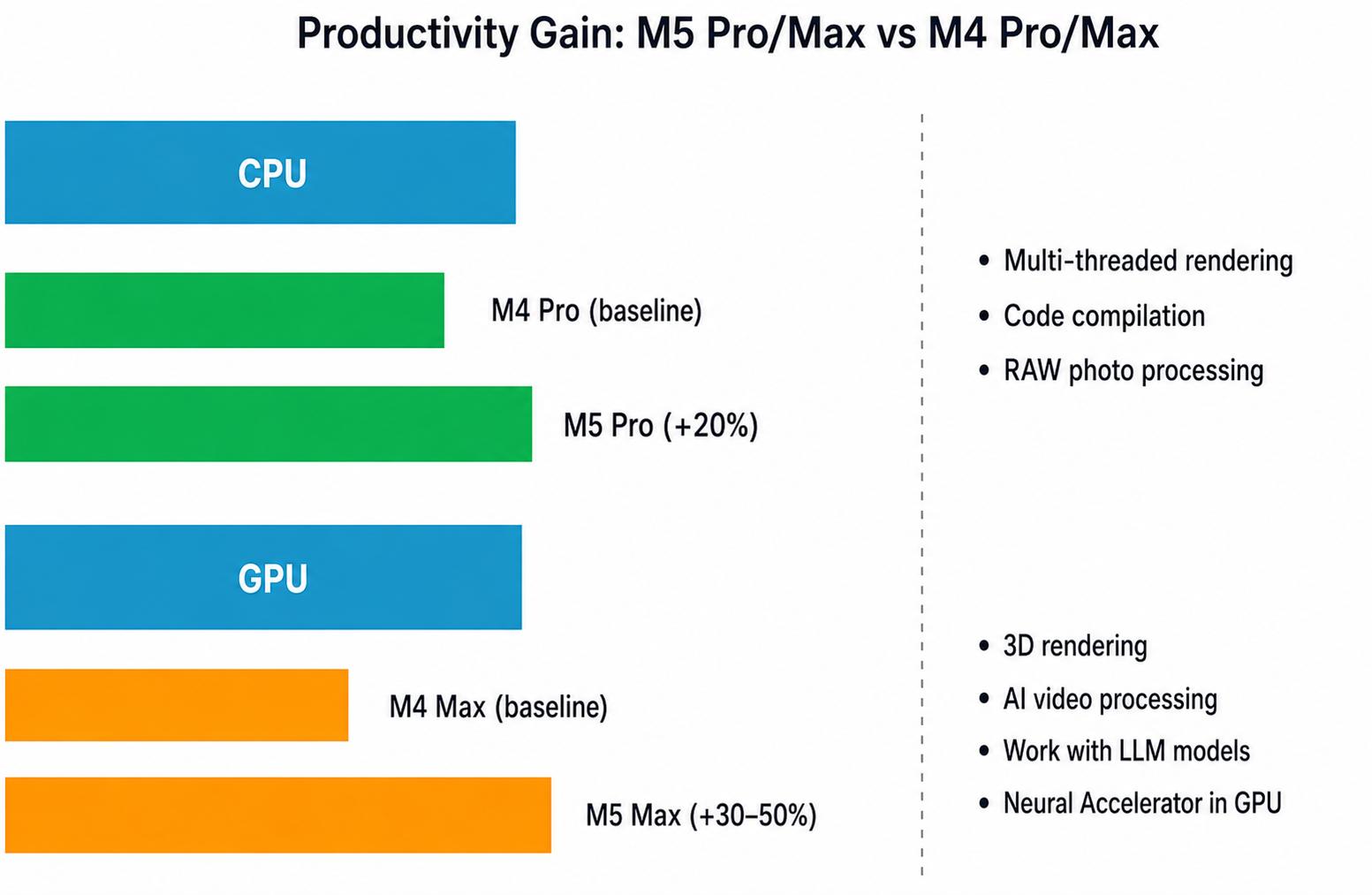
Notebookcheck testing records about 20% CPU performance increase compared to the M4 Pro. This is a significant improvement, especially noticeable in multi-threaded tasks - video rendering, code compilation, RAW photo processing.
GPU with Neural Accelerator: revolution in graphics
The graphics subsystem received an even more impressive update. The M5 Pro offers up to a 20-core GPU, the M5 Max - up to a 32-core or 40-core in the top configuration.
The key innovation is the Neural Accelerator in each graphics core. This is a specialized block for accelerating AI computations that works in parallel with the main Neural Engine.
Notebookcheck records a 30-50% graphics performance increase compared to the M4 Pro/Max. According to Notebookcheck tests, the M5 Max GPU shows results comparable to the NVIDIA GeForce RTX 5070 - an impressive achievement for integrated graphics.
AI performance: up to 3.5 times faster in real tasks
The numbers are impressive, but what does this look like in practice? Apple gives a specific example: AI-enhanced video processing in the Topaz Video app runs up to 3.5 times faster on the M5 Max compared to the M4 Max (according to Topaz Video tests on M5 Max vs M4 Max).
This is not a synthetic benchmark - it is a real task that videographers face every day. Upscaling video from HD to 4K, noise reduction, stabilization - all of this is now performed significantly faster.
Memory and bandwidth
The M5 Pro offers 307 GB/s memory bandwidth, the M5 Max with a 32-core GPU has 460 GB/s bandwidth, and with a 40-core GPU - 614 GB/s.
The unified memory architecture remains a key advantage of Apple Silicon. The CPU, GPU, and Neural Engine all have access to a single pool of RAM without copying data back and forth.
PCIe 5.0 and Wi-Fi 7: infrastructure improvements
In addition to processor and graphics power, Apple has upgraded auxiliary systems, and this is no less important for professional use.
PCIe 5.0 storage: twice as fast
The new MacBook Pro models come with SSD drives using the PCIe 5.0 interface. Read/write speeds reach up to 14.5 GB/s according to Apple's official data - twice as fast as the previous generation.
Notebookcheck in the review of the MacBook Pro 16 with 4 TB SSD configuration recorded speeds of up to 17 GB/s. This is critically important when working with large 4K/8K video files, huge databases, and language models.
Another important change: the base M5 Pro configuration now comes with a 1 TB drive (previously it was 512 GB), and the M5 Max comes with 2 TB. Finally, there is no need to immediately pay extra for a decent amount of storage.
Wi-Fi 7: future-proofing
Wi-Fi 7 support makes the MacBook Pro ready for the next generation of wireless networks. Theoretical bandwidth up to 46 Gbps, lower latency, better stability in crowded environments.
The figure of 46 Gbps is the theoretical limit of the Wi-Fi 7 standard for stationary routers with the maximum number of antennas (16x16). In laptops (including MacBook Pro), chips with a 2x2 antenna configuration are used, which limits real speeds to around 5-6 Gbps.
In Ukraine, Wi-Fi 7 routers are just starting to appear, but in a year or two this technology will become the standard. By buying a MacBook Pro now, you get a device that will remain relevant for years.
Screen sizes, battery life and other specifications
Some things have not changed - and this is good, because they were already excellent.
Liquid Retina XDR displays
14-inch model: 3024×1964, 254 ppi
16-inch model: 3456×2234, 254 ppi
Both displays use mini-LED backlighting with local dimming, providing a contrast ratio of 1,000,000:1. SDR brightness - up to 600 nits, HDR - up to 1000 nits sustained, peak 1600 nits.
For the first time, a nano-texture coating option is available - a matte surface that eliminates glare without losing brightness and contrast. Relevant for working in rooms with bright lighting or near a window.
Battery life: up to 24 hours
Apple claims up to 24 hours of video playback (according to Apple specifications) on the MacBook Pro 16. This is 13 hours more than Intel models from previous years and 3 hours more than M1 models.
An important detail: Apple states that the MacBook Pro demonstrates the same performance when plugged in and on battery. Many Windows laptops slow down significantly when running on battery - this does not happen here.
Fast charging support: up to 50% in 30 minutes using a 96W or 140W adapter.
Ports and connectivity
MacBook Pro 14 and 16 inches with M5 Pro and M5 Max have the same set of ports:
3 × Thunderbolt 4 / USB 4 (up to 40 Gbps)
1 × HDMI (support for 8K 60 Hz or 4K 240 Hz)
1 × SDXC card slot
1 × MagSafe 3
3.5 mm audio jack
M5 Pro supports up to two external 6K 60 Hz displays via Thunderbolt plus one 4K 144 Hz display via HDMI. M5 Max expands capabilities to four external displays simultaneously.
Model comparison: which configuration to choose
Apple offers many configurations, and the choice can be difficult. Let's systematize them.
MacBook Pro 14 with M5 Pro - the optimal choice
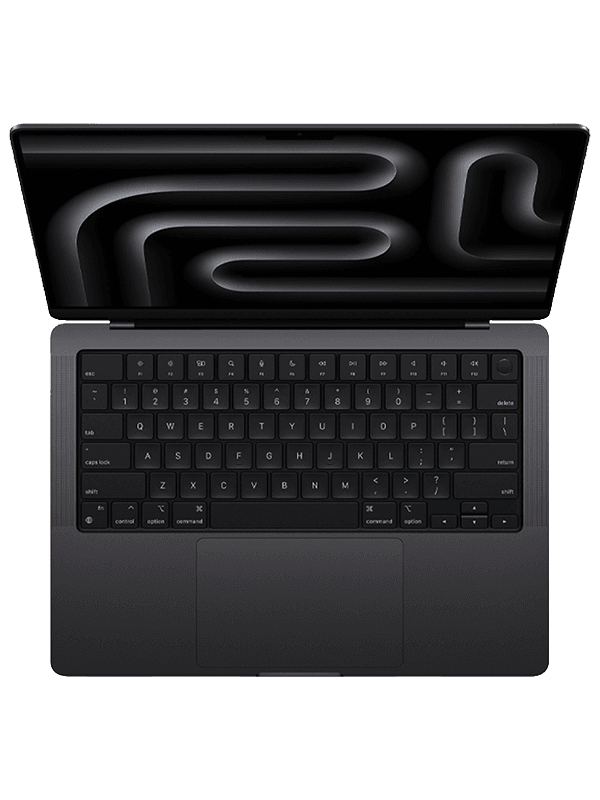
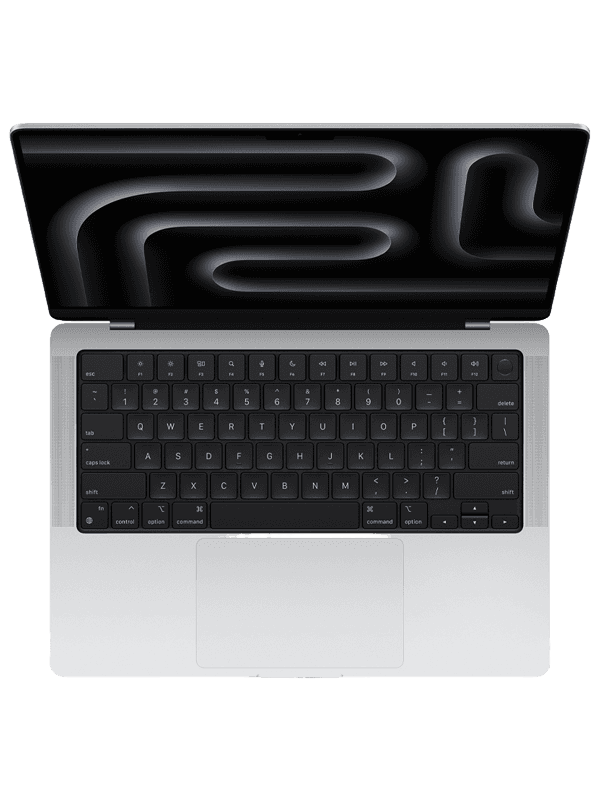
For most professionals, the MacBook Pro 14 M5 Pro offers the best balance of performance, portability, and price. Weight 1.55 kg - easy to carry with you.
24 GB of unified memory is enough for most tasks: 4K video editing, working with photos in Lightroom, app development, running virtual machines. 1 TB SSD is a reasonable minimum for a professional.
MacBook Pro 16 with M5 Pro - for those who value the screen
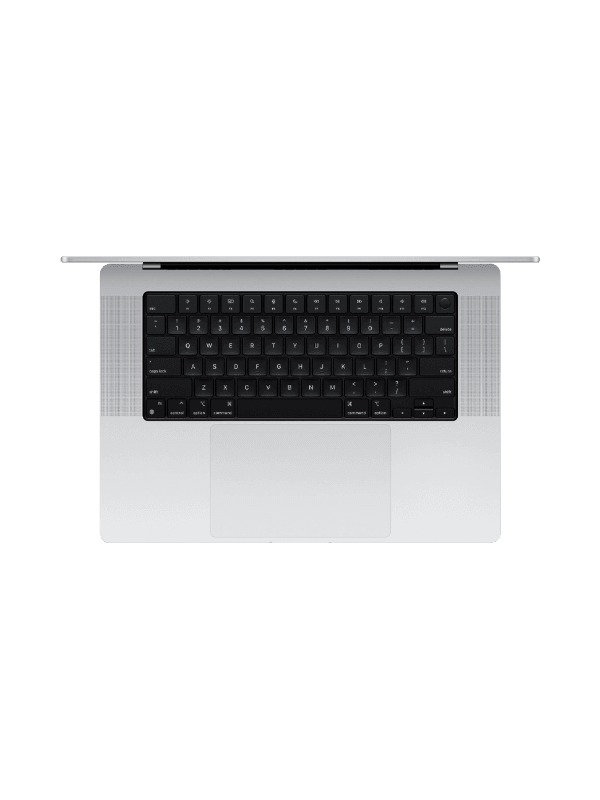
Notebookcheck notes in the review that the MacBook Pro 16 M5 Pro demonstrates an ideal match between chip performance and the cooling system without thermal throttling.
The larger screen makes it easier to work with timelines in DaVinci Resolve, code in Xcode, and multi-window layouts. If the MacBook Pro is your main workstation that rarely leaves the desk, 16 inches is the logical choice.
M5 Max in a 14-inch body: caution
A caveat is needed here. According to Notebookcheck tests, the 14-inch MacBook Pro M5 Max shows cooling and throttling issues.
According to the Notebookcheck review, the 14-inch MacBook Pro demonstrates cooling limitations for the M5 Max under sustained load, which can lead to thermal throttling.
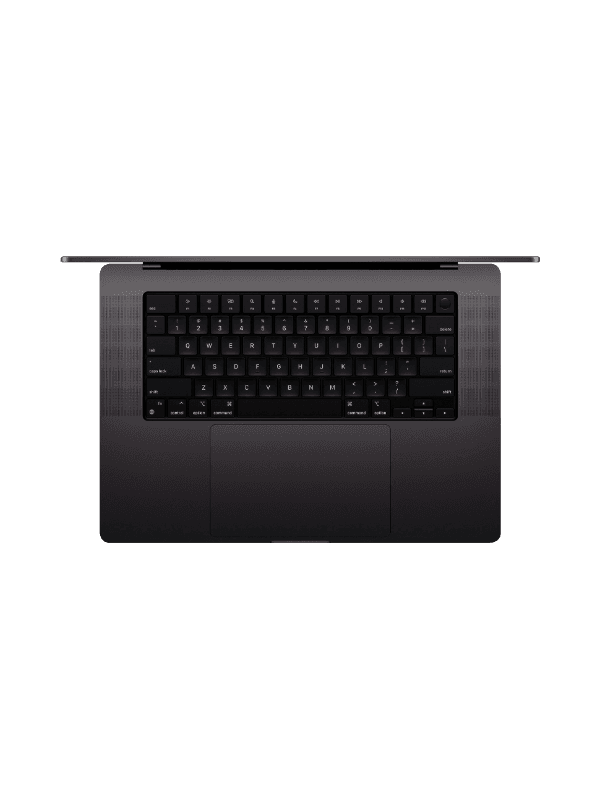
If you need the M5 Max - pay attention to the MacBook Pro 16 M5 Max. There it performs fully without compromise.
Nano-texture display: who should pay extra
The nano-texture option adds about $150-200 to the price. Is it worth it?
If you work in rooms with large windows, studios with softboxes, or on location - definitely yes. The matte coating practically eliminates glare while not degrading color reproduction and brightness like regular matte films do.
If your MacBook Pro is in an office with artificial lighting - you can save money.
Prices and availability in Ukraine
Now the most interesting part - how much the new MacBook Pro models cost in Ukrainian stores and where it is more profitable to buy.
Current prices as of March 2026
According to Ukrainian retailers as of March 20, 2026:
MacBook Pro 14 with M5 (base): 512 GB, 16 GB RAM, Space Black or Silver. Price starts from 88,999 - 97,999 UAH.
MacBook Pro 14 with M5 Pro: 1 TB, 24 GB RAM. Approximate price 110,000 - 125,000 UAH (depends on CPU/GPU configuration).
MacBook Pro 16 with M5 Pro (base): 1 TB, 24 GB RAM, 18-core CPU, 20-core GPU. Apple's recommended price is $2699. Approximate retail price in Ukraine for the base M5 Pro configuration is 130,000 - 145,000 UAH (requires clarification at the time of purchase).
MacBook Pro 16 with M5 Max: 2 TB, 36-48 GB RAM, top GPUs. Expected price from 160,000 UAH and above (depends on configuration).
Exact prices for M5 Pro/Max models may vary as official Ukrainian shipments are just beginning. It is recommended to check current prices on retailer websites.
Who are these MacBook Pro models for
Not everyone needs such power. Let's clearly define the target audience.
Video editors and colorists
If you work in DaVinci Resolve, Final Cut Pro, Adobe Premiere Pro with multi-layer 4K/8K projects - M5 Pro/Max are made for you.
Hardware-accelerated ProRes codec, unified memory (up to 128 GB available in M5 Max), powerful GPU - all this allows working with heavy projects in real time without rendering previews.
3D artists and motion designers
Blender, Cinema 4D, Houdini, After Effects - all these applications receive significant acceleration thanks to Neural Accelerators in the GPU and hardware ray tracing.
According to Notebookcheck, the M5 Max GPU performance is comparable to discrete graphics cards at the level of RTX 5070, while the MacBook Pro operates with passive power consumption from the built-in battery.
Software developers
Compilation of large projects, working with Docker containers, virtual machines, parallel builds - the 18-core multi-threaded CPU handles it brilliantly.
Fast SSD is critical when working with large codebases and Git repositories. 14.5-17 GB/s makes input/output operations almost instantaneous.
Machine learning specialists
Apple Intelligence and on-device AI are Apple's big bet. M5 Pro/Max with their Neural Engine and Neural Accelerators are optimized for running language models locally.
Up to 128 GB of unified memory allows loading large LLM models entirely into memory without swapping. This is important for training, fine-tuning, and inference.
Photographers and retouchers
Adobe Lightroom, Capture One, Photoshop with large RAW files (50+ megapixels) require a powerful CPU and fast memory.
The MacBook Pro handles batch processing of hundreds of photos faster than most desktop workstations. The excellent P3 wide color gamut display ensures accurate color reproduction.
Comparison with competitors: is it worth overpaying
Windows laptops with similar specifications on paper are often cheaper. What's the catch?
Intel/AMD vs Apple Silicon: not just megahertz
Comparing Apple processors directly with Intel/AMD by frequencies and core count is pointless - the architectures are too different.
Apple Silicon uses an ARM architecture focused on energy efficiency. The result is performance at the level or higher than top x86 chips with many times lower power consumption.
Practical example: a Windows laptop with an RTX 5070 may show similar graphics performance, but it will heat up, make fan noise, and drain the battery in 2-3 hours. The MacBook Pro 16 with M5 Max works silently and lasts up to 24 hours on a single charge.
Unified memory vs traditional architecture
In Windows laptops, the CPU has its own RAM (DDR5), the GPU has its own video memory (GDDR6). Data is constantly copied back and forth via the PCIe bus.
In Apple Silicon, all components work with a single memory pool. This is not only faster (no copying), but also uses resources more efficiently.
16 GB of unified memory in the MacBook Pro works differently than 16 GB RAM + 8 GB VRAM in a Windows laptop. In fact, it is closer to 24 GB in efficiency.
macOS vs Windows for professional tasks
macOS has historically been strong in creative applications. Final Cut Pro and Logic Pro are optimized for Apple Silicon at the OS kernel level.
Color management in macOS surpasses Windows - critical for photographers and colorists. P3 wide color gamut support is built into the system.
But there are nuances: if your workflow is tied to Windows-only software or NVIDIA CUDA acceleration, the MacBook Pro will not work.
Disadvantages and limitations: what you need to know
It would be unfair to talk only about the advantages. Here are the real limitations of the MacBook Pro.
Impossibility of upgrade
RAM and SSD are soldered to the board. If you buy a model with 16 GB of memory - it will remain 16 GB forever. Need more - sell and buy a new one.
That is why it is critically important to order a configuration "with a margin". It is better to overpay now for 32-48 GB of memory than to realize in a year that it is not enough.
High upgrade prices
Apple charges huge money for improving specifications. Increasing memory from 16 to 32 GB costs ~$400, although the memory chips themselves cost $50-80.
Upgrading SSD from 512 GB to 1 TB - another $200-250. On one hand, these are the highest quality PCIe 5.0 drives. On the other - the markup is enormous.
Limited software compatibility
Most popular applications have already been ported to Apple Silicon or work through Rosetta 2 (x86 to ARM translator).
But specialized engineering software, some plugins, and old applications may not work at all. Before purchasing, check the compatibility of the software critical to you.
Ecosystem lock-in
The MacBook Pro works best within the Apple ecosystem. If you have an iPhone, iPad, AirPods - the integration is magical (Universal Clipboard, Handoff, AirDrop).
But if your devices are Android or Windows - many conveniences disappear. This is not a problem, but it is worth considering.
Practical tips for choosing and buying
Let's summarize recommendations for Ukrainian buyers.
Determine your real needs
Do not chase the maximum configuration if it is excessive. The M5 Pro with 24 GB of memory covers 90% of professional tasks.
The M5 Max makes sense only if you regularly work with 8K video, huge 3D scenes, or train neural networks. Otherwise, the overpayment will not pay off.
Screen size: 14 or 16 inches
If the MacBook Pro is a mobile workstation that you carry to cafes and meetings - 14 inches. The weight difference (1.55 kg vs 2 kg) is noticeable with daily carrying.
If the MacBook Pro is a stationary desktop replacement - 16 inches. More screen space increases comfort during long work.
Memory: how much is really needed
16 GB is the minimum for a professional - enough for basic development, photo processing, and light video editing.
24-32 GB is the optimum for most. Allows comfortable work with 4K video, virtual machines, and large projects.
48-64 GB - for 8K video, large 3D scenes, LLM models.
128 GB - extreme scenarios, a very narrow niche.
Storage: do not save
512 GB in 2026 is not enough. The operating system, applications, and caches consume 100-150 GB. This leaves 350-400 GB for work files.
1 TB is a reasonable minimum. It will last for a year or two of active work.
2-4 TB - if you work with video and store large project libraries.
8 TB - unlikely to be needed; it is easier to use external SSDs or NAS.
Color: Space Black or Silver
Purely aesthetic choice. Space Black looks more stylish, but fingerprints are more noticeable on it. Silver is more practical in terms of maintenance.
Alternatives: should you consider other models
MacBook Pro M5 Pro/Max are flagships, but not the only option.
MacBook Air M4 - for light tasks
If your tasks are text, tables, light photo processing, and web development - the MacBook Air M4 (13 or 15 inches) will be sufficient and will save 40-50 thousand UAH.
The Air is lighter, thinner, fanless, and has excellent battery life. It lacks active cooling (passive system), so there will be throttling under prolonged load. But for 80% of users this is not a problem.
MacBook Pro M5 (base) - a reasonable compromise
The 14-inch MacBook Pro with base M5 (not Pro) for 88-97 thousand UAH is the golden mean for many.
The 10-core CPU handles most tasks, 16 GB of unified memory is enough for comfortable work. Active cooling prevents throttling.
The only limitation is the 512 GB SSD. If you can live with an external drive - an excellent option.
Mac Studio M5 Max - for stationary work
If portability is not important, the Mac Studio with M5 Max (when released) will provide maximum performance for less money compared to the top MacBook Pro configuration.
Plus the ability to connect any monitors and peripherals. The downside is the need for a separate display, keyboard, and mouse.
Windows alternatives: Dell XPS, Lenovo ThinkPad, HP ZBook
If macOS is not critical, consider top Windows laptops with Intel Core Ultra or AMD Ryzen AI and discrete NVIDIA RTX GPUs.
They are often cheaper than the MacBook Pro with similar specifications on paper. However, when comparing real battery life, noise levels, thermal management, and build quality, the MacBook Pro often shows advantages.
Frequently Asked Questions
When will the MacBook Pro M5 Pro and M5 Max go on sale in Ukraine?
The official announcement took place on March 3, 2026. The base M5 model is already available in Ukrainian stores starting from 88,999 UAH. M5 Pro and M5 Max models will arrive in waves during March-April 2026. For accurate information on the availability of a specific configuration, check retailer websites or call the stores.
Is it worth buying the 14-inch MacBook Pro M5 Max?
According to the Notebookcheck review, the 14-inch MacBook Pro shows cooling limitations for the M5 Max, leading to thermal throttling under load. If you need the M5 Max - choose the 16-inch model, where the cooling system handles it without compromise. The 14-inch version is optimal for M5 or M5 Pro.
How much memory to choose for 4K video editing?
For comfortable work with 4K video in Final Cut Pro, DaVinci Resolve, or Adobe Premiere Pro, a minimum of 24-32 GB of unified memory is recommended. This will be enough for multi-layer projects, color correction, and effects. If you work with 8K, complex 3D composites, or large LUTs - 48-64 GB. 16 GB may be sufficient for simple 4K projects, but there will be limitations with multitasking.
Can memory or SSD be upgraded after purchase?
No. In MacBook Pro with Apple Silicon, RAM and SSD are soldered to the motherboard and cannot be replaced or upgraded. That is why it is critically important to order a configuration with a reserve right away. If you need more memory in a year - the only option is to sell the existing MacBook Pro and buy a new one with the required specifications.
Does specific Windows software work on the MacBook Pro?
It depends on the software. Most popular applications have macOS versions (Adobe Creative Cloud, Autodesk, Affinity, Logic Pro). If the application exists only for Windows, there are three options: 1) Virtual machine (Parallels Desktop, VMware Fusion) - works for many programs but with performance loss; 2) Cloud Windows desktops (AWS, Azure) - run Windows in the cloud; 3) Boot Camp does not work on Apple Silicon, forget about dual booting. Before purchasing, be sure to check the compatibility of the software critical to you.
What is the warranty for MacBook Pro in Ukraine and what does it cover?
When purchasing from official retailers, the standard Apple 1-year warranty is provided. It covers manufacturing defects and component failures not due to user fault. It does not cover: mechanical damage, liquid ingress, or improper operation. You can purchase AppleCare+ (extended 3-year warranty + accidental damage coverage), cost about 15,000-25,000 UAH depending on the model.
How long does the MacBook Pro 16 battery really last during work?
Apple claims up to 24 hours of video playback. In real work, the numbers are more modest: web surfing and light tasks - 15-18 hours; development and document work - 12-15 hours; video editing and rendering - 6-10 hours depending on the load. An important point: unlike Windows laptops, the MacBook Pro works with the same performance when plugged in and on battery. Notebookcheck notes that the M5 Pro model has slightly lower battery life than the M4 Pro (likely due to increased memory volume in the test sample).
Conclusion: is it worth buying MacBook Pro M5 Pro/Max in Ukraine
The MacBook Pro 14 and 16 inches with M5 Pro and M5 Max are outstanding professional laptops, possibly the best on the market as of March 2026. The combination of performance, battery life, display quality, and silent operation has no analogues.
For Ukrainian professionals - video editors, developers, 3D artists, and photographers - this is a tool that pays for itself through time saved and the ability to work anywhere.
But this is not a universal solution. The high price (from 130,000 UAH for the 16-inch M5 Pro model), inability to upgrade, dependence on macOS and the Apple ecosystem - these are factors that need to be considered.