

PlayStation: How the Ecosystem of Devices and Services Works
February 28, 2026
PlayStation has long ceased to be perceived as just a console under the TV. Now it is a connected system where the console, subscriptions, accessories, and cloud features all work together through a single account. Log in to your profile - and games, saves, library, and friends list become available.
The ecosystem is felt not in the numbers of specifications, but in everyday convenience. Connected a second gamepad - you can play together. Activated a subscription - the catalog opened. Using a headset - the sound automatically adjusts to the profile. Everything comes together into one working environment without extra settings or additional steps.
PlayStation Ecosystem: How Everything Comes Together into One System
PlayStation has long stopped being just a console under the TV. Today it is a connected environment where the console, services, and accessories work through a single account and do not compete with each other, but complement one another. Games, subscriptions, cloud saves - everything forms a clear structure. Connection step by step, without the feeling that you have to figure it out from scratch every time.
The meaning of the ecosystem is quite simple: you do not start from zero with every change. A second console appeared - the library is already available. Connected a headset - settings pulled in. Added another gamepad - the system recognized it automatically. Everything works in familiar logic, without unnecessary actions.
Console as the Center of the System
PlayStation serves as the foundation. Through it, games are launched, subscriptions are activated, accessories are connected and configured.
Just log in to your account - and access opens to digital purchases, saves, friends list, and online modes. Even when changing devices, the data remains in the profile. This is convenient: nothing gets lost and nothing is tied to a specific console.
PlayStation Network Account
One profile unites everything together. Through it work:
Digital library
Cloud saves
Multiplayer
PlayStation Plus subscription
This is not a set of separate tools, but parts of one structure that are interconnected through the account.
Subscriptions and Services
PlayStation Plus adds access to online mode, game catalog, and cloud saves. Subscription tiers differ in content, but the principle remains the same - everything connects to the existing profile.
Games can be purchased digitally and downloaded directly to the console. Without discs and additional media - just log in to your account and install the desired project.
Accessories and Compatibility
DualSense gamepads, charging stations, headsets, and other devices are designed to work with PS5. Connection usually takes minimal time and does not require manual configuration.
Added a second controller - the console recognized it. Connected the branded headset - sound parameters applied automatically. Everything stays within one environment.
In the end, the PlayStation ecosystem is not a set of disparate devices. It is a connected system that can be gradually expanded for your tasks: play solo, connect to online, gather with friends, or use at home with the whole family.
PlayStation Accessories: What Expands the Console's Capabilities
The console itself is the base. But how the game feels often depends on small details: whether a second gamepad is connected, whether there is a convenient charging station, whether you use a specialized controller. These details do not catch the eye immediately, but it is they that change the everyday experience.
PlayStation accessories are developed with PS5 in mind, so they usually connect without complicated steps and extra configuration. You do not have to buy everything at once. You can add them as needed: for co-op play, for more precise control, or simply to avoid searching for a cable every time you need to charge the gamepad.
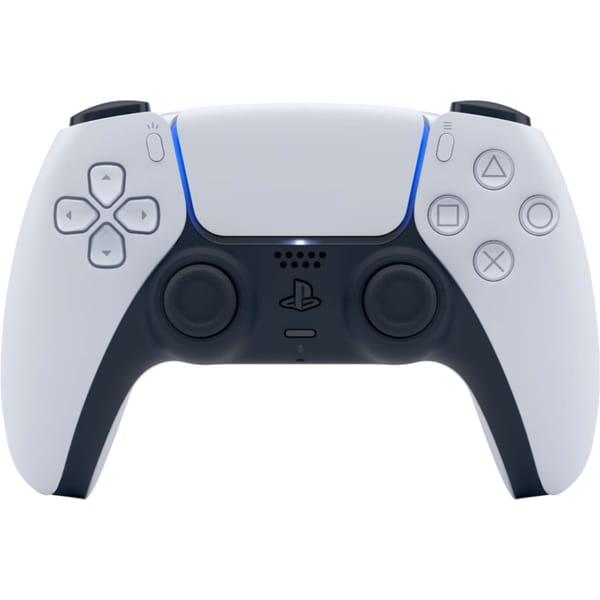
1. Gamepad Sony DualSense White
Sony DualSense White is the main controller for PlayStation 5, which can also be connected to PC. It works via wireless connection and provides haptic feedback depending on what is happening in the game. Thanks to the built-in gyroscope, in supported projects you can use tilt controls, and through the 3.5 mm jack the headset connects directly to the gamepad - without extra adapters.
In the PlayStation ecosystem, this is the basic control tool. Through it you access the console interface, launch games, communicate online. There is also a create button - for screenshots and video recording. The controller syncs with the user profile and immediately supports PS5 features without additional setup.
Key features:
Support for PlayStation 5 and PC
Haptic feedback
Built-in gyroscope
3.5 mm jack for headset
Wireless connection
Specifications:
Compatible platforms: PlayStation 5, PC
Connection type: Wireless
Number of buttons: 18
Gyroscope: Yes
3.5mm jack: Yes
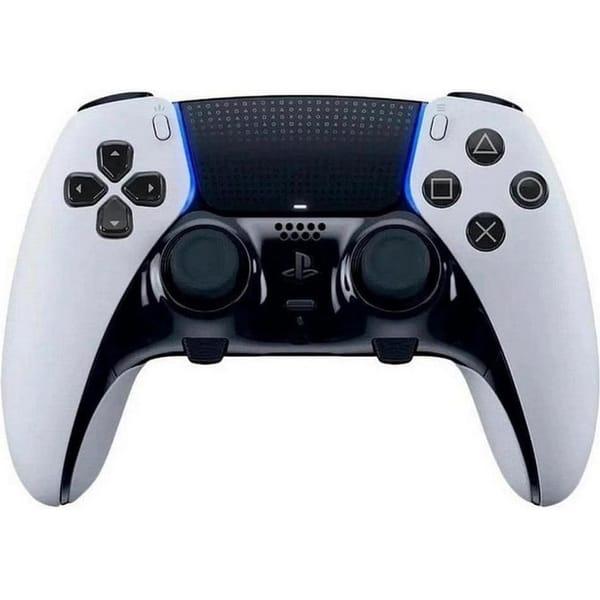
2. Gamepad Sony DualSense Edge
Sony DualSense Edge is a version of DualSense with expanded customization options for PlayStation 5 and PC. It retains everything users are accustomed to in the standard model: haptic feedback, gyroscope, wireless connection. But it adds more control elements and configuration options, which is especially noticeable in games with varied mechanics and high dynamics.
In the PlayStation ecosystem, this controller is often chosen by those who want to tailor controls to themselves. Profiles can be saved in the system and switched as needed. The headset connects directly via the 3.5 mm jack, and the gamepad itself works in the general PS5 environment without separate complex setup - connect and use.
Key features:
Support for PlayStation 5 and PC
Advanced control elements
Haptic feedback
Built-in gyroscope
Specifications:
Compatible platforms: PlayStation 5, PC
Connection type: Wireless
Number of buttons: 19
Gyroscope: Yes
3.5mm jack: Yes
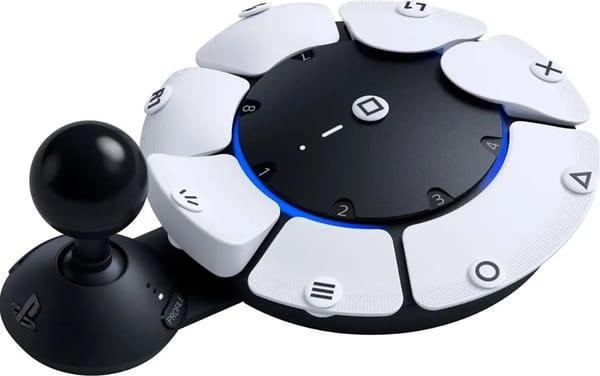
3. Gamepad Sony Access controller (1000038412)
Sony Access controller is created for PlayStation 5 with emphasis on adaptive control. It supports both wired and wireless connection and allows flexible configuration of control elements to meet specific user needs. The console recognizes the device immediately - without complicated steps or separate configuration.
In the PlayStation ecosystem, this controller works as a supplement to standard models and makes the gaming process more accessible. It can be used together with other gamepads, building your own control scheme. The headset connects via the 3.5 mm jack, and the gyroscope is supported in compatible games - if the mechanics allow it.
Key features:
Support for PlayStation 5
Wired and wireless connection
Built-in gyroscope
Specifications:
Compatible platforms: Sony PlayStation 5
Connection type: Wired, wireless
Gyroscope: Yes
3.5mm jack: Yes
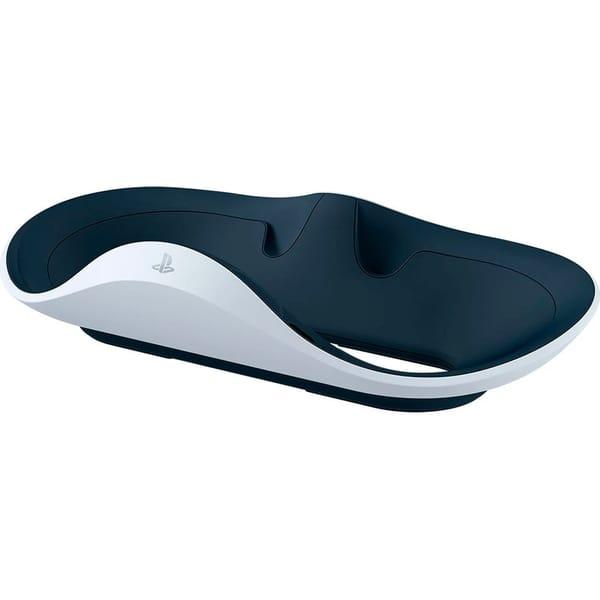
4. Charging station Sony PlayStation VR2 Sense
Sony PlayStation VR2 Sense charging station is designed for charging PlayStation VR2 Sense controllers. It connects to the system and allows keeping both controllers in one place - without separate cables and extra movements. After playing, you can simply place them on the station, and they will be ready for the next session.
This is an accessory designed specifically for PS VR2 devices, so it naturally fits into the PS5 ecosystem. No additional setup is required: connect and use. Essentially, the station performs one clear task - maintains charge and order in the gaming space so everything is at hand.
Key features:
Designed for PlayStation VR2 Sense controllers
Used as a charging station and storage place
Compatible with PlayStation 5 system
Connects without complex setup
Maintains order in the gaming space
Specifications:
Compatibility: PlayStation VR2 Sense
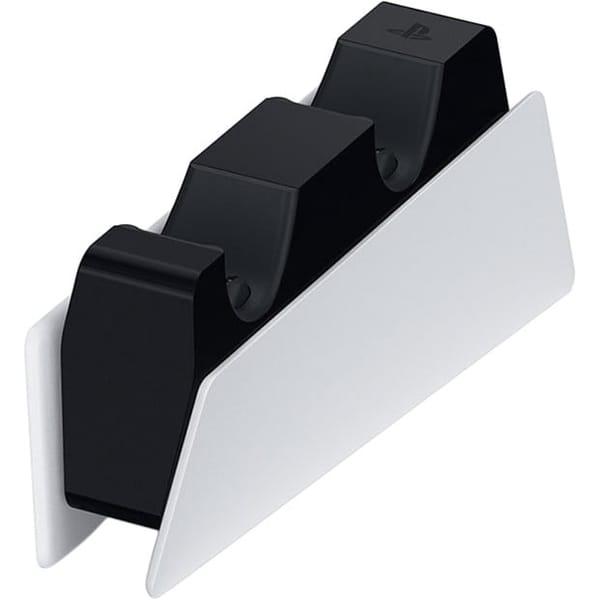
5. Charging device for gamepad Sony DualSense Charging Station
Sony DualSense Charging Station gamepad charging device is designed for simultaneous charging of two DualSense controllers. The station connects to PlayStation 5, and gamepads are placed on it with one motion - without separate cables for each. In everyday use, this is simply more convenient: after playing, place the controllers on the base, and they are charged by the next launch.
The accessory is created for standard DualSense and logically complements the console within the overall device system. It performs two functions at once - storage and charging - while freeing up PS5 USB ports. Controllers lock into the slots and charge automatically, without additional setup.
Key features:
Charging two DualSense gamepads simultaneously
Connection to PlayStation 5
Controller placement without cables
Used as storage place
Compatible with standard DualSense
Specifications:
Compatible platforms: PlayStation 5
Charging connector: USB-C
PlayStation Games and Digital Content
In the PlayStation system, games are not "tied" to a specific console - they are linked to the user's account. Purchases, downloads, and progress are saved in the profile, so when you log in, the library stays with you. The console here acts as an access point, while the collection itself is stored within the digital environment.
Digital purchases via PlayStation Store: Games are purchased and downloaded directly to the console
Library access through one account: All purchases are saved in the user profile
Redownloading previously purchased games: Content can be reinstalled without repaying
Cloud saves with active subscription: Progress is stored in the account and not tied to the device
Data synchronization within the profile: Achievements, friends list, and game history remain available
Launching games without discs: Just log in to your account and download the game from your library
In the end, the library becomes part of the overall system. Games, subscriptions, and saves work together, and switching from one console to another does not require starting over or configuring anything separately.
Why the PlayStation Ecosystem Is Convenient in Everyday Use
When devices and services are truly interconnected, it is felt not in descriptions, but in small things. You do not have to reconfigure the profile, reconnect accessories, or remember where progress was saved. One account unites everything, and the system works as a single whole.
PlayStation is usually "assembled" gradually. First the console appears. Then a second gamepad. Later - a charging station or subscription. Nothing is forced, everything is added as needed and for specific tasks.
One account for games, subscriptions, and saves
Quick accessory connection without complex setup
Support for online mode and cloud data
Ability to expand the system gradually
Device compatibility within one platform
Convenient controller charging via separate stations
You do not need to master the ecosystem separately. Everything works in the familiar logic of menus and settings - without extra steps or additional instructions.
How to Build Your Own PlayStation System
The PlayStation system is usually built step by step. First you choose the console, then add what you really need: a second gamepad, charging station, subscription, or VR. Everything connects to one account and works within the shared environment - without separate complex setup.
The easiest way to navigate is based on how exactly you plan to use the console: for living room gaming, for online, or with additional devices.
1. For living room gaming
Basic set - PlayStation 5 and one DualSense gamepad. This is enough for single-player projects and most games. If co-op play is planned, usually add a second controller and charging station - so you do not have to plug in a cable after every session.
2. For online mode
For network play, connect a PlayStation Plus subscription and a headset via the gamepad's 3.5 mm jack. The profile saves the library and cloud data, so access to games remains when logging in from any compatible system.
3. For more precise control
In a number of projects, it is more convenient to use DualSense Edge with expanded button customization options. Control profiles are saved in the system, and switching happens without extra configuration.
4. For virtual reality
When using PlayStation VR2, supplement the system with Sense controllers and a separate charging station for them. This allows storing and charging devices in one place without occupying extra console ports.
The system does not require radical changes over time. You can start with the basic set and gradually add the needed devices without changing the platform or rebuilding everything from scratch.
Who the PlayStation Ecosystem Is Suitable For
PlayStation does not require the same usage scenario for everyone. The system is assembled for the gaming format and gradually supplemented with the devices and services that are really needed. The console remains the foundation, and everything else connects as required.
For single-player gaming: Enough console and one gamepad. Game library and saves are stored in the account
For co-op gaming at home: Add a second controller and charging station. Both devices stay ready for use
For online players: Connect PlayStation Plus subscription and headset for voice communication
For those who prefer digital format: Games are purchased in PlayStation Store and available without discs
For VR use: Supplement the system with PlayStation VR2 and Sense controllers with charging station
For flexible control customization: Choose DualSense Edge and save individual profiles
The ecosystem does not limit to one usage option. It allows assembling a convenient set of devices for specific tasks and gradually expanding it.
Conclusion
PlayStation is built around one profile. Console, gamepads, charging stations, subscriptions, and game library are connected through the account, so when adding a new device, nothing needs to be reconfigured - data and access pull in automatically.
At the same time, you do not need to buy the full set at once. You can start with the console itself, then gradually add accessories or services as needed. Compatibility is preserved, the menu remains familiar, and the whole system continues to work as a single space. This is where its convenience lies - devices and digital content do not exist separately, they complement each other.
Frequently Asked Questions
1. Do I need to repurchase games when changing consoles?
No. If games are purchased digitally, they are saved in the account. After logging into the profile, they can be downloaded again.
2. Can multiple gamepads be used on one console?
Yes. The system supports connecting multiple controllers, which is convenient for co-op gaming at home.
3. Is PlayStation Plus subscription mandatory?
The subscription is required for online mode and cloud saves. For single-player games it is not mandatory.
4. Do accessories work without additional setup?
Official accessories usually connect automatically. The console recognizes the device and applies standard parameters.
5. Can you play without discs?
Yes. Games are available digitally through PlayStation Store and install directly on the console.
6. Is remote play supported?
Yes. When connected to the network, you can launch games from the console on a compatible device within the same ecosystem.