


ProArt GoPro Edition (PX13 | HN7306): Review 2026 – A Laptop for Those Who Live in the Camera
May 12, 2026
Quick Summary: The ASUS ProArt GoPro Edition (PX13 | HN7306) is a 13.3-inch convertible with an AMD Ryzen AI Max+ 395 processor, 128GB of RAM, and an OLED display, designed specifically for videographers and content creators working with GoPro action cameras. The laptop combines professional performance for 4K and 360° video editing with a rugged design and exclusive software for the GoPro ecosystem. Priced at $2,999.99 (GoPro Edition), it's a dedicated solution for mobile creators who need a full-fledged workstation in an ultraportable form factor.
When ASUS and GoPro announced their partnership, many dismissed it as just another marketing ploy. But the ProArt GoPro Edition PX13 is a completely different product—it's not just a rebranded version of an existing laptop with a GoPro sticker. This device is designed from the ground up for a specific workflow: shooting in extreme conditions, quickly reviewing footage, finishing edits, and color correction right on location. And all this in a body that weighs just over a kilogram.
Sound ambitious? Yes. But does it work in practice?
Who is the ProArt GoPro Edition for?
The ProArt line has always stood apart in the ASUS ecosystem. These aren't just "powerful laptops for creativity," but tools designed from the ground up for the real-world workflows of content creators.
The ProArt GoPro Edition PX13 is a logical extension of this philosophy. The device is designed for:
Videographers shooting action content and travel vlogs
Videographers working with 360° GoPro MAX cameras
Photographers who need a mobile workstation for grading and basic editing
YouTube creators creating content while traveling
Production companies filming documentary projects in the field
Real talk: if you edit video exclusively in the office on a desktop computer, this laptop is overkill. But if at least 30% of your work time is spent outside the studio, the ProArt GoPro Edition makes sense.
Specifications: What's Inside
The official specifications of the HN7306EAC model look impressive. But numbers are one thing, and real-world performance for creative tasks is quite another.
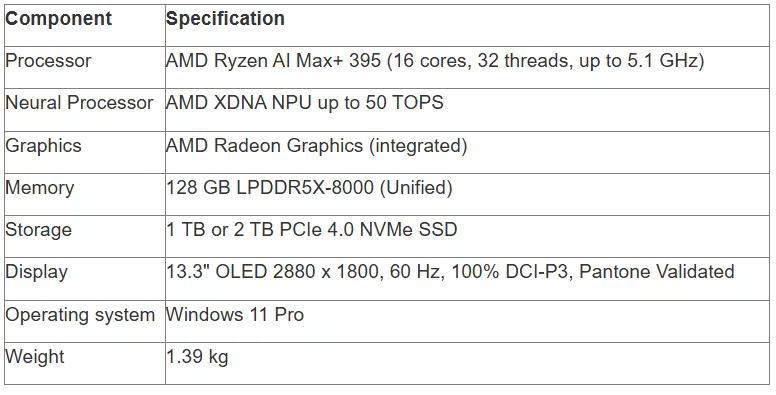
Memory Architecture: Why 128GB Matters
According to official ASUS data, the 128GB of unified memory is dynamically allocated. According to official ASUS data, the system reserves approximately 63.7GB (~64GB) for the CPU and dynamically allocates it to graphics on demand.
This architecture eliminates the traditional bottleneck of transferring data between system memory and video memory. When working with a multi-layer timeline in DaVinci Resolve or After Effects, all assets remain in a single memory pool.
The result? No micro-lag during playback, no need to generate proxy files for viewing 4K footage.
AMD Ryzen AI Max+ 395 Processor: Next Generation
Compared to the previous 2024 PX13 model with a previous-generation processor, processor performance has improved in single-threaded and multi-threaded tests. But here's something interesting: the official ASUS website claims that the ProArt GoPro Edition generates images using Stable Diffusion 7.4 times faster than the MacBook Pro M3 Pro (22 seconds versus 162 seconds). This claim requires independent verification.

ProArt PX13 GoPro Edition and Creative Laptops at JustBuy
JustBuy is a convenient place to quickly find a laptop for content creation without the hassle of searching. Our catalog features current models, including the ProArt PX13 GoPro Edition and other solutions for photography, video, and design.
Here you can compare specifications, check availability, and immediately select the right configuration.
Looking for a laptop for video and photography?
At JustBuy, you can:
Select current laptops for creatives
Compare specifications and performance
Check availability and price
Place an order or get a consultation
👉 Contact JustBuy to find the ProArt PX13 or the right laptop for your needs.
Display: Why Calibration Is More Important Than Resolution
A 13.3-inch OLED panel with a 2880x1800 pixel resolution is more than just a "pretty picture." Color accuracy is critical for professional video editing.
Official specifications confirm the device's high color reproduction standards.
The high pixel density, deep blacks, and instantaneous response time of the OLED panel (0.2 ms according to official specifications) make video editing not just comfortable, but visually accurate.
100% DCI-P3 coverage and factory calibration (Delta E < 1 according to official specifications) make the display a reliable tool for color correction. However, a final check on a reference monitor is recommended for critical work.
Pantone Validation: Marketing or Real Benefit?
Pantone Validated certification means that each laptop is individually calibrated at the factory. Color temperature, gamma curve, and white points are verified according to Pantone standards. This is critical for designers working with print. For videographers, it's useful, but not essential. Most video platforms still compress colors to Rec.709 or the wider Rec.2020 for HDR.
If you're editing material for a client that will eventually be released to the web, television, and cinemas, the ability to see how the content looks in different color spaces is invaluable.
GoPro Edition Design: More Than Just Cosmetics
Nano Black is the exclusive finish for this edition. But the differences go beyond color.
According to the official ASUS website, the ProArt GoPro Edition meets MIL-STD-810H military durability standards. The laptop can withstand extreme conditions, including temperature shock and humidity.
The aluminum body, reinforced hinges for converting into a tablet, and rugged keyboard—these aren't just for show. When working on the beach, in the mountains, or in the desert, the device must withstand harsh conditions and temperature fluctuations.
Exclusive GoPro Edition Features
GoPro Engraving: The GoPro logo is engraved on the lid—a tactile element that distinguishes this edition from the standard PX13.
Case Included: A GoPro-style fabric protective case with compartments for cameras and accessories.
Collector's Packaging: A premium box with customizable tabs for storing action cameras.
GoPro Edition Wallpapers: Exclusive desktop wallpapers with signature patterns.
GoPro Hotkey: A physical button that instantly launches the Quik app.
A hotkey isn't a gimmick. When you've just finished filming and want to quickly review the footage without digging through menus, a single press saves time.
Integration with the GoPro Ecosystem
Software is where the ASUS and GoPro partnership really shines.
StoryCube: Centralized Content Management
The StoryCube app is preinstalled on the ProArt GoPro Edition. It integrates with GoPro Cloud and automatically syncs all footage from GoPro Hero and GoPro MAX cameras.
Key features:
Automatic video and photo upload via Wi-Fi when a camera is connected
AI-powered sorting by content type (action, landscapes, portraits, timelapses)
360° video support with the ability to rebrand to a standard format
Direct export to DaVinci Resolve, Adobe Premiere Pro, or Final Cut Pro
StoryCube doesn't replace a full-fledged video editor, but it significantly speeds up initial sorting and import. AI tags footage based on various criteria to quickly select the best moments.
Working with 360° content: a special case
According to official information, ProArt GoPro Edition is optimized for working with large 360° files. 128 GB of memory and 1 TB of storage allow you to keep large projects quickly accessible. 360° video in 5.6K requires several times more resources than standard 4K. Each frame contains a spherical panorama, and rendering requires computing power.
Unified memory eliminates this bottleneck—data is not copied between system and video memory. The result: smooth playback without proxy generation.
Performance: Field Editing
Benchmark numbers are one thing. But how does the ProArt GoPro Edition handle real-world editing?
DaVinci Resolve: 4K Fine Editing
The official ASUS website claims the device delivers GPU-accelerated editing 1.8 times faster than the previous generation.
In practice, this means:
A timeline with 3-4 4K video layers plays without rendering.
Color correction is applied in real time (assuming no more than 5-6 nodes).
Exporting video to Resolve should take a reasonable time on this hardware.
Important caveat: we're talking about H.264 or H.265 footage. If you're working with RAW or ProRes, expect a slowdown.
Adobe Premiere Pro and After Effects
Premiere Pro is traditionally less GPU-intensive than Resolve, but it uses a lot of RAM. 128 GB of memory is a comfortable amount even for projects with dozens of layers.
After Effects benefits from its unified memory architecture when working with compositing. Layers aren't "loaded"—they're already in memory.
However, there's a caveat: some specialized tasks optimized for NVIDIA CUDA may run at limits on integrated AMD graphics. AMD supports ROCm acceleration, so there are options.
Thermal Management and Battery Life
The convertible form factor places limitations on the cooling system. The laptop can't have massive heatsinks and powerful fans like 17-inch workstations.
Under sustained loads (video export, rendering), the case heats up noticeably, especially around the hinges. The processor can throttle down to 4.0-4.2 GHz instead of the stated 5.1 GHz to control temperature.
Battery life is a weak point. The review (February 25, 2026) notes that battery life is relatively limited. Expect 2-3 hours of intensive video editing, which requires regular charging, while viewing and sorting material can last up to 5-6 hours.
USB-C charging with Power Delivery support allows the use of external batteries, which partially offsets the limited battery life.
Interfaces and Connectivity
According to the official specifications, the ProArt GoPro Edition is equipped with:
2× USB-C 4.0 (40 Gbps, DisplayPort, Power Delivery)
1× USB-A 3.2 Gen 2 (10 Gbps)
1× HDMI 2.1 (4K@120Hz support)
1× 3.5 mm combo audio jack
1× microSD slot (UHS-II, up to 312 MB/s)
The lack of a full-size SD slot is a deliberate compromise for the sake of compactness. Most new GoPro cameras use microSD, so this isn't a dealbreaker for the target audience.
USB-C 4.0 with 40 Gbps throughput allows you to connect external SSDs for working with huge footage libraries without bottlenecks.
Wireless Interfaces
Wi-Fi 7 (802.11be) provides theoretical speeds of up to 5.8 Gbps. In practice, when directly connecting to GoPro cameras via Wi-Fi Direct, the transfer speed is limited by the camera's capabilities (typically 100-200 Mbps).
Bluetooth 5.3 allows for connecting wireless headphones, microphones, and controllers. Latency is low enough for audio monitoring during editing (when using aptX or LDAC codecs).
Keyboard, Touchpad, and Input
IT Pro noted the positive characteristics of the keyboard and touchpad in their review. For a 13-inch device, this is not an obvious achievement.
DialPad Controller: Analog Control
The physical dial in the upper right corner of the keyboard is not a cosmetic feature. In video editor mode, it controls:
Timeline zoom (scrolling)
Track volume (press + scroll)
Brightness/contrast of the selected clip (key combination)
Haptic feedback is more precise than mouse or gesture controls. When making fine color corrections, the ability to rotate a physical dial instead of dragging a slider is a noticeable advantage.
Keyboard Backlight
Backlighting with adjustable brightness and automatic adaptation to ambient light. Concave keys with 1.4 mm travel offer a compromise between tactility and case thickness.
The keyboard includes advanced control functions.
Comparison with the base version of the PX13
ASUS sells the standard version of the ProArt PX13 (model HN7306EA-XS99T) with the same AMD Ryzen AI Max+ 395 processor for $2,799.99, according to the official announcement on February 25, 2026.
A $200 difference (the GoPro Edition costs $2,999.99) results in:
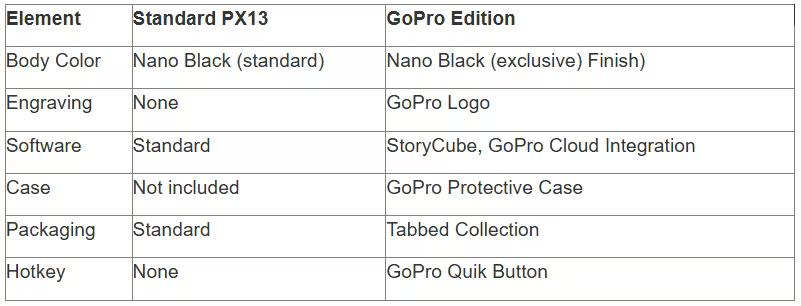
Is the extra $200 for the GoPro Edition worth it? It depends on your workflow. If you already actively use GoPro action cameras and GoPro cloud storage, the integration saves time. If you shoot with Sony, Canon, or other cameras, you're paying for features you don't use.
Competitors and Alternatives
In the compact video editing workstation segment, the ProArt GoPro Edition competes with several other devices.
MacBook Pro 14" M3 Pro/Max
An obvious competitor. The MacBook's advantages:
Better battery life (up to 18 hours with mixed use)
Quieter operation under load
macOS ecosystem for Final Cut Pro
Advantages of the ProArt GoPro Edition:
128 GB of unified storage (versus the maximum 128 GB of the M3 Max, but cheaper)
OLED touchscreen with tablet-like functionality
Native integration with Windows apps
Physical DialPad for precise control
Dell XPS 13 Plus
A compact premium Ultrabook with Intel processors. It lacks graphics performance and memory, but offers better battery life and portability.
Lenovo ThinkPad X1 Yoga Gen 9
Another business-class convertible. It offers superior keyboard reliability and security, but lacks graphics power and a display.
Price and Availability
According to the official ASUS press release dated February 25, 2026, the ProArt GoPro Edition (PX13) is available for $2,999.99 in the US through:
Official ASUS Store (online)
Best Buy (online and in retail stores)
The standard ProArt PX13 (HN7306EA-XS99T) model, with the same AMD Ryzen AI Max+ 395 processor, sells for $2,799.99.
Is it worth it?
$3,000 is premium. For that price, you can build a desktop computer with an RTX 4080, 64 GB of memory, and a powerful processor that will render faster.
But the ProArt GoPro Edition isn't about maximum performance per dollar. It's about mobility without compromise. If 70% of your work is done in the office or at home, invest in a desktop workstation or a 15-17-inch gaming laptop. Get more power for less.
But if you regularly edit videos while traveling, on set, or on expeditions, the ProArt GoPro Edition solves a problem that other devices don't solve well.
Real-World Use Cases
Theory is great, but how does the device perform in real-world conditions?
Scenario 1: Filming a Travel Vlog
You're filming a week-long vlog in Iceland. Every day:
4-5 hours of filming with 2-3 GoPro Hero 12 cameras
In the evening: import footage (100-150 GB)
Selecting the best moments in StoryCube
Basic editing of a 10-minute video in Premiere Pro
Exporting and uploading to YouTube via hotel Wi-Fi
The ProArt GoPro Edition handles it. StoryCube automatically marks the best shots, editing is done without a proxy, and exporting takes 5-7 minutes. For web surfing and office tasks, the battery lasts up to 7-8 hours. For editing, the battery can last 2-3 hours with intensive video editing, which requires regular charging.
Limitation: If the hotel doesn't have good Wi-Fi, downloading a 2GB final video can take hours. Mobile internet via a modem is a solution, but not in all countries.
Scenario 2: Documentary Filming
A production team is filming a documentary in a remote location. The cameraman uses a GoPro MAX for 360° shooting and several Hero cameras for traditional video.
Filming with multiple GoPro cameras generates a significant amount of data, depending on the duration and quality. The ProArt GoPro Edition is used for:
Quickly reviewing and selecting takes
Synchronizing with central storage (external RAID via USB-C)
Creating rough cuts for director approval
The 1 TB of internal storage provides a buffer for 1-2 days of work. Footage is constantly transferred to external drives. 128 GB of memory allows for quick access to the entire current project.
Final editing and color correction are performed on stationary workstations in the studio. The ProArt GoPro Edition is a tool for field work, not a replacement for a full-fledged post-production studio infrastructure.
Scenario 3: Extreme Sports and Action
A professional rider films video for sponsors. Filming in the mountains, on the beach, in the desert—conditions where regular laptops cannot survive.
The rugged ProArt GoPro Edition housing, tested to MIL-STD-810H, can withstand extreme conditions, including temperature shock and humidity. Transforming into a tablet allows you to work in awkward positions—on your lap, on the hood of a car, or even on a cliff.
Touch controls with stylus support provide flexibility in controlling the device in a variety of situations.
Disadvantages and Limitations
No device is perfect. The ProArt GoPro Edition has obvious weaknesses.
Battery Life
With intensive video editing, the battery may last 2-3 hours—not enough. Competitors with ARM processors (MacBook Pro with M3, Surface Laptop with Snapdragon X Elite) last 8-12 hours.
This is partially offset by fast charging and Power Delivery support—you can use external batteries. However, this comes at the cost of additional weight and expense.
No discrete GPU
Integrated AMD Radeon Graphics provides good performance for video editing, but it's not up to par with discrete graphics cards. AMD supports ROCm acceleration, but support in professional applications is still lagging.
Price
$3,000 is a lot. Especially considering that the standard PX13 with the same processor costs $2,800, and the only difference is in the software and accessories.
If you're already invested in the GoPro ecosystem (multiple cameras, GoPro Cloud subscription), integration makes sense. If you shoot with other cameras, you're overpaying for features you don't use.
Thermal Management
The compact body limits cooling. Under prolonged load, the processor throttles, dropping frequencies from 5.1 GHz to 4.0-4.2 GHz.
The body heats up to 40-45°C near the hinges. It's not critical, but noticeable during operation.
Final Verdict
The ProArt GoPro Edition (PX13 | HN7306) is a niche device. It solves a specific problem for a specific audience. Buy if:
Regularly shoot with GoPro Hero or MAX cameras
Edit video in the field (travel, expeditions, film sets)
Need professional color correction on a calibrated display
Value compactness and a convertible form factor
Willing to pay a premium for integration and convenience
Don't buy if:
Work primarily in an office or studio (buy a desktop workstation)
Shoot with other brands' cameras (lose half the functionality)
Maximum battery life is a priority (look at MacBook Pros or ARM-based laptops)
Need a discrete GPU for CUDA-intensive tasks (go for models with RTX)
Budget is limited (there are cheaper alternatives for video editing)
ASUS and GoPro have created a device that's ideal for a narrow segment of professionals. If you're in this segment, the ProArt GoPro Edition offers solutions specifically designed for these needs.
If not, you're paying for specialization you don't need.
Frequently Asked Questions (FAQ)
Can I use the ProArt GoPro Edition with other brands of cameras?
Yes. It's a full-fledged Windows 11 Pro laptop, so standard video editors like DaVinci Resolve and Adobe Premiere Pro work without limitations. However, exclusive features like StoryCube, AI sorting, and GoPro Quik integration are only available for GoPro cameras.
How long does the battery actually last when editing video?
When actively editing 4K video in DaVinci Resolve or Premiere Pro, the laptop lasts about 2.5-3 hours. When reviewing and sorting footage, the battery lasts up to 5-6 hours. For typical tasks like browsing and office work, it lasts about 7-8 hours.
Is 1 TB of internal storage sufficient for professional work?
For short-term projects, yes, but with regular use of multiple cameras, the storage capacity quickly runs out. Typically, 1 TB is enough for several days of active shooting and editing. For archiving and larger projects, we recommend using external SSDs or cloud storage.
Does the laptop support connecting external monitors?
Yes. HDMI 2.1 allows you to connect one external monitor, and USB-C 4.0 with DisplayPort supports additional displays. The built-in OLED display allows for up to three displays to be used simultaneously.
Can the memory or storage be upgraded?
The 128GB of RAM is soldered to the motherboard and is not replaceable. The M.2 NVMe SSD is theoretically replaceable, but accessing it requires complete disassembly of the case and may void the warranty.
How good is the display for professional color grading?
The OLED display with 100% DCI-P3 coverage, Delta E <1, and Pantone Validated certification ensures highly accurate color reproduction. It's suitable for professional photo editing, editing, and basic video color correction.
Is the GoPro Edition worth the extra $200 over the standard PX13?
If you're a heavy user of GoPro cameras, additional features like StoryCube, AI sorting, and GoPro Quik integration are real time savers. If you primarily work with Sony, Canon, or DJI cameras, the standard PX13 is a more cost-effective purchase.
Conclusion: A Tool for Those on the Move
The ASUS ProArt GoPro Edition (PX13 | HN7306) isn't a one-size-fits-all laptop. It's a specialized tool for mobile content creators who work with GoPro action cameras in extreme conditions.
128 GB of unified memory, a powerful 16-core AMD Ryzen AI Max+ 395 processor, a calibrated OLED display, and a ruggedized case—all of this adds up to a device that solves real-world problems for professionals.
However, this specialization comes with certain tradeoffs. Battery life is limited compared to competitors, the price is premium, and full functionality is available only with GoPro equipment.
If your workflow includes shooting with a GoPro, editing in the field, and the need for a compact workstation, the ProArt GoPro Edition is worth considering.
If you primarily work in the office or shoot with other cameras, there are more versatile and affordable options.