

ROG Zephyrus G14 (2026) GA403: review and specifications
July 1, 2026
In brief: The ROG Zephyrus G14 (2026) GA403 is a compact gaming laptop featuring an AMD Ryzen AI 9 465 processor, an NVIDIA GeForce RTX 5060 graphics card, a 3K OLED Nebula HDR display with a 120 Hz refresh rate, and 1100 nits of brightness. The device combines power, portability, and long battery life in a slim 1.59 cm chassis.
The ASUS ROG Zephyrus G14 has remained the benchmark for compact gaming laptops for several years. The 2026 model with the GA403 designation continues this tradition but with important changes to the hardware configuration.
This year, ASUS moved away from its traditional approach. For 2026, ASUS offers both options: the AMD-based GA403 and the Intel-based GU405. However, the GA403 remains true to the series' roots—with AMD processors and the classic balance between performance and portability.
Key Specifications and Configurations
The ROG Zephyrus G14 GA403 is powered by the AMD Ryzen AI 9 465 processor—a 10-core chip with 20 threads and speeds of up to 5.0 GHz. Graphics are handled by the NVIDIA GeForce RTX 5060 Laptop GPU with a maximum TGP of 90 W.
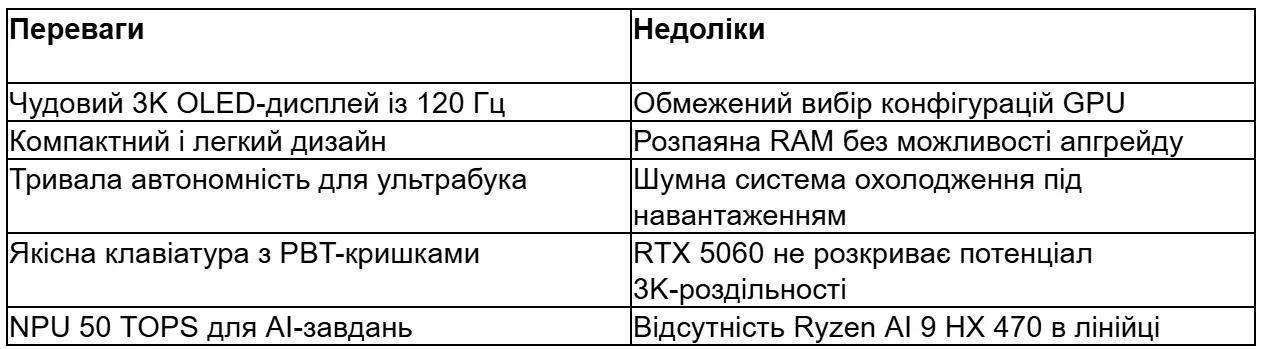
It is important to understand the positioning of this model. Unlike the Intel-based GU405, which received top-tier configurations with the RTX 5080 and Core Ultra 9, the AMD version is limited to the mid-range segment. It includes neither the Ryzen AI 9 HX 470 nor more powerful graphics cards.
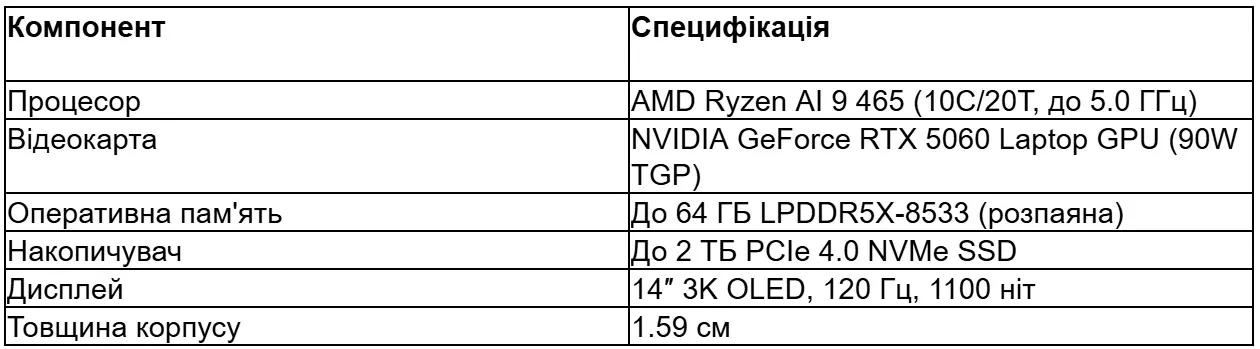
The RAM is soldered onto the motherboard—up to 64 GB of LPDDR5X-8533, providing high memory bandwidth. The PCIe 4.0 SSD can have a capacity of up to 2 TB, although base configurations usually come with 1 TB.

Choose a Gaming Laptop at JustBuy
JustBuy offers laptops, computer equipment, gaming consoles, and accessories. Here, you can browse available models for gaming, work, study, streaming, video editing, and everyday use.
For a gaming laptop, not only the processor and graphics card matter. It is also worth considering the display, cooling system, weight, battery life, memory capacity, and how often you will carry the laptop with you.
Looking for a laptop for gaming or work?
JustBuy can help with:
choosing a laptop for your tasks
comparing available models
selecting accessories for gaming and work
consultation before purchase
👉 Contact JustBuy to choose a laptop that matches your usage needs.
ROG Nebula HDR Display — The Main Advantage
The display remains one of the strongest features of the Zephyrus G14. According to ASUS, it is a 14-inch 3K OLED display (2880×1800 pixels) with HDR support and a 120 Hz refresh rate.
The specifications are impressive. Peak brightness reaches 1100 nits, making the image easy to see even in bright daylight. The response time is only 0.2 ms, which is important for fast-paced games. The OLED panel has a contrast ratio of 1,000,000:1.
The DCI-P3 color gamut coverage is 100%, while color accuracy in SDR mode is Delta E below 1. This is a professional level for graphics and video work. According to ASUS, the peak brightness is 1100 nits.
The 16:10 aspect ratio provides more vertical space compared to the standard 16:9 format. This is especially useful for productivity tasks such as programming, video editing, and working with documents.
Performance: AMD Ryzen AI 9 465 and RTX 5060
The AMD Ryzen AI 9 465 processor belongs to the Zen 5 generation and features an integrated 50 TOPS NPU for artificial intelligence tasks. The architecture provides 10 cores and 20 threads with a base clock of 2.0 GHz and a boost clock of up to 5.0 GHz.
But the main question is why ASUS limited the GA403 to this particular processor. The more powerful Ryzen AI 9 HX 470 was reserved for other models or future updates. This positions the AMD version as a mid-range option in the lineup.
The NVIDIA GeForce RTX 5060 Laptop GPU with a 90 W TGP is also a compromise. The RTX 5060 belongs to the new Blackwell generation and supports DLSS 4 and Frame Generation, but its performance is more suitable for 1080p gaming at high settings than for native 3K.
Real Gaming Performance
In games at a resolution of 2880×1800, the RTX 5060 will require active use of DLSS to maintain smooth frame rates. Native 3K resolution is the domain of the RTX 5070 and above.
At 1080p with DLSS Quality enabled, most modern AAA games will deliver 60+ FPS at ultra settings. For esports titles—CS2, Valorant, and League of Legends—the performance headroom is more than sufficient for a stable 120 FPS and full use of the 120 Hz display.
Cooling System and Battery Life
The 1.59 cm chassis thickness leaves limited space for the cooling system. ASUS uses its proprietary Intelligent Cooling technology with liquid metal thermal compound on the processor, thin heat pipes, and dual Arc Flow fans.
Under load, the laptop inevitably heats up, but the system handles thermal throttling effectively. Fan noise is noticeable in Turbo and Performance modes, but in Silent mode the device operates quietly for office tasks and content consumption.
The battery provides about 8–10 hours of battery life during light use—web browsing, videos, and text editors. During gaming, it lasts only 1–2 hours at most. According to official data, fast charging allows the battery to recover 50% of its capacity in 30 minutes while powered off under optimal conditions (20–45°C).
Design, Keyboard, and Ergonomics
The 2026 Zephyrus G14 retains its minimalist aluminum design without unnecessary elements. The lid is smooth, and the ROG logo is understated. The laptop is available in several color options—traditionally gray and brighter alternatives.
The keyboard follows the ROG standard: full-size keys with approximately 1.5 mm of key travel, white backlighting, and doubleshot PBT plastic. The layout does not include a numeric keypad, which is typical for the 14-inch form factor. The touchpad is large, glass-covered, and offers precise responsiveness —
supports Windows Precision Drivers and multi-touch gestures.Ports and Connectivity
The selection of ports includes USB 4.0 Type-C with Power Delivery and DisplayPort support, USB 3.2 Gen 2 Type-A, HDMI 2.1, a combined audio jack, and an SD UHS-II card reader (up to 312 MB/s). Wi-Fi 6E and Bluetooth 5.3 provide wireless connectivity.
Charging is performed via USB-C—the included power adapter ranges from 100 W to 140 W depending on the configuration. The ability to charge using the standard Power Delivery protocol is a convenient option for travel.
Software and AI Features
The ROG Zephyrus G14 GA403 comes with Windows 11 Pro. ASUS includes the proprietary Armoury Crate utility—a control center for performance, RGB lighting, cooling profiles, and driver updates.
The 50 TOPS NPU provides access to Windows Studio Effects—background blur in video calls, automatic framing, and noise cancellation. Microsoft Copilot is integrated at the system level for AI assistance in Office applications and the browser.
For creators, hardware acceleration of AI tasks is important: local processing of LLM models, acceleration of DaVinci Resolve and Adobe Premiere through NVIDIA RTX AI, and image generation in Stable Diffusion without sending data to the cloud.
Audio System and Webcam
The audio system consists of a pair of stereo speakers with Dolby Atmos support. The sound is clear, with pronounced midrange frequencies, but the bass is limited by the compact chassis.
The Full HD webcam includes an infrared sensor for Windows Hello. The video quality is acceptable for video conferences, with good sharpness and color reproduction. There is no physical privacy shutter, but camera access can be disabled in the Windows settings.
Advantages and Disadvantages
Who Is the ROG Zephyrus G14 GA403 For?
This laptop is ideal for students, freelancers, and mobile professionals who need a balance between performance and portability. It can handle AAA games at 1080p, professional video editing, 3D modeling, and programming.
If maximum gaming performance is the priority, it is better to consider the GU405 with the RTX 5080 or full-size 15–16-inch gaming laptops. The GA403 is all about compromise in favor of mobility.
For creators, the OLED display with Delta E < 1 and 100% DCI-P3 is the number one selling point. 4K video editing, color grading, and graphic design all look flawless on this display.
Alternatives on the Market
The main competitors of the GA403 are the Razer Blade 14 2026, Lenovo Legion Slim 5 Gen 9, and ASUS's own Intel-based GU405 model. The Razer offers a similar form factor with premium build quality, but at a higher price. The Lenovo Legion Slim 5 is often less expensive with comparable specifications, but it uses an LCD display instead of OLED.
The choice between the GA403 and the GU405 depends on your preference for AMD or Intel processors and your budget. The Intel version is more expensive but offers more powerful GPU options.
Conclusion
The ROG Zephyrus G14 (2026) GA403 is a solid compact gaming laptop with an exceptional OLED display, sufficient performance for most tasks, and excellent portability. The limitations of the RTX 5060 and Ryzen AI 9 465 make it less competitive compared to the Intel version, but the price is also lower.
If you need a slim 14-inch laptop with an excellent display that handles games and creative tasks, the GA403 is worth considering. If your budget allows and you need maximum performance, it is worth looking at the GU405 or full-size ROG Strix models.
Frequently Asked Questions (FAQ)
Can the RAM be upgraded on the GA403?
No, the LPDDR5X-8533 RAM is soldered onto the motherboard. Choose a configuration with enough RAM from the start—32 GB for most users and 64 GB for professionals.
What is the actual battery life during gaming and work?
With light use (web browsing, videos, documents), it lasts about 8–10 hours. During gaming, it lasts only 1–2 hours at most. Under a moderate workload (programming, light video editing), it lasts 4–6 hours. Fast charging restores 50% of the battery capacity in 30 minutes while powered off.
Does the laptop support external GPUs via Thunderbolt?
The GA403 is equipped with USB 4.0 (not Thunderbolt 4, although the functionality is similar). Theoretically, connecting an eGPU is possible, but AMD platforms have traditionally had weaker drivers for this scenario compared to Intel. It is better to rely on the built-in RTX 5060 as the final option.
What Is the Difference Between the GA403 and the GU405?
The GA403 uses AMD Ryzen AI 9 465 processors and is limited to the RTX 5060 graphics card. The GU405 is based on the Intel Core Ultra 9 386H and offers configurations up to the RTX 5080. The Intel version is more expensive but more powerful. The AMD version is better for battery life and a lower price.
Is the OLED Display Worth the Risk of Pixel Burn-In?
OLED panels are susceptible to burn-in from static elements (the taskbar, logos) when displayed for extended periods. ASUS includes protective features—automatic dimming of static areas and pixel shifting. With normal use and varied content, the risk is minimal. For those who work with static user interfaces all day, an LCD display is a better choice.
What Is the Difference Between the 2025 and 2026 Models?
The main differences are the processors (the 2025 model had the Ryzen AI 9 HX 370, while the 2026 model received the Ryzen AI 9 465), the GPU generation (RTX 4000 vs. RTX 5000), and updated displays. The RTX 5060 delivers higher performance than the RTX 4060 thanks to the Blackwell architecture and DLSS 4. The design and form factor remain similar.
Is the GA403 Suitable for 3D Graphics and CAD Work?
The RTX 5060 can handle most CAD applications and moderately complex 3D scenes in Blender or Maya. For large projects and complex simulations, it is better to look for laptops with the RTX 5070/5080 or workstations with RTX Ada or professional NVIDIA RTX graphics cards.