

ROG Zephyrus G16 (2026) GU606 review: power and style
July 1, 2026
In brief: The ROG Zephyrus G16 (2026) GU606 is an update to ASUS's popular gaming laptop series, offering Intel Core Ultra 9 386H processors, graphics up to the NVIDIA GeForce RTX 5090, a bright 2.5K OLED display with 1100 nits of brightness and a 240 Hz refresh rate, all in a chassis only 1.49 cm thick. The model retains its premium aluminum design, improved cooling system, and up to 64 GB of RAM.
ASUS has introduced an updated version of its popular Zephyrus G16 gaming laptop, and this time the changes are more than just cosmetic. The 2026 GU606 model features new hardware, a brighter display, and improved cooling.
But is it worth upgrading from last year's model? And how does the G16 compare to competitors like the Razer Blade 16?
Let's take a detailed look.
What's new in the ROG Zephyrus G16 (2026)
The Zephyrus series has always balanced performance and portability. The 2026 GU606 continues this tradition, but with several important updates.
The biggest change is the transition to Intel Panther Lake processors, specifically the Core Ultra 9 386H. It replaces the previous Meteor Lake and Arrow Lake generations that were used in the 2024–2025 models.
According to the official website, the processor offers up to 50 TOPS of NPU computing power for AI tasks. This makes the laptop compatible with Copilot+ PC and Windows 11 Pro.
Graphics: from RTX 5060 to RTX 5090
Variants with Intel processors come with NVIDIA GeForce RTX 5000 series graphics – from the RTX 5060 to the flagship RTX 5090 Laptop GPU with 24 GB of VRAM.
This is a significant upgrade compared to last year's RTX 4000 series. According to Notebookcheck, the RTX 5090 in the Zephyrus G16 operates with a TGP of around 140–160 W, which is slightly lower than the maximum 175 W found in thicker laptops.
So even though it is a flagship mobile graphics card, expect performance to be slightly lower than competitors with better cooling. However, the results are impressive for a chassis that is only 1.49 cm thick.
There are also variants with the AMD Ryzen AI 7 350, but they are equipped only with up to the RTX 5060 – a less powerful option for those looking for better battery life.
Display: brighter than ever
One of the biggest improvements for 2026 is the updated ROG Nebula HDR OLED display.
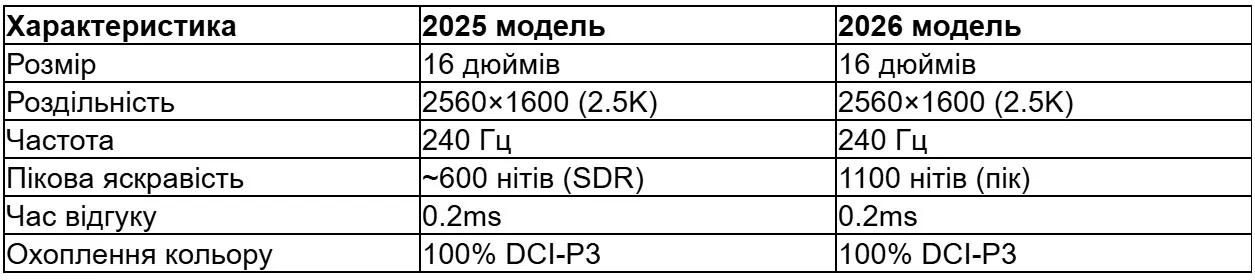
The main difference is brightness. The previous model delivered around 500 nits in SDR mode, while the new one reaches 1100 nits at peak HDR brightness.
According to the official ASUS website, the panel supports VESA DisplayHDR True Black 1000, which means a true HDR experience with a 1,000,000:1 contrast ratio.
The display also has a 16:10 aspect ratio, providing an additional 11% of vertical space compared to the traditional 16:9 ratio. This is convenient for working with code, documents, or video editing.

Choose a laptop for work and gaming at JustBuy
JustBuy has sections with laptops, computer equipment, and gaming products. This is convenient if you need a single device for gaming, graphics work, video editing, studying, or everyday tasks.
Before making a purchase, it's worth looking beyond performance alone. The screen, cooling, keyboard, ports, weight, charging, and memory capacity also affect how comfortable the laptop will be to use every day.
Looking for a powerful laptop?
JustBuy can help with:
comparing available models
choosing a laptop for gaming, work, or study
selecting a mouse, headset, storage device, or other accessories
consulting on specifications before purchase
👉 Contact JustBuy to choose a laptop for your needs.
Design and construction
On the outside, the 2026 GU606 is almost identical to the previous model. ASUS did not radically change the chassis, which is logical because the design was already one of the best on the market.
The chassis is made of CNC-machined aluminum and is available in Platinum White or Eclipse Gray depending on the region. The surface is anodized, pleasant to the touch, and does not collect fingerprints.
Dimensions and weight
According to the official specifications, the dimensions are 31.1 × 22.0 × 1.59–1.83 cm. The weight ranges from 1.5 to 1.58 kg depending on the configuration.
This makes the G16 one of the lightest gaming laptops with flagship graphics. For comparison, the Razer Blade 16 weighs around 2.4 kg, while the MSI GE66 Raider weighs more than 2.5 kg.
The thickness of 1.49 cm at its thinnest point is an impressive achievement, considering that it houses an RTX 5090.
Keyboard and touchpad
The keyboard has a key travel of 1.7 mm, which is deeper than that of most ultra-thin laptops. The keycaps are made of PBT plastic using ROG doubleshot technology, ensuring long-lasting key legends.
The ROG Aura RGB backlighting is fully customizable through Armoury Crate. You can configure individual zones or synchronize it with other ROG peripherals.
The touchpad is large, glass-covered, and supports Windows Precision gestures. It works smoothly and exactly, although a mouse is still recommended for serious gaming.
Performance: Intel Core Ultra 9 386H and RTX 5090
Now let's move on to the most interesting part – how the laptop performs under load.
We rely on data from Notebookcheck and UltrabookReview reviews, which tested the flagship configuration with the Core Ultra 9 386H and RTX 5090.
Processor performance
The Intel Core Ultra 9 386H is a 16-core processor (6 P-cores, 8 E-cores, 2 LP E-cores) with a base frequency of 2.2 GHz and Turbo up to 5.4 GHz. It is built on Intel's 3 nm Intel 20A process.
In synthetic benchmarks, the processor shows an improvement in single-core performance of approximately 15–18% compared to the previous Core Ultra 9 285H (Arrow Lake). Multi-core performance increased more modestly – by around 8–10%.
The real advantage is energy efficiency. Thanks to the new architecture, the processor consumes less power in standby mode and during light tasks, which has a positive impact on battery life.
Gaming performance
The RTX 5090 Laptop GPU in this chassis operates with a TGP of around 140–150 W. This is lower than the maximum 175 W, but it is still enough for excellent results.
According to Notebookcheck benchmarks, at 2560×1600 (the display's native resolution), the laptop delivers:
Cyberpunk 2077 (Ultra RT): ~85–95 FPS with DLSS Quality
Red Dead Redemption 2 (High): ~100–110 FPS
Call of Duty Modern Warfare III (High): ~180–200 FPS
Baldur's Gate 3 (Ultra): ~120–140 FPS
With G-Sync enabled, the 240 Hz display remains smooth even in demanding games.
It is worth noting that the RTX 5090 in the thicker Zephyrus Duo GX651 with a 150 W TGP delivers 10–15% higher performance. So if you need the absolute maximum, it is worth considering a larger chassis.
But for a portable laptop, the results are impressive.
ROG Intelligent Cooling system
Fitting an RTX 5090 into a chassis only 1.49 cm thick is a complex engineering challenge. ASUS uses the ROG Intelligent Cooling system, which includes:
A vapor chamber for the GPU and CPU
Two Arc Flow Fan 2.0 fans with 84 blades each
Thermal Grizzly Conductonaut Extreme liquid metal on the processor
Five heat pipes
Graphite nano-insulating film
According to testing data, temperatures under load are:
CPU: 85–92°C (peak loads)
GPU: 78–85°C (ultra gaming)
These are normal figures for a thin laptop. There is virtually no throttling, and performance remains stable even after hours of gaming.
Noise level
In Performance mode, the fans are audible – around 45–48 dB under load. It is not the loudest, but it is not the quietest either.
In Silent mode, the noise is reduced, but performance is also reduced.
Turbo mode runs the fans at maximum speed for additional performance. It is best used only with headphones.
Memory and storage
Variants with Intel Core Ultra support up to 64 GB of LPDDR5X-8533 memory soldered to the motherboard. Variants with AMD Ryzen are limited to 32 GB of LPDDR5X-7500.
The memory cannot be upgraded, so choose the required configuration from the start.
Storage consists of one or two M.2 PCIe 4.0 x4 NVMe slots. Officially, up to 2 TB is supported, but physically more can be installed (up to 8 TB across two slots if 4 TB SSDs are used).
One slot is easily accessible after removing the bottom cover. The second may be occupied or available depending on the configuration.

Ports and connectivity
On the left side:
1× USB-C 3.2 Gen 2 with DisplayPort and 100W Power Delivery support
1× USB-A 3.2 Gen 2
3.5 mm combo audio jack
On the right:
1× USB-A 3.2 Gen 2
1× HDMI 2.1 (supports 4K@120Hz or 8K@60Hz)
1× Thunderbolt 4 (40 Gbps, DisplayPort, 100W Power Delivery)
1× power connector (240W barrel plug)
1× UHS-II SD card reader (up to 312 MB/s)
Network connectivity:
Wi-Fi 7 (Intel Killer BE1750)
Bluetooth 5.4
Wi-Fi 7 is one of the key updates for 2026. Previous models had Wi-Fi 6E. The new version promises higher speed and greater stability, especially on crowded networks.
Battery life
The battery is rated at 90 Wh, which is standard for a 16-inch gaming laptop.
According to official ASUS data, the laptop can play video in Battery Saver mode for up to 8–10 hours (when tested under standardized conditions) (testing conducted with Wi-Fi/Bluetooth disabled, Battery Saver mode enabled, volume at 67%, and 1080p video).
Real-world usage shows:
Web browsing, documents: 6–7 hours
Video (YouTube, Netflix): 7–9 hours
Light gaming (indie, older AAA titles): 2–3 hours
Demanding games (Cyberpunk, RDR2): 1–1.5 hours
Fast charging is supported – according to official data, the battery reaches 50% charge in 30 minutes (temperature 20–45°C, system powered off).
The charger is a 240 W barrel-type adapter. It is large and heavy (~600 g), but necessary to power the RTX 5090.
You can also charge via USB-C (up to 100 W), but this is not sufficient under load – the battery gradually discharges even while connected.
Audio: 6 speakers with Dolby Atmos
The system consists of 6 speakers: 2 tweeters and 4 woofers. It supports Dolby Atmos, Smart AMP Technology, and two-way AI noise cancellation.
According to reviews, the sound is among the best in gaming laptops. It is loud, clear, and has respectable bass (for a laptop).
The system provides clear sound without distortion even at maximum volume. This is sufficient even in noisy environments.
The microphones have also been improved – a dual-array system with AI background noise filtering. It works excellently for video calls and streaming.
Software and AI features
The laptop runs Windows 11 Pro. Some configurations may come with Windows 11 Home – check before purchasing.
ROG Armoury Crate SE is the central utility for managing:
Performance profiles (Silent, Performance, Turbo, Manual)
RGB lighting
Driver and BIOS updates
Game scenarios
The 50 TOPS NPU enables Copilot+ PC features:
Windows Studio Effects (background blur, auto framing)
Live Captions with translation
Recall (content indexing for quick search)
ROG also offers its own AI tools through MyASUS:
Noise cancellation for the microphone and speakers
Charging optimization (stopping at 80% to preserve battery health)
Comparison with competitors
The main competitor is the Razer Blade 16 2026 with the RTX 5090. Both laptops are aimed at users who want maximum power in a relatively compact chassis.
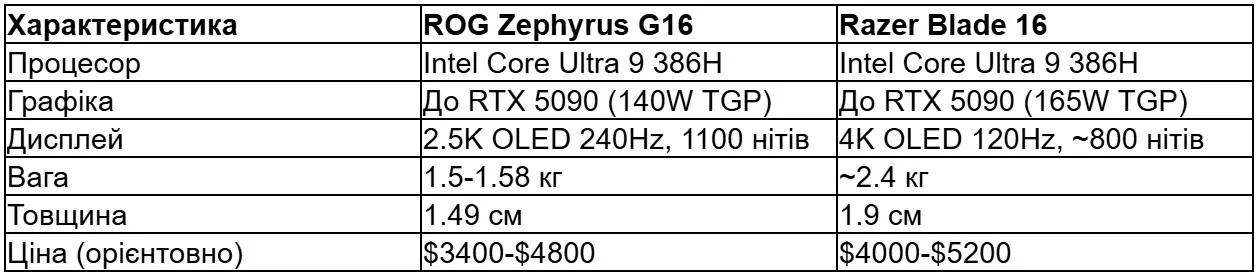
The Zephyrus G16 is lighter and thinner, with a brighter display and a higher refresh rate. Razer Blade 16 offers a higher resolution (4K), a slightly more powerful RTX 5090, and a more premium build.
The choice depends on your priorities: if portability and brightness are important, choose the G16. If you need absolute performance and 4K, choose the Blade 16.
Who this laptop is for
The ROG Zephyrus G16 (2026) GU606 is a laptop for those who:
Want flagship graphics without sacrificing portability
Need a high-quality display for content creation (100% DCI-P3, Delta E <1)
Frequently travel with a laptop and value lightweight design
Are willing to pay a premium for design and build quality
Use AI tools and need an NPU
It is not suitable if:
Your budget is limited – there are cheaper alternatives with the RTX 5070 Ti
You need the maximum GPU TGP – thicker laptops deliver more FPS
The ability to upgrade memory is important – here it is soldered
Long battery life is essential – gaming laptops with the RTX 5090 are not known for it
Price and availability
Official prices vary depending on the region and configuration. According to the official ASUS website, the starting price of the flagship model (RTX 5090, 64 GB) is around $3,699.99 in the United States.
In Ukraine, prices are usually higher due to taxes and logistics. Approximately:
RTX 5060 variant: ~$2200-$2600
RTX 5070 variant: ~$2800-$3200
RTX 5080 variant: ~$3400-$3900
RTX 5090 variant: ~$4200-$4800
It is recommended to check current prices on the official website or with authorized retailers.
Pros and cons
Pros
Premium aluminum chassis, lightweight and thin
Bright 240 Hz OLED display with 1100 nits (HDR peak)
Flagship performance in a compact form factor
Excellent cooling system without throttling
Excellent speakers (6 total) with Dolby Atmos
Wi-Fi 7 and Thunderbolt 4
Copilot+ PC with a 50 TOPS NPU
UHS-II SD card reader
Cons
High price, especially for flagship configurations
The memory is soldered, making upgrades impossible
GPU TGP is lower than that of thicker competitors
Battery life is modest under load
Large charger (240 W barrel plug)
1080p webcam only, without Windows Hello IR
Conclusion
The ROG Zephyrus G16 (2026) GU606 is an evolution, not a revolution. ASUS took last year's successful formula and improved the key aspects: processor, display, and Wi-Fi.
The result is one of the best portable gaming laptops on the market. It is not the most powerful in absolute terms, but it offers the best balance of performance, portability, and display quality.
If your budget allows and you are looking for a premium gaming laptop that you can carry around without back pain, the G16 2026 deserves your attention.
However, if performance is more important than portability, consider thicker alternatives with a higher TGP. And if your budget is limited, there are excellent options with the RTX 5070 that cost $1000-$1500 less.
Frequently Asked Questions (FAQ)
Can you upgrade the memory in the ROG Zephyrus G16 (2026)?
No, the LPDDR5X memory is soldered to the motherboard. Choose the required configuration (16, 32, or 64 GB) at the time of purchase. Upgrading is not possible.
What is the difference between the Intel and AMD variants?
Variants with the Intel Core Ultra 9 386H support up to 64 GB of memory and GPUs up to the RTX 5090. Variants with the AMD Ryzen AI 7 350 are limited to 32 GB of memory and the RTX 5060, but may offer slightly better battery life. Choose Intel for maximum performance.
Does the laptop support USB-C charging?
Yes, both USB-C ports (Thunderbolt 4 and USB 3.2 Gen 2) support up to 100 W Power Delivery. However, this is not enough under gaming loads – the battery will gradually discharge. For full performance, use the included 240 W adapter.
How long does the battery last while gaming?
In demanding games (Cyberpunk 2077, RDR2 on Ultra) – around 1-1.5 hours. In lighter or older games – 2-3 hours. For web browsing and video playback – 6-9 hours depending on brightness and settings.
Is it worth upgrading from the G16 2025?
If you have the 2025 model with the RTX 5080 or 5090, the upgrade is not essential. The main improvements for 2026 are a brighter display (1100 vs. ~600 nits), Wi-Fi 7, and a newer processor with better energy efficiency. If these matter to you and your budget allows, then yes. Otherwise, the 2025 model is still excellent.
Does the laptop have a MUX switch?
Yes, the ROG Zephyrus G16 2026 has a MUX switch that allows you to switch between hybrid mode (Optimus for battery savings) and dGPU mode (direct display connection to the NVIDIA GPU for maximum FPS). Switching is available in Armoury Crate and requires a restart.
What is the maximum SSD capacity that can be installed?
Officially, up to 2 TB is supported. Physically, you can install two 4 TB M.2 PCIe 4.0 SSDs (8 TB total) if compatible models are used. The second slot may not be available in some base configurations – check the specifications.