

The Top Premium Laptops of 2026: ThinkPad X1 and ASUS Zenbook DUO
April 2, 2026
Quick Summary: The ThinkPad X1 Carbon Gen 14 Aura Edition, ThinkPad X1 2-in-1 Gen 11 Aura Edition, and ASUS Zenbook DUO 2026 represent the pinnacle of the premium laptop segment, featuring Intel Core Ultra X9, up to 50-TOPS NPUs, and a focus on AI. The X1 Carbon Gen 14 features a modular design and Panther Lake processors, the 2-in-1 Gen 11 offers the versatility of a convertible, and the Zenbook DUO stands out with dual 3K OLED displays and an 18+ hour battery.
The premium business laptop segment has been radically reimagined in 2026. Lenovo has completely refreshed its ThinkPad lineup, and ASUS continues to experiment with form factors. Today, we're talking about three machines that are setting the tone for the entire industry.
And it's not just a processor update. Here, we see a new design philosophy, an emphasis on repairability, and AI features built into the hardware. The ThinkPad X1 Carbon Gen 14 features a "space frame" architecture, the X1 2-in-1 Gen 11 is a versatile convertible with a full-fledged stylus, and the ASUS Zenbook DUO offers two independent OLED displays in a compact chassis.
Let's explore what makes these laptops truly premium and who they're for.
Lenovo ThinkPad X1 Carbon Gen 14 Aura Edition: Modularity and Panther Lake
Lenovo has taken a bold step by completely redesigning its flagship business laptop. The ThinkPad X1 Carbon Gen 14 Aura Edition is not just the fourteenth generation of a familiar series, but a radical rethinking of its approach to design and maintenance.
New "Space Frame" Design
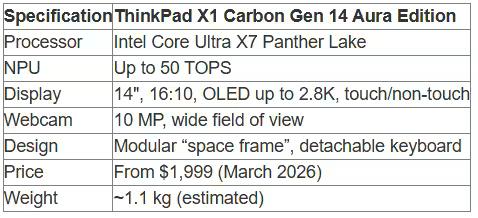
According to NotebookCheck-ru, the X1 Carbon Gen 14 features a "Space Frame" architecture with modular components. The keyboard is now detachable, rather than being integrated into the palm rest as in previous generations. The USB-C ports are also modular.
This represents a fundamental shift in priorities. The ThinkPad X1 Carbon was never known for its easy repairability—integrated batteries, soldered-in RAM, and top-loading keyboard made servicing difficult.
Now that's changed. The modular keyboard and ports simplify replacing failed components. This is important for enterprise customers who value extending the lifespan of their devices.
Intel Core Ultra X7 Panther Lake
The ThinkPad X1 Carbon Gen 14 is based on Intel Panther Lake processors—the new generation of Core Ultra X7. This marks the first widespread adoption of this architecture in the business segment.
Panther Lake uses the Intel 18A processor and a newer architecture for power efficiency compared to its predecessors.
The NPU (Neural Processing Unit) in Panther Lake delivers up to 50 TOPS of performance for AI workloads. This allows for running local LLM models and processing AI queries without accessing the cloud.
Aura Edition and AI Features
The Aura Edition designation indicates the integration of AI capabilities at the system level. Lenovo has implemented technologies for automatic performance tuning, adaptive display brightness, and intelligent power management.
The new webcam features a 10 MP resolution and a wide field of view—an upgrade from the 8 MP in Gen 13. The camera supports background effects, noise reduction, and automatic framing for video conferencing.
Display and Battery Life
The ThinkPad X1 Carbon Gen 14 offers a 14-inch display with a 16:10 aspect ratio. Touch and non-touch options are available. The top-end configuration includes an OLED panel with a 2.8K resolution.
The OLED display delivers deep blacks, a 100,000:1 contrast ratio, and 100% DCI-P3 coverage. This is critical for creative professionals working with photos and videos.
However, there's a catch. Lenovo traditionally uses integrated batteries in the X1 Carbon, which complicates battery replacement when they degrade. This hasn't changed in the Gen 14, although the modular design theoretically allows for a removable battery in future revisions.
Pricing and Availability
Lenovo will begin selling the Lenovo ThinkPad X1 Carbon Gen 14 Aura Edition in March 2026, starting at $1,999. This is the entry-level configuration with a basic display and a mid-range processor. Top-end options with an OLED screen, maximum RAM, and a 2TB SSD will cost significantly more—approximately $2,800–$3,200.

Find your laptop and make a purchase at JustBuy
After comparing models, a simple question usually remains: where to look at the specifications, check availability, and buy the right version. JustBuy is an online tech store where you can find laptops, compare options, check delivery, payment, and warranty terms, and, if necessary, contact support or visit our showroom in Kyiv.
Looking for where to look at and buy a laptop?
At JustBuy you can:
View available models and their specifications
Compare laptops and other devices in the catalog
Check availability, price, delivery, and warranty
Place an order online or ask for advice
👉 Contact JustBuy to check the availability of the model you need and make a purchase.
ThinkPad X1 2-in-1 Gen 11 Aura Edition: The Versatility of a Transformer
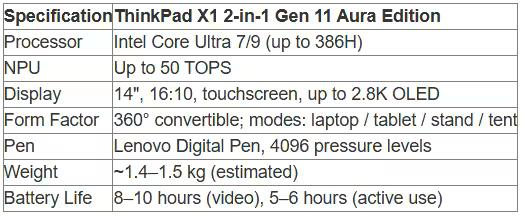
The second flagship of the line is the ThinkPad X1 2-in-1 Gen 11 Aura Edition. This convertible laptop features a 360-degree hinge that transforms into a tablet, stand, or tent, depending on your needs.
Form Factor and Flexibility
The ThinkPad X1 2-in-1 Gen 11 Aura Edition is positioned as a premium convertible with on-device AI for optimized user experience and productivity.
The convertible design makes the device versatile. In laptop mode, you get a full keyboard and touchpad. In tablet mode, you get a compact device with a touchscreen for presentations and note-taking. Stand mode is convenient for viewing content, and tent mode is perfect for video conferencing in tight spaces.
The ThinkPad X1 2-in-1 supports the Lenovo Digital Pen with 4,096 levels of pressure sensitivity. This allows you to take handwritten notes, sketch, and annotate documents directly on the screen.
Processors and Performance
Like the X1 Carbon Gen 14, the 2-in-1 Gen 11 model is based on the latest-generation Intel Core Ultra processors. Options include Core Ultra 7 and Core Ultra 9, including the top-end configuration with the Core Ultra 9 386H.
The Intel Core Ultra 9 386H operates at 2.1 GHz with a boost frequency of up to 4.9 GHz, has 18 MB of cache, and boasts 16 cores and 16 threads, according to official specifications. The NPU delivers up to 50 TOPS.
This is serious computing power for a business convertible. Multithreaded tasks like compiling code, processing large datasets, and running virtual machines are handled with confidence.
Display and Touch Input
The ThinkPad X1 2-in-1 Gen 11 features a 14-inch touchscreen display with a 16:10 aspect ratio. Resolution varies by configuration, from Full HD+ to 2.8K OLED. The OLED option is critical for creative work. 100% DCI-P3 coverage, a 0.2 ms response time, and infinite contrast create a benchmark image.
The touchscreen supports multi-touch gestures and works with a pen. Corning Gorilla Glass protects against scratches and fingerprints.
Features of the Aura Edition
The Aura Edition of the ThinkPad X1 2-in-1 Gen 11 includes the same AI features as the Carbon Gen 14: adaptive brightness, intelligent cooling, power management, and improved video processing algorithms for the webcam.
Additionally, the convertible features optimization modes for different orientations. The system automatically recognizes the device's mode (laptop, tablet, stand, or tent) and adapts power consumption, brightness, and screen orientation.
Battery Life and Mobility
Convertible laptops traditionally have inferior battery life to their classic counterparts due to the heavier hinge design and touchscreen. The ThinkPad X1 2-in-1 Gen 11 is no exception.
Actual battery life depends on usage. Watching videos or light web browsing can last 8-10 hours. With more intensive use—compiling, running virtual machines, and multitasking—this time will drop to 5-6 hours.
The convertible also weighs more than the classic X1 Carbon—approximately 1.4-1.5 kg versus 1.1 kg for the Carbon Gen 14.
Who is this laptop for?
The ThinkPad X1 2-in-1 Gen 11 Aura Edition is suitable for professionals who need versatility. Consultants, architects, designers, project managers—anyone who works with presentations, sketches, and notes—will appreciate the convertible feature.
For pure performance, the classic X1 Carbon Gen 14 is better. But if form factor flexibility and pen support are important, the 2-in-1 Gen 11 is the optimal choice.
ASUS Zenbook DUO 2026: Dual OLED Displays and a Multitasking Revolution
And now for the most experimental device of the trio. The ASUS Zenbook DUO (UX8407) 2026 is a laptop with two independent 3K OLED displays. Yes, you read that correctly. Two full-sized screens in a single chassis.
The Dual Display Concept
This isn't the first time ASUS has experimented with additional displays. The ScreenPad in previous Zenbook generations was more of a marketing gimmick. The Zenbook DUO 2026 is a serious attempt to rethink the laptop form factor itself.
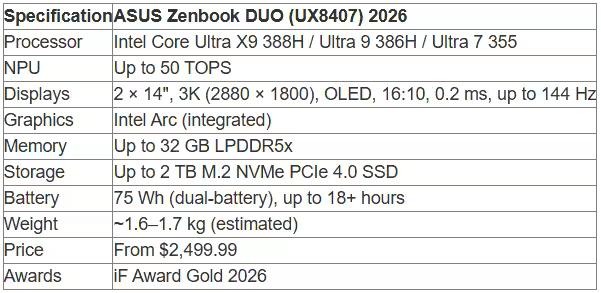
The device is equipped with two 14-inch OLED panels with a 3K resolution (2880 x 1800), a 16:10 aspect ratio, and a 0.2ms response time. Both displays are fully functional and operate independently.
The lower screen can be used as a keyboard, touchpad, additional workspace, or even a drawing tablet. ASUS has provided dedicated software for managing display modes.
Intel Core Ultra X9 Processors
According to official ASUS specifications, the 2026 Zenbook DUO (UX8407) is based on Intel Core Ultra X9 processors—the flagship line with maximum performance.
Three configurations are available:
Intel Core Ultra X9 388H: 2.1 GHz (up to 5.1 GHz in boost mode), 18 MB cache, 16 cores, 16 threads, NPU up to 50 TOPS
Intel Core Ultra 9 386H: 2.1 GHz (up to 4.9 GHz), 18 MB cache, 16 cores, 16 threads, NPU up to 50 TOPS
Intel Core Ultra 7 355: 2.3 GHz (up to 4.7 GHz), 12 MB cache, 8 cores, 8 threads, NPU up to 49 TOPS
The top configuration with the Core Ultra X9 388H delivers 5.1 GHz in single-threaded mode—one of the highest frequencies among mobile processors in 2026.
Intel Arc Graphics and NPU
The Zenbook DUO uses integrated Intel Arc Graphics. This isn't a discrete graphics card, but it's plenty for business and creative work.
The Intel Arc GPU in the Core Ultra X9 supports hardware-accelerated AV1 video encoding, 8K decoding, and real-time ray tracing. Performance is comparable to previous-generation NVIDIA MX-series discrete GPUs.
The NPU (Neural Processing Unit) with up to 50 TOPS of performance handles AI tasks locally. This accelerates image processing, audio and video noise reduction, voice recognition, and other scenarios.
Battery and battery life: 18+ hours
This is where ASUS really surprised. The Zenbook DUO 2026 delivers up to 18+ hours of battery life when watching 1080p video and surfing the web.
Battery tests were conducted in November 2025 with the following configuration: 3K OLED panel, Intel Core Ultra X9 processor, 2 TB SSD, 32 GB RAM, according to official ASUS data. WiFi was enabled but not connected to a hotspot during video playback, and connected while surfing the web. The Windows power plan was set to Balanced.
This battery life is achieved thanks to a dual-battery system. ASUS uses a dual-battery system (two independent batteries) with a total capacity of 99 Wh.
This is an impressive result. By comparison, most single-display Ultrabooks deliver 10-14 hours of battery life under similar scenarios.
ASUS Lumina OLED Displays
ASUS uses its proprietary Lumina OLED technology for both screens. These panels offer up to 1000 nits of brightness (HDR peak brightness), 100% DCI-P3 coverage, a 100,000:1 contrast ratio, and a 144Hz refresh rate.
144Hz is critical not for business tasks, but for smooth interface and animations. Scrolling web pages, dragging windows, and zooming in on documents—everything feels instantaneous.
OLED technology delivers a lightning-fast pixel response (0.2ms), eliminating blurring and ghosting with fast-moving content.
Materials and Design: Ceraluminum
The Zenbook DUO's chassis is crafted from Ceraluminum, a combination of ceramic and aluminum. ASUS claims this provides durability, lightness, and a pleasant tactile feel.
The device is available in Moher Gray. Weight varies depending on configuration, but is typically 1.6-1.7 kg—slightly heavier than classic Ultrabooks, given its dual displays.
Awards and Recognition
According to the official ASUS website, the Zenbook DUO (UX8407) received an iF Award Gold Award in March 2026. The jury praised the innovative form factor, build quality, tactile finishes, and the freedom the dual displays provide for work and creativity.
This isn't just marketing. The iF Design Award is one of the most prestigious awards in the industry, and gold is awarded only to truly outstanding products.
Price and Configurations
According to the official ASUS website, the 2026 Zenbook DUO (UX8407) is available in two main configurations:
UX8407AA-DS99T: Intel Core Ultra 9 Processor 386H, 14" 3K (2880 x 1800) 16:10 144Hz 500nits
OLED touchscreen, 1TB M.2 NVMe PCIe 4.0 SSD, Windows 11 Home — starting at $2,499.99
UX8407AA-PSX9T: similar configuration — price TBA
Both configurations are marked OUT OF STOCK on the official ASUS store.
Top-of-the-line configurations with a Core Ultra X9 388H, 2TB SSD, and 32GB of RAM may cost $2,499.99 more than the base configuration.
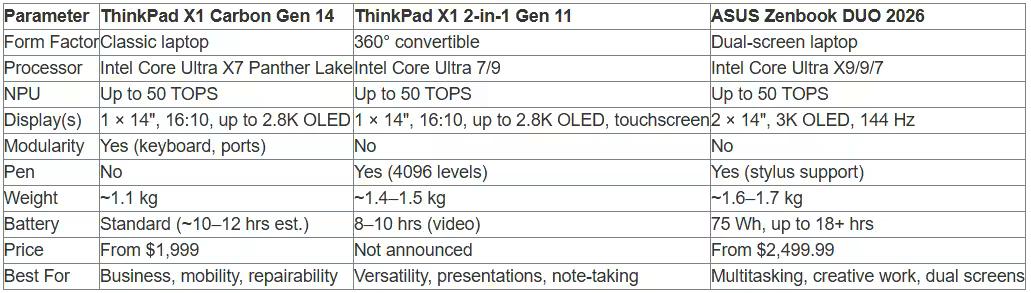
Comparison of the ThinkPad X1 Carbon Gen 14, X1 2-in-1 Gen 11, and ASUS Zenbook DUO 2026
Three completely different approaches to a premium business laptop. Let's summarize the key parameters in a single table for clarity.
Performance: On par
In terms of pure computing power, all three laptops are in the same weight class. Intel Core Ultra 7/9/X9 with an NPU of up to 50 TOPS deliver top-tier performance for business tasks, development, analytics, and creative workloads.
Differences in speed will only become apparent in synthetic benchmarks or extreme scenarios—rendering 4K video, compiling huge projects, training ML models. In everyday work, the difference is imperceptible.
Mobility: Carbon leads the pack
The ThinkPad X1 Carbon Gen 14 is the lightest of the three (~1.1 kg). This is an important factor for frequent business trips and working on the go. Every 200-300 grams is noticeable in a backpack after a few hours.
The Zenbook DUO is heavier (~1.6-1.7 kg), but it compensates for this with a battery that lasts 18+ hours. You can work all day without charging, which is critical in airports, cafes, and conference rooms without outlets.
Versatility: 2-in-1 and DUO Take the Lead
The ThinkPad X1 2-in-1 Gen 11 and Zenbook DUO offer more use cases. The convertible converts into a presentation tablet, while the Zenbook DUO provides two independent screens for multitasking.
If your work requires flexibility—presenting to clients, sketching ideas, annotating documents—the convertible and dual-screen design is more functional.
Repairability: Carbon Gen 14 Takes the Lead
The modular design of the ThinkPad X1 Carbon Gen 14 is a unique advantage. The detachable keyboard and modular ports simplify service and extend the lifespan of the device.
For corporate customers who purchase hundreds of laptops and use them for 5-7 years, this is a critical factor. The ability to replace a broken keyboard in 20 minutes instead of sending the device in for repair saves time and money.
AI Functions and NPU: What They Mean in Practice
All three laptops are labeled as AI PCs with NPUs up to 50 TOPS. But what does this mean in real-world use? Let's find out.
What is an NPU and why is it needed?
An NPU (Neural Processing Unit) is a specialized processor for processing AI tasks. Unlike CPUs and GPUs, an NPU is optimized for neural network operations: matrix multiplications, convolutions, and activation functions.
The NPU (Neural Processing Unit) provides specialized processing for AI tasks with optimized energy efficiency compared to general-purpose CPUs and GPUs. This allows requests to be processed locally without accessing the cloud, which speeds up response times and improves data privacy.
Practical NPU use cases
Here are specific tasks where the NPU offers an advantage:
Local LLM models: running language models like Llama, Phi, and Mistral locally for text generation, code generation, and data analysis without sending data to the cloud
Audio/video noise reduction: real-time removal of background noise during video conferences—dog barking, keyboard input, street noise
Background effects: blurring or replacing the background in video calls without performance degradation
Auto-framing: the camera automatically tracks you and keeps you in the center of the frame as you move
Image processing: photo upscaling, noise reduction, detail enhancement
Speech recognition: local speech-to-text conversion for notes and dictation
A key advantage is that all this runs on the device without sending data to the cloud. For enterprise customers with privacy requirements, this is critical.
NPU performance: 50 TOPS in context
50 TOPS (Trillion Operations Per Second) is 50 trillion operations per second. That sounds impressive, but what does this mean in practice?
Running medium-sized language models (7-13 billion parameters) in inference mode requires approximately 20-30 TOPS. The NPU in the Core Ultra X9 handles this reliably.
Larger models (30-70 billion parameters) require more power and memory. Here, the NPU will work, but more slowly—or some work will need to be offloaded to the CPU/GPU.
Comparison with competitors
For context: the Qualcomm Snapdragon X Elite/Plus NPU delivers up to 45 TOPS (according to Tom's Hardware). The Apple M4 Neural Engine delivers up to 38 TOPS. The Intel Core Ultra X9, with 50 TOPS, is one of the market leaders in NPU performance in 2026.
This doesn't mean Intel is automatically faster at AI tasks. Actual performance depends on software optimization, drivers, and memory architecture. But in theory, Intel has the advantage.
Which Laptop is Best for Who: Usage Scenarios
Three premium laptops, three different philosophies. Here's who each is best suited for.
ThinkPad X1 Carbon Gen 14: The Mobile Professional
Choose the X1 Carbon Gen 14 if you need:
Minimal weight and maximum mobility (frequent flights, business trips)
Classic ThinkPad layout with physical mouse buttons (if they remain)
Modular design for simplified service and repair
Proven reliability of the ThinkPad business series
Standard form factor without experimentation
This laptop is for consultants, managers, analysts—those who work on the go and value lightness and battery life.
ThinkPad X1 2-in-1 Gen 11: The Versatile Creator
Choose the 2-in-1 Gen 11 if:
Form factor flexibility (laptop modes,
Tablet, stand, tent)
Pen support for notes, sketches, and annotations
Touchscreen for intuitive control
Presentations and client demonstrations
Working in tight spaces (planes, trains)
Ideal for architects, designers, consultants, teachers—anyone who needs versatility and the ability to transform.
ASUS Zenbook DUO 2026: Multitasking Creativity
Choose the Zenbook DUO if you value:
Two independent screens for multitasking
Maximum battery life (18+ hours)
Top-tier performance (Core Ultra X9 388H)
Innovative form factor and design
Working with video, photos, and code—scenarios that require a lot of screen space
For developers, video editors, traders, and data scientists—those who juggle dozens of windows and value screen real estate.
Alternatives and Competitors in the Premium Segment 2026
The three laptops reviewed aren't the only options in the premium business segment. Here are the main competitors.
Apple MacBook Pro 16" M4 Max 2024
The Apple MacBook Pro 16.2" M4 Max 2024 received a 91.7% rating from NotebookCheck and is recognized as one of the best laptops of spring 2025.
Pros of the MacBook Pro 16 M4 Max:
Exceptional performance of the M4 Max chip (up to 16 CPU cores, 40 GPU cores)
Excellent build quality and display
Long battery life (up to 18-20 hours)
Support for two external displays
New 12MP Center Stage webcam (upgradeable from 1080p)
Cons:
Price is at least $3,999 for the base top configuration
Limited upgrade and service options
macOS instead of Windows (critical for some)
The MacBook Pro is the choice for those who work in the Apple ecosystem and value performance and battery life above all else.
Lenovo ThinkPad X9 15p
Lenovo also updated the ThinkPad X9 15p Aura Edition—a business laptop in a larger 15-inch form factor. The ThinkPad X9 15p offers:
15-inch display for more workspace
One USB Type-A port (not available on the 14-inch X9)
180-degree hinge (folds almost completely flat)
Latest-generation Intel processors
According to Tom's Hardware (ThinkPad X9 review, March 27, 2025), the X9 has a beautiful design and an excellent webcam, but falls short of Apple and Qualcomm-based alternatives in battery life and performance in some configurations.
Qualcomm Snapdragon X Elite/Plus Laptops
Qualcomm Snapdragon X Elite and X Plus processors represent an alternative to Intel in ARM-based Windows laptops. The Snapdragon X Series offers:
High power efficiency (up to 20+ hours of battery life)
Integrated 5G modem (in some configurations)
NPU for AI tasks
Quiet operation (passive cooling in some models)
But there's a catch. Windows on ARM may have compatibility limitations with some x86 applications. Emulating x86 software works, but reduces performance.
For specific business tasks with proven software, the Snapdragon X is an excellent choice. For versatility, Intel/AMD is still a safer bet.
Premium Laptop Trends in 2026
The models reviewed reflect key industry trends. Here's what will shape the premium laptop market in 2026.
AI Becomes Standard
The NPU is no longer an experimental feature – it's now a core component of premium processors. Intel Core Ultra, Apple M-series, and Qualcomm Snapdragon processors all include dedicated AI accelerators.
The reason is simple: local processing of AI queries is faster, more secure, and doesn't require a constant internet connection. This is critical for enterprise customers.
Modularity and Repairability Are Making a Comeback
The ThinkPad X1 Carbon Gen 14's modular design is no accident. It's a response to the growing demand for device stability and durability.
European "Right to Repair" regulations and corporate ESG goals are pushing manufacturers to simplify serviceability. Expect more modular components in future generations.
Form Factor Experimentation Continues
ASUS Zenbook DUO with dual screens, convertibles, and foldable displays—manufacturers are seeking new ways to differentiate themselves in a crowded market.
Not all experiments are successful. But those that do are becoming the new standard. Dual-screen is still a niche format, but demand is growing among creative professionals and developers.
Autonomy is the number one priority
18+ hours of battery life for the Zenbook DUO, 10-12 hours for the Carbon Gen 14, 18-20 hours for the MacBook Pro M4 Max—battery life has become a key selection parameter.
Users are tired of constantly searching for power outlets. A laptop that lasts all workday without recharging is a competitive advantage.
OLED is displacing IPS
OLED displays are becoming the standard in the premium segment. Deep blacks, instant response times, and a wide color gamut—the advantages are obvious.
The only drawback of OLED is pixel burn-in when displaying static elements for long periods. However, modern panels with pixel compensation and shifting technologies minimize this risk.
Frequently Asked Questions (FAQ)
Which laptop is better for programming: ThinkPad X1 Carbon Gen 14 or Zenbook DUO 2026?
Both are excellent. The ThinkPad X1 Carbon Gen 14 is lighter and more portable, ideal for working on the go. The Zenbook DUO offers dual screens, giving more space for code, terminal, documentation, and debugging. If you multitask heavily — choose Zenbook DUO. If you prefer mobility — Carbon Gen 14.
Is it worth paying extra for an OLED display in a business laptop?
It depends on your tasks. For photo, video, and design work — yes, OLED offers better colors, deep blacks, and high contrast. For office tasks, IPS is usually sufficient. OLED may also consume more power with bright backgrounds.
How practical is the dual-screen ASUS Zenbook DUO in real work?
Great for multitasking (code + docs, analytics + spreadsheets). However, it requires adaptation and may cause neck strain. Some users still prefer an external monitor.
What is the real battery life of ThinkPad X1 2-in-1 Gen 11?
About 5–6 hours under heavy workloads. Up to 8–10 hours for lighter tasks. Less than X1 Carbon due to touchscreen and convertible design.
Do these laptops support local LLM models?
Yes, with up to 50 TOPS NPU they can run local LLMs (7–13B parameters). Larger models require more RAM (32GB+ recommended) or GPU/CPU offloading.
Can you upgrade RAM and SSD in ThinkPad X1 Carbon Gen 14?
RAM is soldered and not upgradeable. SSD can be replaced but access may be limited. Choose configuration carefully at purchase.
Which is better: Intel Core Ultra X9 or Apple M4 Max?
Intel is better for Windows ecosystem and compatibility. Apple M4 Max offers better efficiency and performance but requires macOS.
Conclusion: Choosing a Premium Laptop in 2026
The ThinkPad X1 Carbon Gen 14 Aura Edition, ThinkPad X1 2-in-1 Gen 11 Aura Edition, and ASUS Zenbook DUO 2026 represent three different approaches to the premium business laptop. And each one is justified.
The Carbon Gen 14 is for those who value mobility, proven ThinkPad reliability, and a new modular design. This is a laptop for professionals on the go.
The X1 2-in-1 Gen 11 is for professionals who need the versatility of a convertible. Presentations, notes, sketches—anywhere where form factor flexibility and pen support are essential.
The Zenbook DUO 2026 is for those who work with multiple windows and applications simultaneously. Developers, analysts, video editors, traders—two independent OLED displays radically change the workflow. All three machines are equipped with the latest-generation Intel Core Ultra processors with up to 50 TOPS NPUs for AI workloads. Performance is top-notch, battery life is decent (especially the Zenbook DUO with 18+ hours), and build quality and displays are exemplary.
The choice depends on your priorities. Determine what's most important: weight, versatility, or screen real estate. Then choose accordingly.
Ready to choose your premium laptop? Check current prices and configurations on the official Lenovo and ASUS websites—specifications and availability are subject to change. Investing in the right laptop will pay off with years of productive work.