

RTX 5090 for Work: A Review for 3D, Editing, and Design 2026
April 6, 2026
Quick Summary: The NVIDIA GeForce RTX 5090, with Blackwell architecture and 32 GB of GDDR7 memory, is a powerful graphics card for professional 3D, video editing, and design. 21,760 CUDA cores, 3,352 AI TOPS, and DLSS 4 support deliver 2x performance in generative AI workloads and rendering compared to the RTX 4090, but the high price ($1,999) and power consumption (575 watts) require careful consideration.
The GeForce RTX 50-series graphics cards launched in January 2025, and the flagship RTX 5090 immediately became a source of controversy. On the one hand, it offers unprecedented power for professional workloads. On the other, it boasts a price tag of $1,999, limited availability, and a power consumption of nearly 600 watts. For those working with heavy graphics in Ukraine—3D visualization, video editing in 4K and higher, motion design, or generative AI models—the question is more relevant than ever. Is the RTX 5090 worth the price in a professional context?
We'll examine the Blackwell architecture, real-world performance in production applications, availability, and pricing in the Ukrainian market, and compare it to the previous generation and professional RTX PRO cards.
Blackwell Architecture and Key Features of the RTX 5090
The GeForce RTX 5090 is built on the NVIDIA Blackwell architecture, the next generation after Ada Lovelace (RTX 40-series). The GB202 GPU is manufactured using TSMC's 4N process (5 nm class) and contains 92.2 billion transistors on a 750 mm² die.
This is a huge chip. By comparison, the previous flagship RTX 4090, based on the AD102, had a significantly smaller die size. The increased die size directly impacts production costs and explains both the high price and the shortage of cards in the first months after release.
GeForce RTX 5090 Specifications
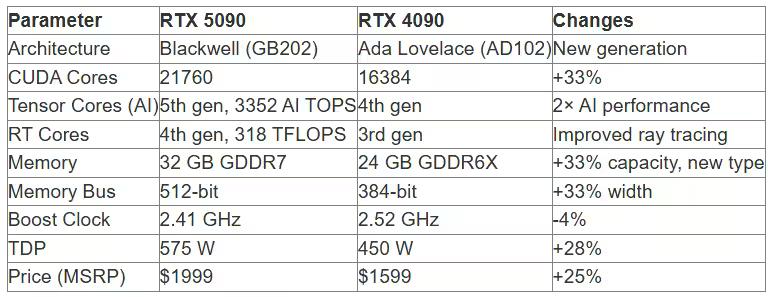
According to NVIDIA's official website, the RTX 5090 is equipped with 21,760 CUDA cores—33% more than the RTX 4090. Fifth-generation Tensor Cores now support FP4, dramatically accelerating generative AI models while using less memory.
But the key difference for professionals is the 32 GB of GDDR7 memory. This is the first gaming card with this amount. This headroom is critical for complex 3D scenes, compositions with dozens of layers in After Effects, or working with 8K video.
What is GDDR7 and why is it important?
GDDR7 is a new video memory standard that delivers significantly higher bandwidth than the previous generation's GDDR6X. The RTX 5090 has an effective memory frequency of approximately 28 Gbps per pin, which with a 512-bit bus provides a throughput of over 1.7 TB/s.
For professional workloads, this means faster loading of high-resolution textures, faster work with large projects, and less lag when switching between demanding scenes.
The increased throughput directly translates into performance in 4K rendering and when ray tracing is active—a technology actively used by modern engines like Unreal Engine 5, V-Ray, Octane, and Redshift.

Choose the right graphics card for your work and order it from JustBuy.
After a review, you'll usually want to get down to business: look at current models, compare specifications, and figure out what you can buy to suit your needs—3D, editing, design, or rendering. JustBuy is an online tech store where you can find video cards, laptops, computer equipment, and other electronics. Here you can easily check availability, price, delivery, payment, and warranty terms.
Looking for a place to view and buy a graphics card for work?
At JustBuy you can:
View current models and their specifications
Compare devices and choose the right option
Check availability, price, delivery, and warranty
Place an order online or get advice before purchasing
👉 Contact JustBuy to select a graphics card and clarify the terms of purchase.
RTX 5090 in Professional Workloads: Real-World Performance
GeForce series gaming graphics cards have traditionally been positioned as a gaming solution, but the latest generations of top-end models have blurred the line between the consumer and professional segments.
The RTX 5090 is more than just a gaming card. According to NVIDIA's official blog post from January 7, 2025, the RTX 50 series is built on the Blackwell architecture and can run generative AI models up to 2x faster with lower memory consumption thanks to support for the FP4 format.
3D Modeling and Rendering
For 3D workflows like Blender, 3ds Max, Maya, and Cinema 4D, three parameters are critical: the number of CUDA cores, the amount of VRAM, and the performance of the RT Cores.
The RTX 5090 delivers impressive results in GPU rendering:
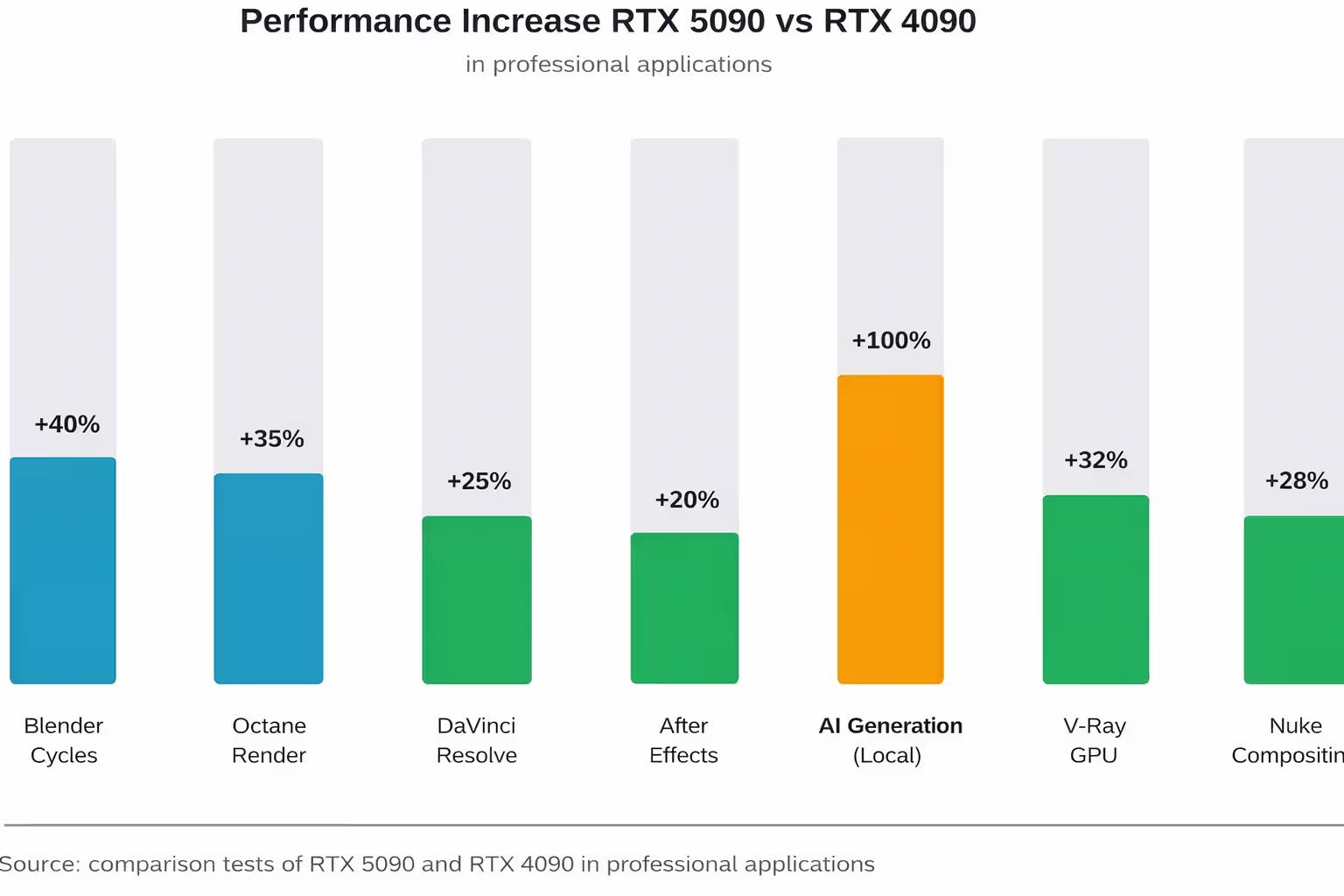
Blender Cycles – rendering test scenes is accelerated by 40-50% compared to the RTX 4090 when using OptiX
Octane Render – 35-45% performance boost depending on scene complexity and the number of light sources
Redshift – 30-40% improvement, especially noticeable in scenes with a high polygon count and highly detailed textures
V-Ray GPU – approximately 35% speedup thanks to improved fourth-generation RT Cores
32 GB of memory allows you to work with huge scenes without having to split them or reduce texture quality. This is especially important for architectural visualization, where a single project can include tens of millions of polygons.
However, it's worth mentioning an important nuance: the RTX 5090 is a GeForce, not the professional RTX PRO (formerly Quadro) line. GeForce drivers are optimized primarily for DirectX and popular 3D applications, but do not undergo the same rigorous certification for CAD systems as RTX PRO.
Video Editing and Color Correction
Adobe Premiere Pro, DaVinci Resolve, Final Cut Pro (via eGPU on Mac)—all of these applications actively use the GPU for effects processing, stabilization, color correction, and exporting.
The RTX 5090 features updated ninth-generation media engines with support for:
Two 6th-generation AV1 encoders with a 5% quality improvement at the same bitrate (HEVC and AV1 formats)
4:2:2 color format for professional video
Hardware decoding of AV1, HEVC, H.264, and VP9
According to the official NVIDIA blog, the updated RTX Video feature reduces GPU load by 30% during AI-powered video upscaling, allowing for smooth work with multiple 4K streams simultaneously.
In DaVinci Resolve Studio, performance for color correction and GPU effects is increased compared to the RTX 4090. Project export is accelerated thanks to updated ninth-generation NVENC encoders.
For 8K video editing, 32 GB of VRAM provides critical headroom—enabling work with RAW formats and multi-layered compositions without a performance hit.
Motion Design and Compositing
Adobe After Effects, Nuke, and Fusion are applications that traditionally rely more on the CPU than the GPU. However, modern versions actively use the GPU for effects, tracking, and compositing.
Most effects and layers in After Effects are still calculated on the CPU, but the GPU helps display real-time previews of complex compositions, apply some effects, and speed up final rendering.
The RTX 5090 shows a boost in GPU-accelerated tasks within After Effects. This isn't revolutionary, but for projects with dozens of layers and effects like Optical Flares or Element 3D, the difference is noticeable.
In Nuke, which is better optimized for the GPU, the performance boost is significant for tracking, keying, and compositing tasks with multiple nodes.
Graphic design and AI tools
Photoshop, Illustrator, and Figma aren't the most GPU-intensive applications, but modern AI features like generative fill, neural filters, and upscaling actively utilize Tensor Cores.
The RTX 5090, with 3,352 AI TOPS (Tensor Operations Per Second), delivers 2x faster performance in generative AI tasks compared to the RTX 4090. Generative fill in Photoshop, AI image upscaling via Topaz Gigapixel, and working with local Stable Diffusion models are all significantly faster.
According to a practical guide from alfa-server.com.ua from November 23, 2025, the RTX 5080 is sufficient for graphic design and most 2D tasks. The RTX 5090 only offers additional performance when working with 8K and higher graphics cards or when actively using AI features on local models.
RTX 5090 vs. RTX 4090: Is the Upgrade Worth It?
The RTX 4090 remains an extremely powerful card. It's still quite sufficient for many professional tasks, even as of March 2026.
However, the RTX 5090 offers several key advantages that may justify the upgrade for certain use cases.
When upgrading from an RTX 4090 to an RTX 5090 makes sense:
Working with 8K video and RAW formats — 32 GB of memory versus 24 GB provides critical headroom for multi-threaded processing
Complex 3D scenes with a lot of geometry — additional VRAM allows for no reduction in texture quality
Active use of generative AI — 2x acceleration in AI tasks and FP4 support save time
Professional rendering on deadlines — a 35-45% increase in GPU rendering can pay off in time savings
Streaming and simultaneous recording/processing — two AV1 encoders allow for simultaneous streaming to two platforms without quality loss
When an RTX 4090 is still sufficient:
Working in Full HD and 2K — the performance difference is minimal here
Standard 4K editing without complex effects — 24 GB is quite sufficient
Graphics Design without active use of AI generation
Limited budget – the $400 price difference may not be worth the performance gain
It's important to understand: in tasks where the CPU remains the bottleneck (many effects in After Effects, physics simulations, compilation), the difference between the RTX 5090 and RTX 4090 will be minimal or even unnoticeable.
RTX 5090 vs. professional RTX PRO (Blackwell)
NVIDIA also released a professional RTX PRO line based on the Blackwell architecture. The top-of-the-line RTX PRO 6000 Blackwell Workstation Edition features a whopping 96 GB of GDDR7 ECC memory and 24,064 CUDA cores.
According to NVIDIA's official website, the RTX PRO line is designed for professional visualization, CAD systems, and local execution of complex AI models.
Key differences between the RTX PRO and the GeForce RTX 5090:
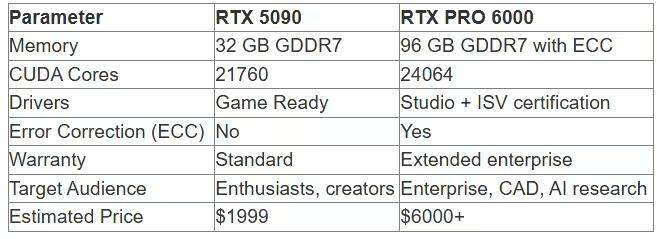
For most creative tasks—rendering, editing, design—the RTX 5090 is sufficient. The RTX PRO lineup makes sense in specific scenarios:
Working with professional CAD systems (CATIA, Siemens NX, SolidWorks)—RTX PRO drivers are certified by the manufacturers
Critical computing requiring ECC memory for error protection
Enterprise environments with support and warranty requirements
Working with AI models larger than 32 GB (RTX PRO 6000 or PRO 5000 with 72 GB required)
For freelancers, small studios, and individual professionals, the RTX 5090 delivers 80-90% of the performance of the RTX PRO at a third of the price.
Power Consumption and System Requirements
The RTX 5090 is a very power-hungry card. The official TDP is 575 W, but under peak loads, consumption can reach 600 W or more. This places significant demands on the rest of the system's components.
Recommended System Configuration:
Power Supply: Minimum 1000W from a quality manufacturer (80 Plus Gold or higher). 1200W is recommended for headroom and overclocking.
Power Connector: One 12VHPWR (PCIe 5.0) 16-pin connector. Make sure your PSU has a native cable and not an 8-pin to 16-pin adapter.
Processor: A modern, high-performance CPU. For professional work, we recommend an AMD Ryzen 9 7950X / 9950X or an Intel Core i9-14900K / Ultra 9.
RAM: Minimum 32GB DDR5, 64GB recommended for comfortable handling of demanding projects.
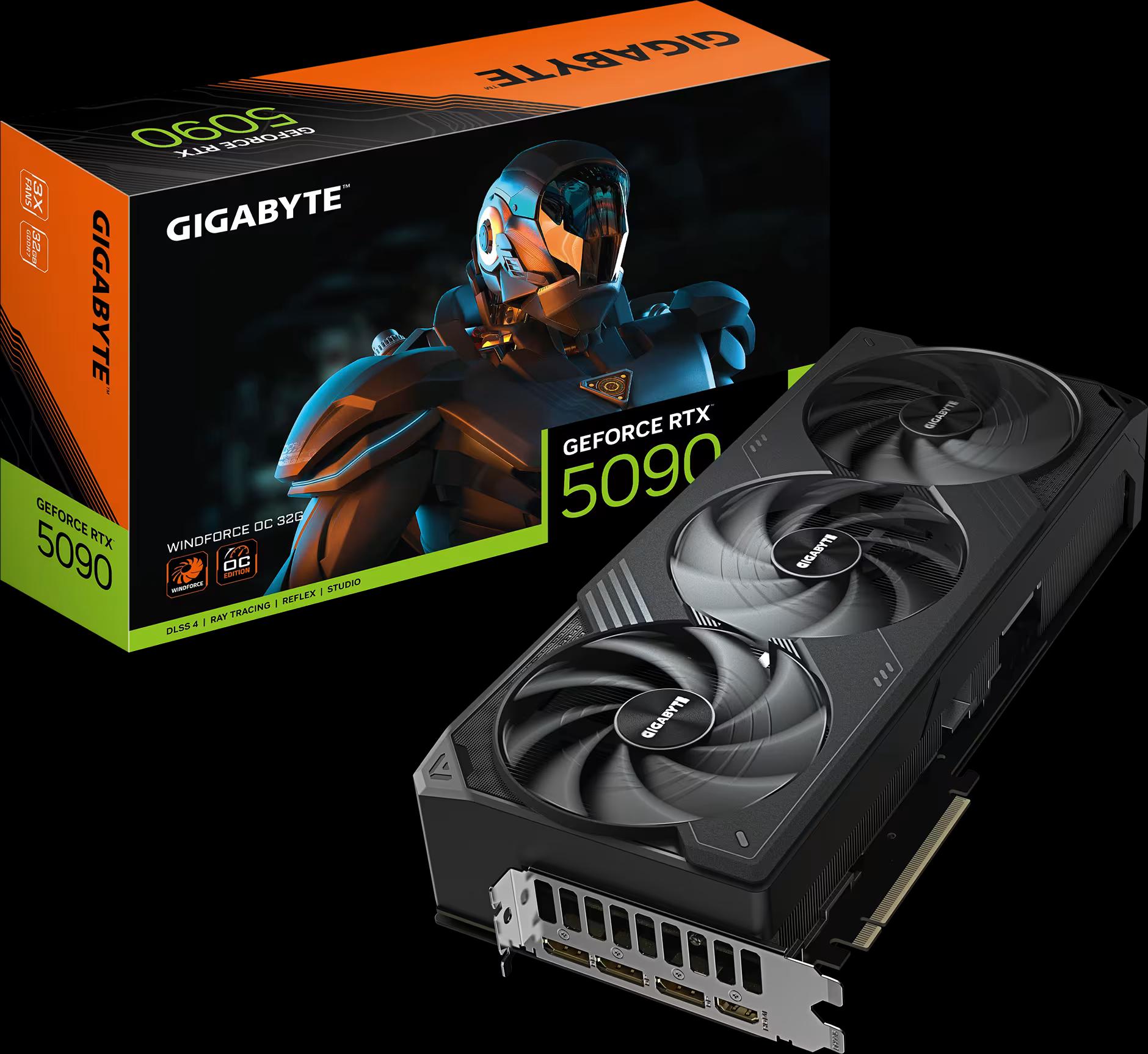
Case: The RTX 5090 Founders Edition is 304mm long and takes up two slots. Partner versions (ASUS, MSI, Palit, Gigabyte) can be larger – up to 33-35 cm in length and up to 4 slots.
Cooling: High-quality case ventilation. The card generates a lot of heat, and with poor airflow, temperatures can exceed comfortable limits.
NVIDIA's Founders Edition features an updated dual-slot design and two flow-through fans. This is more compact than the previous generation and allows the card to be used even in small form factor (SFF) systems.
However, partner versions – Palit GameRock, ASUS ROG Strix, MSI Suprim – often feature massive 3-4-slot cooling systems with three fans. These models are quieter and cooler, but require a spacious case.
Undervolting: Reducing Power Consumption Without Losing Performance
For the RTX 5090, undervolting is becoming no less an interesting tool than traditional overclocking. Reducing voltage while maintaining frequencies close to the nominal value allows for a 50-100W reduction in power consumption without a noticeable performance loss. This reduces temperatures, cooling system noise, and power supply load.
Some users report being able to undervolt the RTX 5090 to approximately 0.95-1.0V at frequencies of 2.3-2.4 GHz, which can result in a consumption of approximately 480-500W instead of 575W while maintaining 95-98% performance.
This is especially true for systems with limited ventilation or for those working indoors without air conditioning.
RTX 5090 Pricing and Availability in Ukraine (March 2026)
NVIDIA's official recommended retail price for the RTX 5090 is $1999. However, the real situation in the Ukrainian market is more complex.
In the first months after release (January-February 2025), the cards were virtually unavailable. The shortage was explained by several factors:
The huge size of the GB202 die reduces the yield of usable chips on the wafer
High demand from both gamers and professionals
Quality issues in some of the first batches (reports of defective dies)
As of March 2026, the cards are still selling above MSRP.
Approximate prices in Ukrainian stores (March 2026):
According to data from Ukrainian retailers (artline.ua, telemart.ua, click.ua, elmir.ua), the RTX 5090 is available in the following price ranges:
RTX 5090 Founders Edition: Rarely available for sale, priced around 100,000-110,000 hryvnias (if available)
Partner versions (Inno3D, Palit, Gigabyte): 105,000-125,000 hryvnias
Premium models (ASUS ROG Strix, MSI Suprim): 130,000-150,000 hryvnias
For comparison: the RTX 4090 at the end of its life cycle cost around 80,000-90,000 hryvnias, the RTX 5080 – around 60,000-70,000 hryvnias.
Installment plans are available through PrivatBank's "Payment in Installments" (up to 24-36 payments) and MonoBank's "Purchase in Parts" services. Some stores offer trade-ins—exchange your old graphics card for an additional fee.
Should you expect price reductions?
Most likely, yes. Historically, prices for NVIDIA's flagship graphics cards drop 6-9 months after release when:
Production reaches full capacity and shortages disappear
More affordable models of the same generation are released (RTX 5070, RTX 5060)
AMD releases competing products
If you're not urgent, it makes sense to wait until summer 2026—by then, prices may drop closer to the MSRP or even lower.
RTX 5090 Alternatives for Professional Workloads
The RTX 5090 is a flagship, but it's not always the best choice in terms of price/performance.
The RTX 5080 is a balanced choice for most.
According to a guide from alfa-server.com.ua, if you're choosing an RTX 50 graphics card for graphic design, start with the RTX 5080. Its performance is sufficient for 90% of tasks.
The RTX 5080 offers:
16 GB of GDDR7 memory – enough for 4K editing and most 3D scenes
10,752 CUDA cores – approximately 60% of the RTX 5090, but with good efficiency
Officially priced at around $999 (60,000-70,000 hryvnias in Ukraine)
Much better availability in stores
For 4K editing, standard 3D rendering, compositing, and graphic design, the RTX 5080 delivers 70-75% of the performance of the RTX 5090 at half the price.
The RTX 5090 will only offer additional performance for larger workflows (8K+) and active AI work.
The RTX 4090 is a previous generation, but still powerful.
The RTX 4090 remains relevant. If you find it at a good price (under 80,000 hryvnia), it could be a great option.
Current advantages of the RTX 4090:
Proven Ada Lovelace architecture
24 GB of memory – enough for the vast majority of tasks
Lower power consumption (450 W vs. 575 W)
Better availability on the used market
Disadvantages:
Lack of FP4 for AI tasks – generative models run slower
Older 8th-generation encoders instead of 9th-generation ones
Less VRAM (24 GB vs. 32 GB)
AMD Radeon – an alternative for some tasks
AMD introduced the Radeon RX 9000 series (RDNA 4) in 2025, but the flagship models still trail NVIDIA in professional applications. Reasons:
Less driver optimization in 3D applications (Blender, Maya, and 3ds Max have historically performed better with CUDA)
Lack of hardware Tensor Cores – AI tasks are slower
AMD's RT Cores are weaker at ray tracing
However, the Radeon may be of interest for:
Working in DaVinci Resolve (well optimized for AMD)
Rendering in Radeon ProRender (AMD's proprietary engine)
Tasks where memory capacity is critical at a lower price
However, for a general-purpose professional system, NVIDIA remains the preferred choice.
Practical recommendations: who is the RTX 5090 suitable for?
The RTX 5090 is a specialized tool. It's not for everyone, and that's okay.
The RTX 5090 is worth it if you:
Work with 8K video regularly — 32 GB of memory provides comfortable RAW editing and multi-threaded processing
Render complex 3D scenes on the GPU — a 35-45% performance boost pays off on large projects and deadlines
Actively use local AI models — generative graphics, upscaling, and neural filters run twice as fast
Professional architectural visualization — huge scenes with millions of polygons require maximum VRAM
Stream simultaneously to multiple platforms — two AV1 encoders allow you to stream to Twitch and YouTube without loss of quality
Can afford an investment of $2,000+ — the card will pay for itself in the time saved on rendering and processing
The RTX 5090 is overkill if you:
Work primarily in 2D (Photoshop, Illustrator) — an RTX 5070 or even The 4070 Ti will be sufficient.
If you edit Full HD or 2K video, the CPU, not the GPU, will be the bottleneck.
If you use CPU-intensive applications (most tasks in After Effects, simulations).
If you're on a budget, the RTX 5080 offers 70% the performance at half the price.
If you don't want to upgrade your power supply, the RTX 5090 requires a powerful 1000+ W PSU.
For most freelancers and small studios, the RTX 5080 is a more rational choice. It covers 90% of professional workloads at a significantly lower cost.
The RTX 5090 is the choice for those who value maximum performance and can recoup its cost by saving time on commercial projects.
Problems and Disadvantages of the RTX 5090
Despite its impressive specifications, the RTX 5090 is not without its drawbacks.
Main issues:
Shortages and inflated prices. Even a year after release, cards are difficult to find at MSRP. Partner versions are 20-30% higher than the recommended price.
Power consumption is 575W. This isn't just a number. It also includes additional costs for electricity, cooling system noise, the need for a powerful PSU, and effective case ventilation.
Quality issues in early batches. Reports of defective GB202 dies in early revisions of cards forced some customers to return the product. NVIDIA and its partners fixed the issue in later batches, but a bad feeling remains.
12VHPWR connector. The 16-pin PCIe 5.0 power connector has been a problem since the RTX 4090 era, causing melting issues when connected incorrectly. With the RTX 5090, NVIDIA has improved the design, but some users still have concerns.
PCIe limitations. According to TechPowerUp, using PCIe 3.0 instead of PCIe 4.0/5.0 can reduce the RTX 5090's performance by 5-10% in some tasks. For maximum performance, a modern motherboard with PCIe 4.0 or 5.0 is required.
Dimensions of partner versions. While the Founders Edition is relatively compact (304 mm, 2 slots), cards like the Palit GameRock or ASUS ROG Strix can reach 33-35 cm in length and occupy 4 slots. This requires a spacious case and can block adjacent motherboard connectors.
Optimizing your system for the RTX 5090
To ensure the RTX 5090 reaches its full potential, it's important to properly configure your system and drivers.
Drivers: Studio vs Game Ready
NVIDIA releases two driver branches for GeForce:
Game Ready Drivers — optimized for new games, released more frequently (every 2-4 weeks)
Studio Drivers — optimized for professional applications, undergo more thorough testing, released less frequently (every 1-2 months)
For professional work, Studio Drivers are recommended. They are more stable and better optimized for Adobe Creative Cloud, Blender, DaVinci Resolve, and other applications.
NVIDIA Control Panel Settings
For professional tasks, it's worth setting:
Power Management — "Prefer Maximum Performance" mode (instead of "Adaptive")
Texture Filtering Quality — "High Performance" for rendering, "Quality" for design
Vertical Sync — Disable for minimal latency in interactive 3D scenes
Application Optimization
Most professional applications have GPU usage settings:
Adobe Premiere Pro / After Effects: In Settings, enable "Accelerate with Mercury Playback Engine GPU" and allocate maximum VRAM
DaVinci Resolve: In Memory and GPU, set GPU Processing Mode to CUDA, increase GPU Memory
Blender: In Preferences → System, select CUDA or OptiX as the Cycles Render Device
Octane / Redshift: Ensure that the renderer uses the RTX 5090, not the integrated graphics Processor
Temperature and Frequency Monitoring
Use utilities like MSI Afterburner, GPU-Z, or HWiNFO to monitor:
GPU Temperature: Under load, it should be 70-85°C. If it's above 85-90°C, check your case ventilation.
Frequency: The RTX 5090 should maintain a Boost clock of around 2.4 GHz under load. If the frequency drops, it may be throttling due to temperature or power limitations.
VRAM Usage: When working with large projects, ensure that the memory isn't overflowing (this will dramatically reduce performance).
The Future of the RTX 5090 and the Blackwell Architecture
The RTX 5090 is the top-of-the-line Blackwell card and will remain relevant for at least 2-3 years.
NVIDIA historically releases a new GeForce generation every 18-24 months. The next architecture (codenamed "Rubin" or RTX 60 series) is not expected until 2027.
What awaits the RTX 5090 in the coming years:
Driver improvements. NVIDIA will continue to optimize drivers for new applications and software versions. Performance in some tasks may increase by 5-10% due to software improvements.
Expanded DLSS 4 support. Multi-Frame Generation technology (generating up to 3 additional frames between two real ones) is currently supported by a limited number of games and applications. As support expands, the RTX 5090's advantage over previous generations will grow.
AI tool development. Generative AI models are becoming increasingly complex and demanding. FP4 support and 3352 AI TOPS give the RTX 5090 future-proofing for next-generation models.
Price reduction. As the market saturates and competitive products from AMD launch, RTX 5090 prices should gradually decrease. By the end of 2026, prices could drop to $1600-$1700 for partner versions.
The RTX 5090 Ti is coming. NVIDIA may release an even more powerful version of the RTX 5090 Ti with a fully unlocked GB202 chip. However, given the issues with yield and power consumption, this is unlikely.
FAQ: Frequently Asked Questions about the RTX 5090
Is RTX 5090 worth it for 4K video editing?
RTX 4090/5080 is enough for basic 4K. RTX 5090 is for 8K, RAW, and heavy effects.
Best CPU for RTX 5090?
Ryzen 9 or Intel i9/Core Ultra 9 to avoid bottlenecks.
Is RTX 5090 good for AI?
Yes, 32 GB VRAM allows running LLMs and Stable Diffusion.
RTX 5090 vs dual 4070 Ti?
RTX 5090 is better — SLI is outdated.
Do you need a new PSU?
Yes, at least 1000W (80+ Gold).
Multi-monitor support?
Yes, up to 4 displays.
How long will it last?
3–5 years.
RTX 5090 vs RTX PRO 6000?
5090 delivers ~80–90% performance for much less cost.
Conclusion: The RTX 5090 is an investment for demanding professionals.
The NVIDIA GeForce RTX 5090 isn't a universal recommendation. It's a specialized tool for those who need maximum performance for professional tasks.
32 GB of GDDR7 memory, 21,760 CUDA cores, FP4 support for generative AI, and improved encoders make it ideal for:
Rendering complex 3D scenes with highly detailed textures
Editing and color-correcting 8K RAW video
Working with generative AI models locally
Simultaneous streaming to multiple platforms without loss of quality
Professional architectural visualization
However, the high price ($1999 MSRP, 100-150 thousand UAH in Ukraine), scarcity, 575W power consumption, and the need for a power supply upgrade make the RTX 5090 a choice for a niche audience.
For most professionals, the RTX 5080 offers the best balance of price and performance. It covers 90% of workloads at half the cost. The RTX 5090 is the choice for those who earn enough from professional graphics to recoup the cost of the card through time savings. If you render commercial projects to deadlines, work with high-profile clients, or create content for film and television, the RTX 5090 could be a tool that pays for itself in a matter of months.
For everyone else, wait for a price drop in summer 2026 or consider more affordable alternatives like the RTX 5080 or RTX 4090 on the used market.